
Most site owners do not ignore internal linking because they think it is unimportant. They ignore it because it gets difficult to keep up with once the site grows. After a while, linking related pages takes more than a quick edit here and there.
That is why internal linking plugins are here. They reduce the manual work. They also help you find linking opportunities in older posts without checking your whole site.
Table of Contents
Why are Internal Links Important?
Internal links help Google understand how your pages relate to each other.
They also help readers move from one relevant page to another.
That matters more as your site grows. Good pages get buried when no important link point to them.
Here are some of the main reasons internal links matter:
- They help search engines understand your site structure.
- They pass relevance and support to important pages.
- They help new pages gain support from older content.
- They keep useful posts from becoming isolated.
- They improve navigation for readers.
- They help you guide visitors to related topics.
You can learn more about the importance of SEO internal linking.
What are Internal Linking WordPress Plugins?
Internal linking WordPress plugins are tools that help you build, manage, and review internal links inside WordPress.
Some mainly suggest links while you are editing a post. They scan your content and recommend places where links should be added.
Others go further and give you reports, automation, audits, and link management features that would take too much time to handle by hand.
That is the real reason people use them.
Once a site has a lot of content, manual internal linking becomes terrifying.
Useful links: Internal Linking Automation / Internal Linking Tools.
🏃♂️💨 TL;DR (Internal linking plugins rundown)
- 🥇AI Link Genius (by Rank Math) – best internal linking plugin with other SEO features | first choice if you haven’t secured an SEO plugin yet | most suitable for Rank Math users | best in terms of link reports and analysis.
- 🥈Linksy AI – best for relevant link suggestion | most feature-rich | great at bulk/automated linking | great at AI-powered linking.
- 🥉LinkBoss – best internal link opportunity tool overall | best SaaS tool (cloud-based) | works for WordPress and Shopify.
- Link Whisper – best for internal link click tracking | works for WordPress and Shopify.
- Internal Link Juicer – best overall for keyword-based linking.
>>> Hop to the comparison table to make an informed decision (save 30 minutes)
Factors to consider when buying an Internal linking plugin?
Not every internal linking plugin is solving the same problem.
Some are mainly useful inside the editor when you are writing. Some are better for auditing an existing site. Others are built for automation and can handle a large part of the work for you.
So before choosing one, you need to know what kind of help you actually need.
The best way to compare them is to look at the features that affect real internal linking work. That gives you a better basis for judging the plugin than just looking at brand reputation or marketing claims.
Inbound Internal Link Suggestion (Add internal links from older pages)
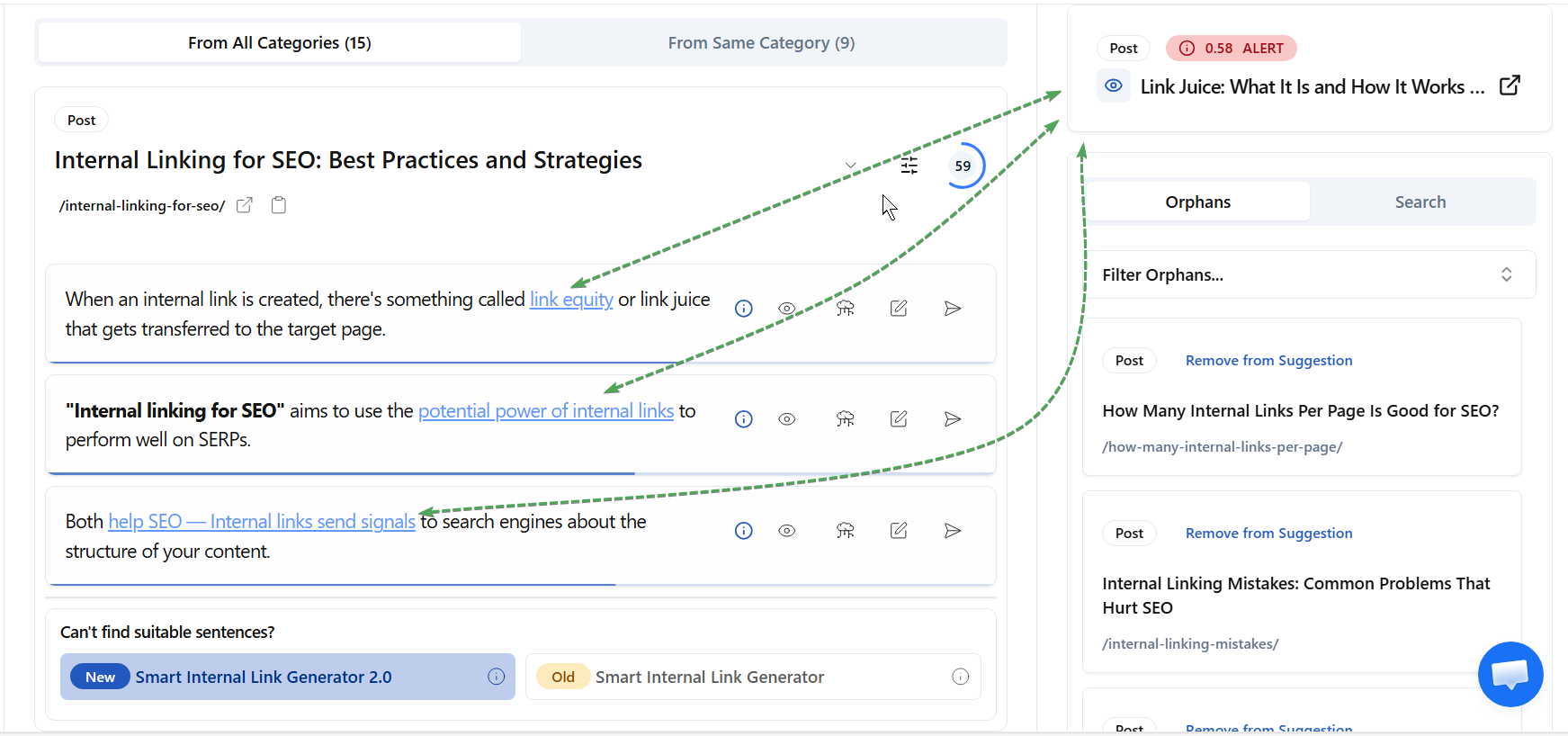
This is the most important features to check. Inbound internal link suggestion means the plugin helps you find older posts that should link to a page you want to strengthen.
In simple terms, you publish or open a page, and the plugin looks across your site for relevant places where that page can be added as an internal link.
Why does this matter so much? Because this is the part most people do badly by hand.
Adding links inside the page you are editing is manageable. Going back into older posts to find the right places to support a new page is where the tough work lies.
A good plugin should make this easier without giving you useless suggestions. Relevance matters here. If the suggested placements do not fit the sentence or the topic, the feature loses its value completely.
Outbound Internal Link Suggestion (Add internal links within a page)
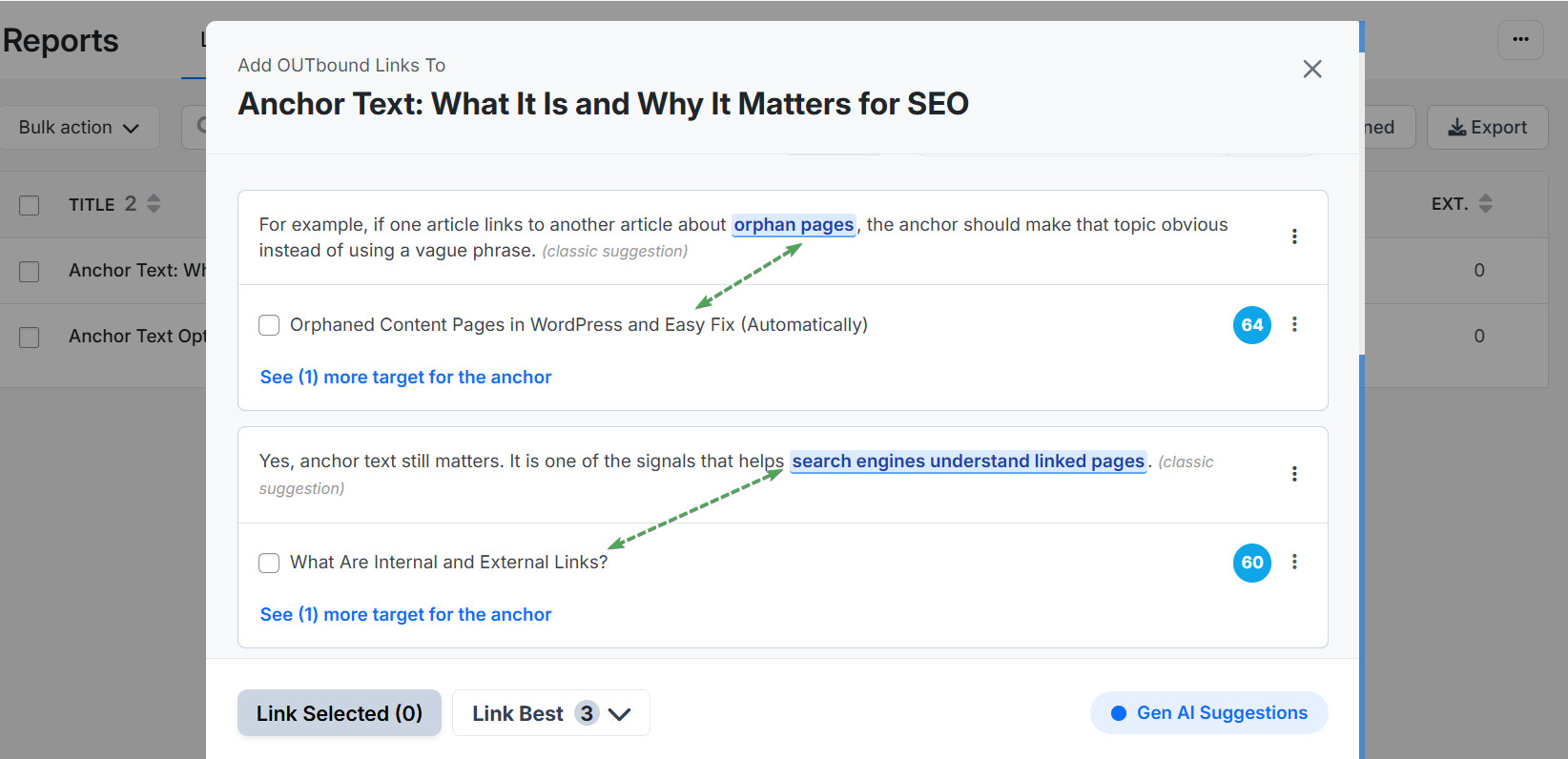
Outbound internal link suggestion works from the other direction.
Instead of helping older pages link to the current page, it helps the current page link out to other relevant posts on your site. While editing a post, the plugin shows pages that could be linked from phrases already present in the content.
This is useful because it keeps internal linking inside your writing flow.
You do not have to rely only on memory or keep searching your site manually whenever you want to add a useful link. Still, this feature is usually easier to live without than inbound suggestions.
Most writers can add a few outgoing links while editing. The harder part is making sure the new page receives support from the rest of the site.
Internal Link Reports and Analysis/Audit (Find internal links to/on a page)
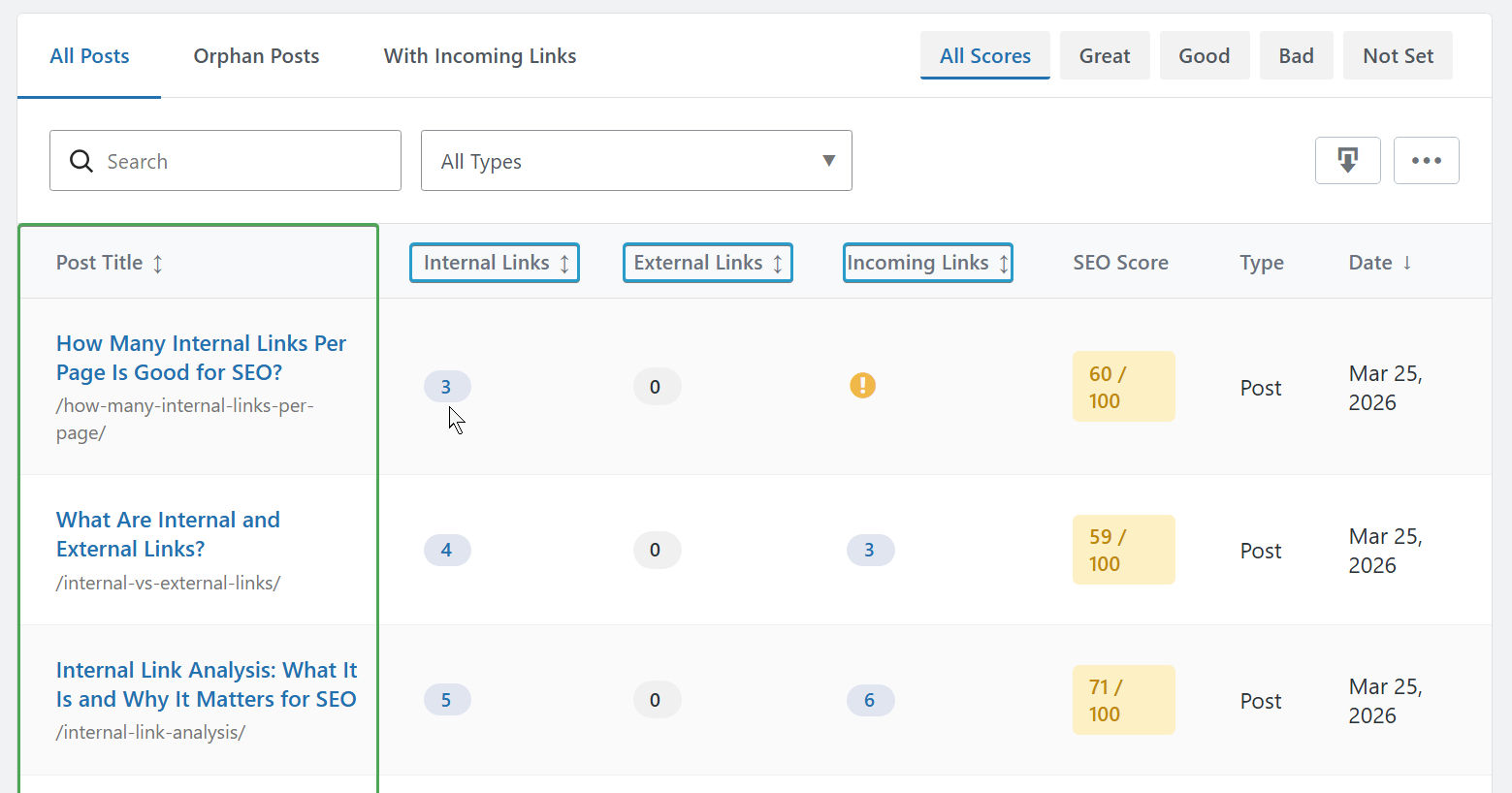
Internal link reports show you the actual number of links on each page.
In most tools, these links are usually grouped into incoming internal links, outgoing internal links, and external links.
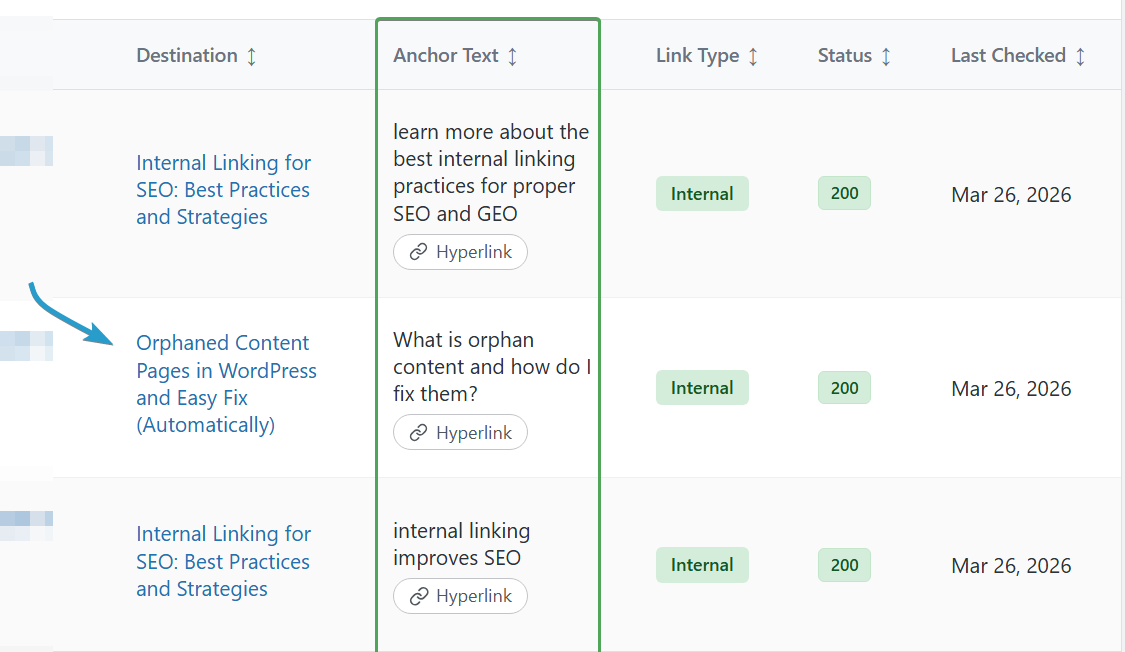
The analysis side goes further. It shows you the actual links on a page, not just the numbers. You can see the internal links pointing to a page, the internal links going out from that page, and the external links leading away from it. This is useful when you want to understand the link structure of a page without checking everything manually. Some tools even let you edit the anchor text or the link itself from that screen.
AI-powered internal linking automation.
Given where AI is today and how far it has come, it’s important to look at tools that actually use artificial intelligence in their internal linking features.
The best tools go as far as using large language models like OpenAI to suggest better, more relevant links. The weaker ones just rely on basic natural language processing or simple keyword matching.
When real AI is involved, the power of large language models and generative engines, the suggested internal linking opportunities are actually worth it. You won’t spend your time filtering through weak suggestions.
AI can be applied across many parts of an internal linking tool, but link suggestions are where it makes the biggest difference.
Anchor Text analysis
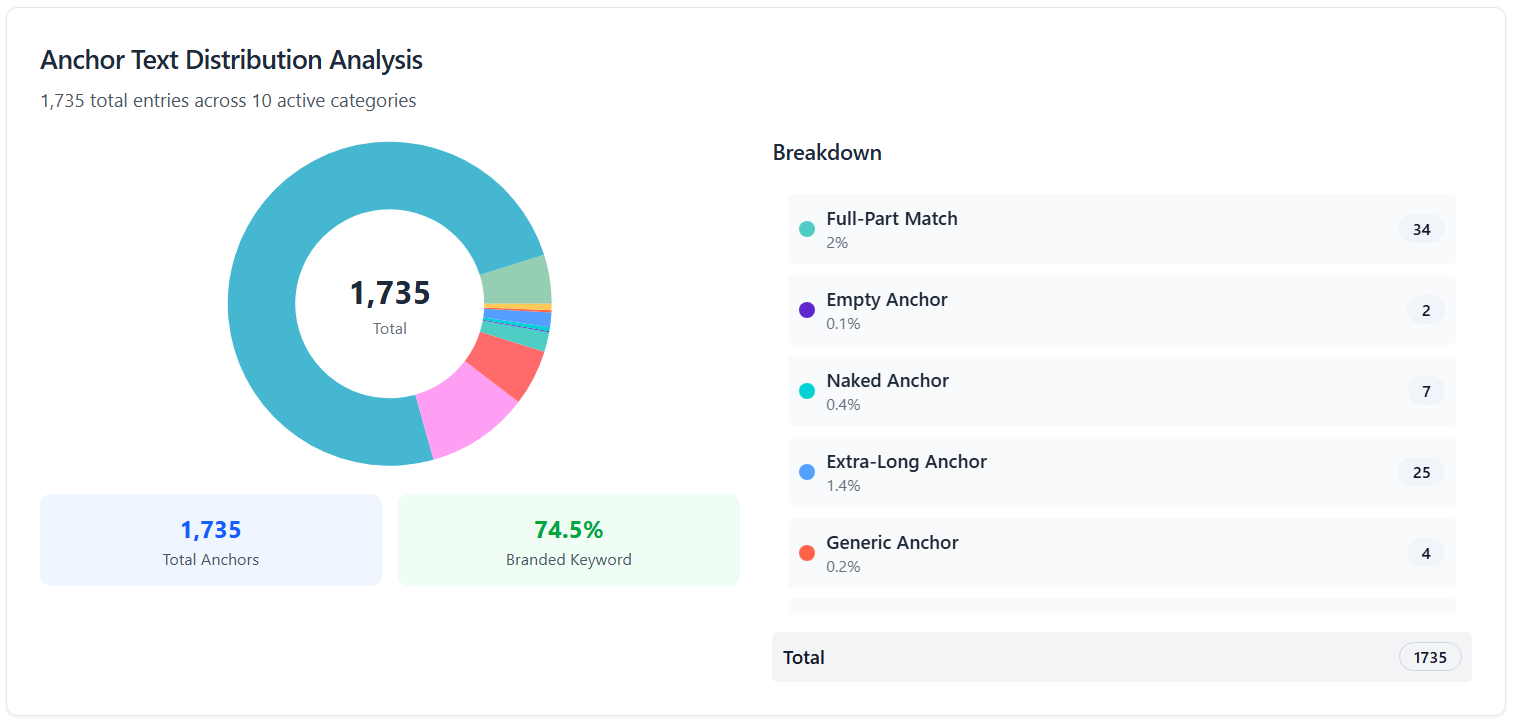
Anchor text analysis is very important because it allows you to see all the anchor texts across your site, along with how many times each one has been used.
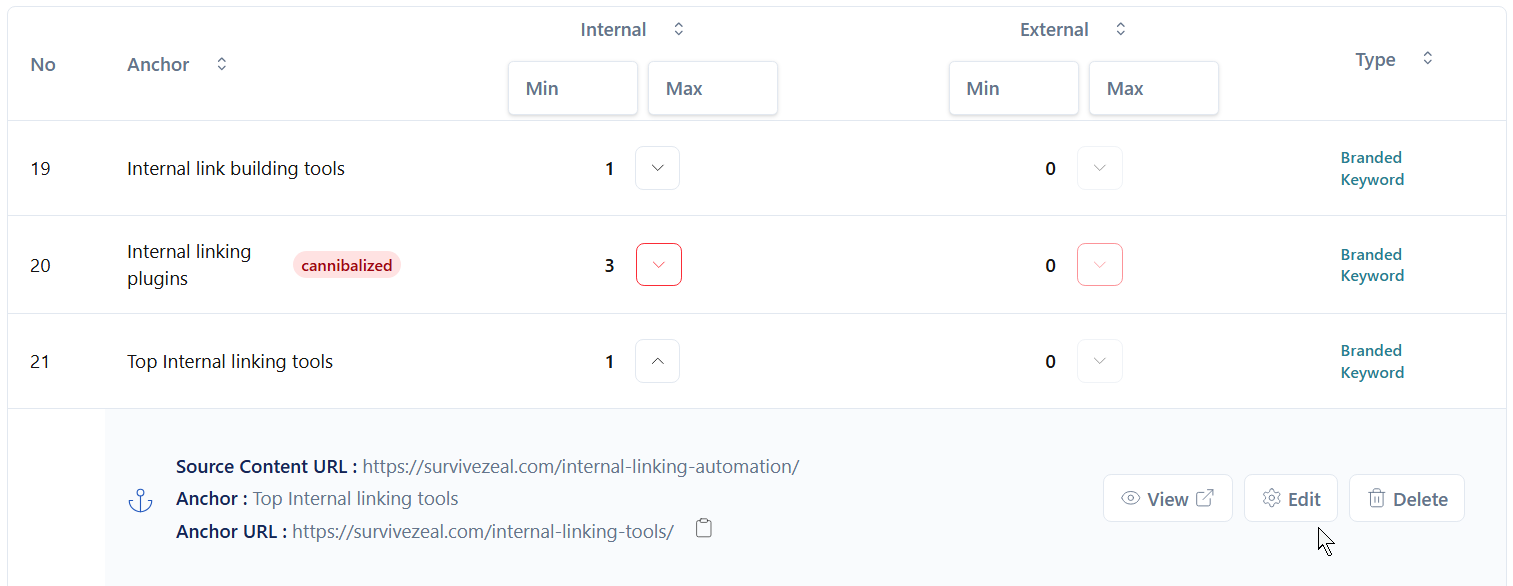
This kind of report also helps you spot keyword cannibalism — when the same anchor text is used for different pages. That’s usually a sign something needs to be cleaned up. With more advanced tools, you can edit anchor texts directly. You can update them on a specific page, across multiple posts, or even site-wide, depending on what you need. It’s a really powerful feature.
You’ll also be able to see which anchor texts appear more often than others, which usually points to your most linked content. That insight helps you prioritize your key pages and keep your internal linking strategy focused.
Search and Replace (Link, Anchor, Post Title)
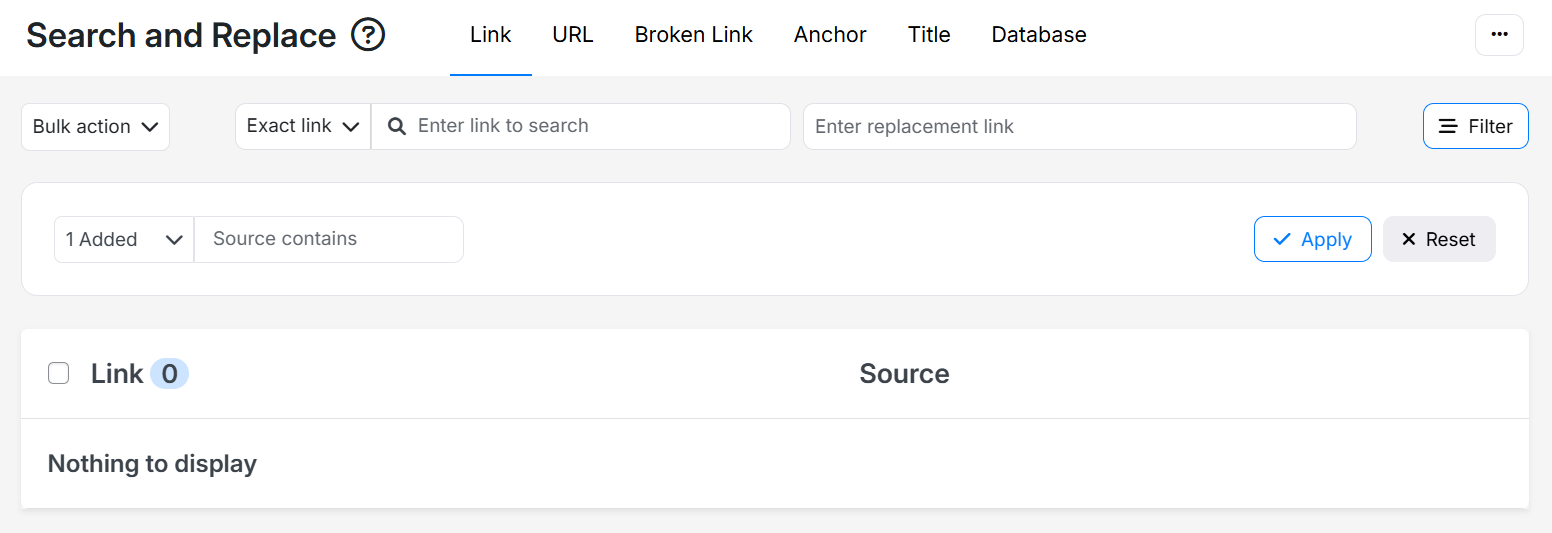
Search and replace is a feature to look out for because it helps you quickly update links across your site. You can replace both anchor texts and URLs in bulk, without editing posts one by one.
For example, if you create new pages later, you might realize some existing anchor texts are pointing to the wrong page. With search and replace, you can find them fast and update them. It’s simple, but very useful for keeping your links accurate.
Bulk Linking
This is especially useful for people producing content at scale and wanting to connect everything quickly without manual work.
It also works well for large volumes of AI-generated content, helping you link everything together fast using AI. This is different from keyword-based linking, which we’ll talk about shortly.
Others
Silo Network tool
The silo network tool helps you bring your site structure into a visual form, so you can clearly see how your content is organized. It’s not just for visuals. It also gives you a working environment where you can manage links between posts.
Once set up, it shows you pages that are not properly linked and highlights posts that are not pointing to their pillar content. It also provides link suggestions to help you fix those gaps quickly.
Linked-to Domain Reports and Analysis
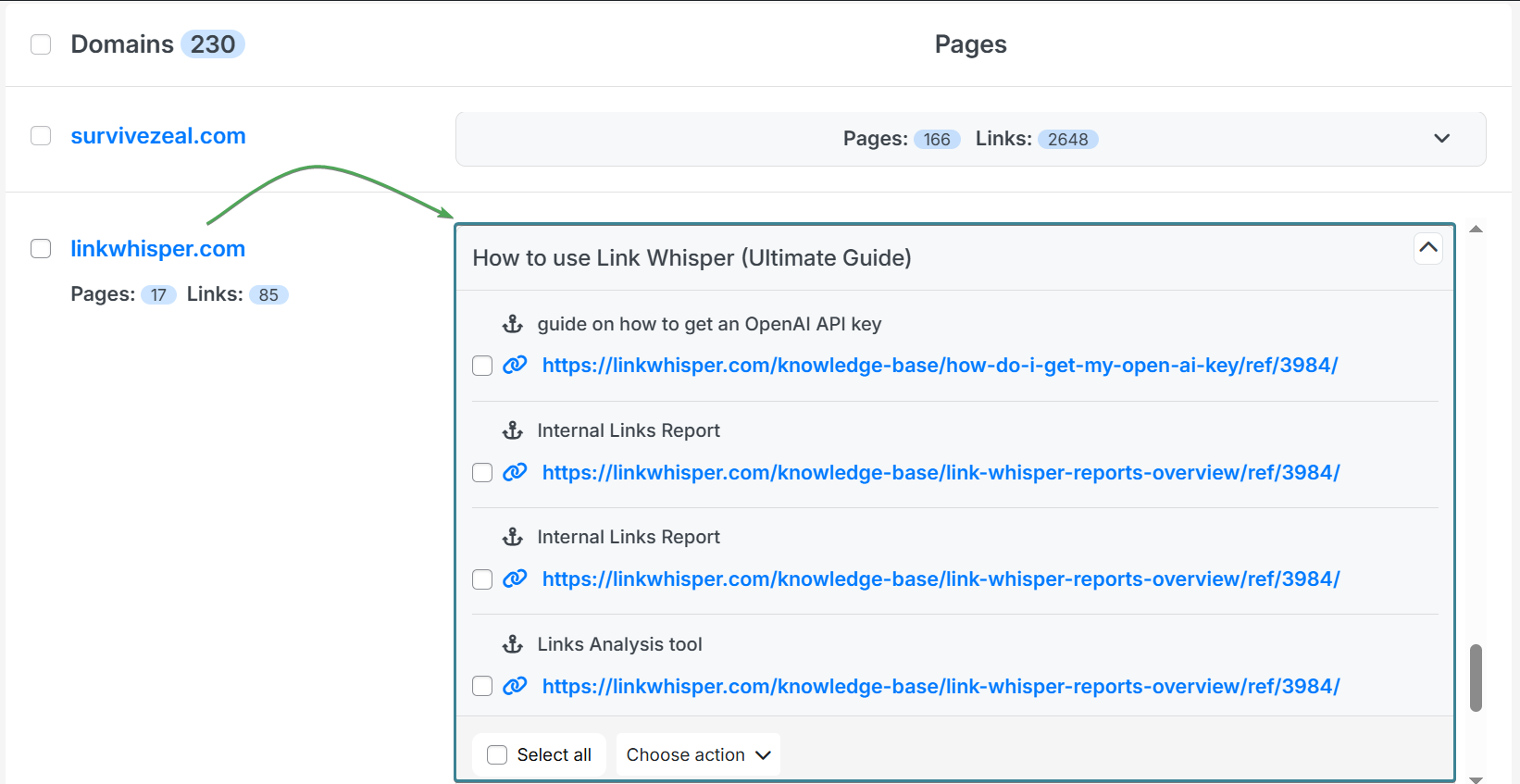
Linked-to domain analysis reviews all the external sites you’ve linked to across your content.
Each domain is grouped in its own section, and when you expand it, you can see every link pointing to that domain. This makes it easy to understand which domains you link to the most and quickly access those links when needed.
It’s a useful feature, though not something you’ll need all the time.
Linked-to Domain setting
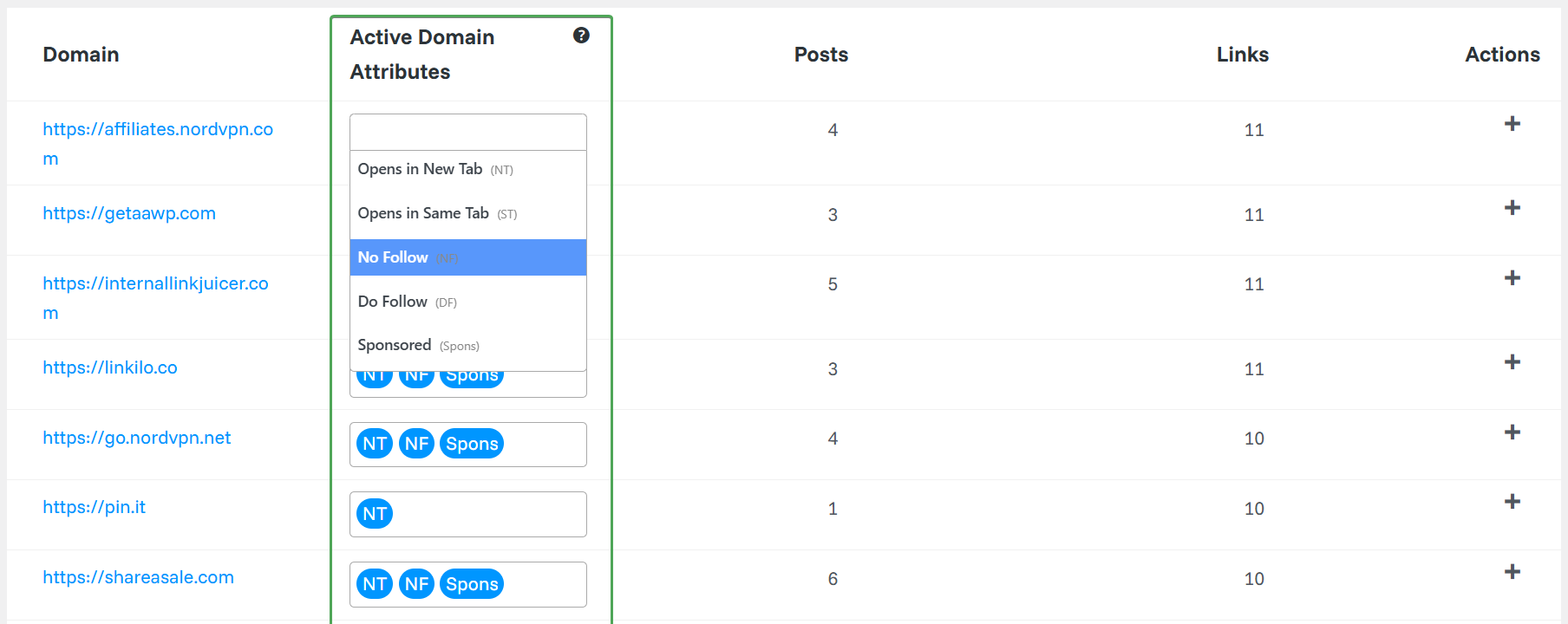
Linked-to domain settings, often part of the linked-to domain feature, let you manage link behavior at a global level. You can set attributes like nofollow or sponsored once, and apply them across all relevant links without editing each post.
It also helps you control how links behave, like opening in a new tab or the same tab. This saves time and keeps your link attributes consistent across your site.
Link Visualization
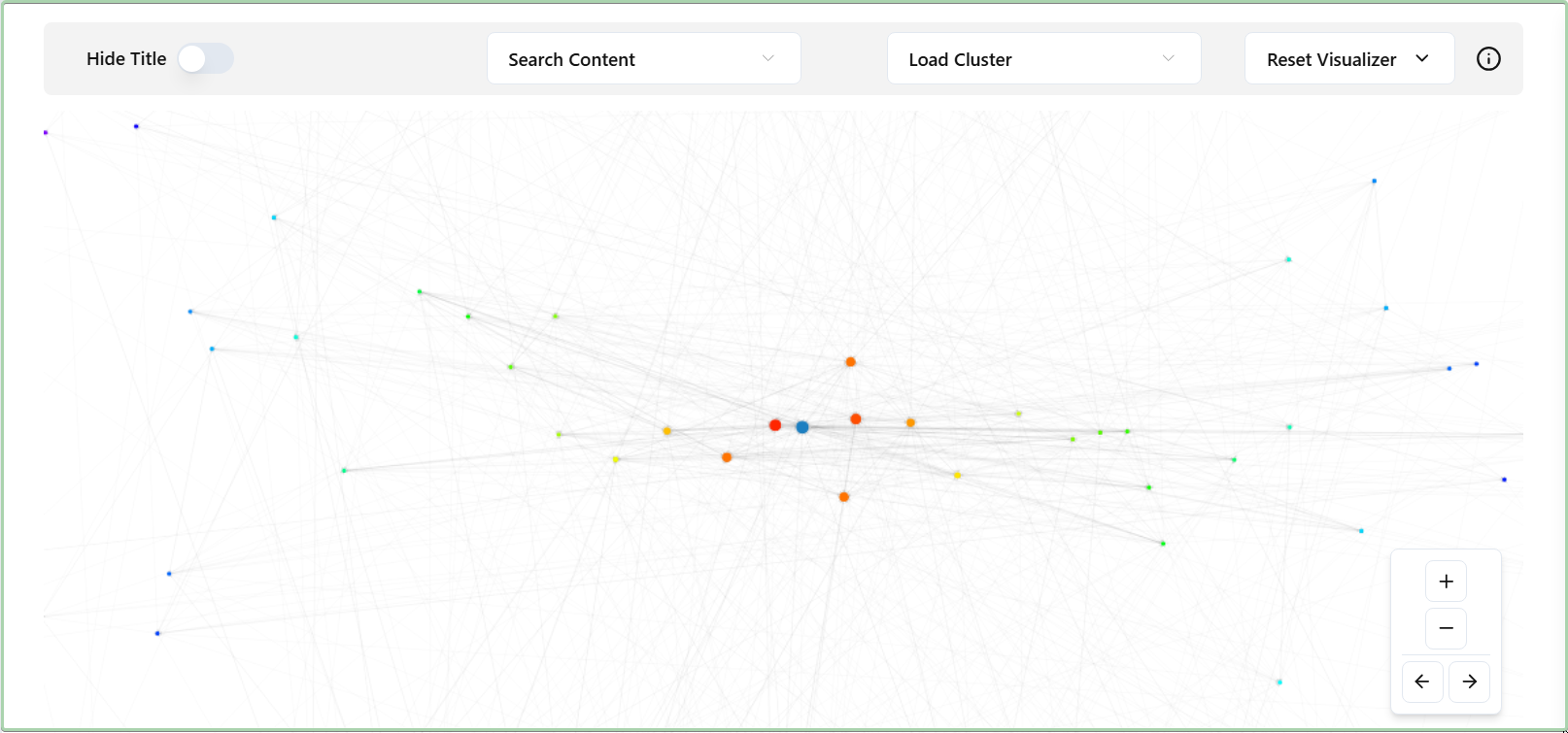
Link visualization is simply the visual form of your internal link reports.
It shows your internal linking structure, how each page connects to others. Your main pages often sit at the center, with other pages linking around them like a network. From here, you can easily spot orphan pages and fix them using link suggestions.
You can just see it as a more concrete way to understand your internal link reports.
Keyword-based Linking
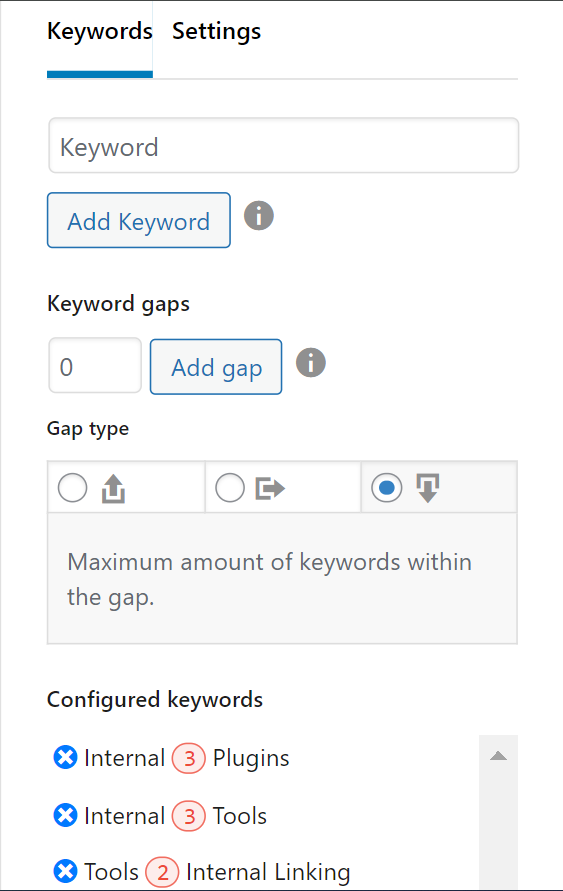
Keyword-based linking, just as the name suggests, involves setting a keyword and assigning a specific link to it, so it automatically gets linked across your site.
Most tools come with advanced options like previewing links before they are applied, so you can review everything in advance. You also get extra controls to make sure the links are added in a meaningful and purposeful way. This feature is especially useful for things like affiliate links.
Best Internal Linking Plugins for WordPress SEO
Now that we’ve covered the key features to expect in an internal linking tool, let’s move on to ranking the plugins based on what they offer.
This page focuses on WordPress plugins. If you want broader coverage, you can check our internal linking tools article or the AI-powered internal linking tools article.
Keep in mind, these plugins are judged based on the features we’ve already covered. Just read on. This is an unbiased ranking. At the end, you’ll be able to make an informed decision.
🏃♂️💨 TL;DR (Internal linking plugins rundown)
- 🥇AI Link Genius (by Rank Math) – best internal linking plugin with other SEO features | first choice if you haven’t secured an SEO plugin yet | most suitable for Rank Math users | best in terms of link reports and analysis.
- 🥈Linksy AI – best for relevant link suggestion | most feature-rich | great at bulk/automated linking | great at AI-powered linking.
- 🥉LinkBoss – best internal link opportunity tool overall | best SaaS tool (cloud-based) | works for WordPress and Shopify.
- Link Whisper – best for internal link click tracking | works for WordPress and Shopify.
- Internal Link Juicer – best overall for keyword-based linking.
>>> Hop to the comparison table to make an informed decision (save 30 minutes)
1. AI Link Genius by Rank Math
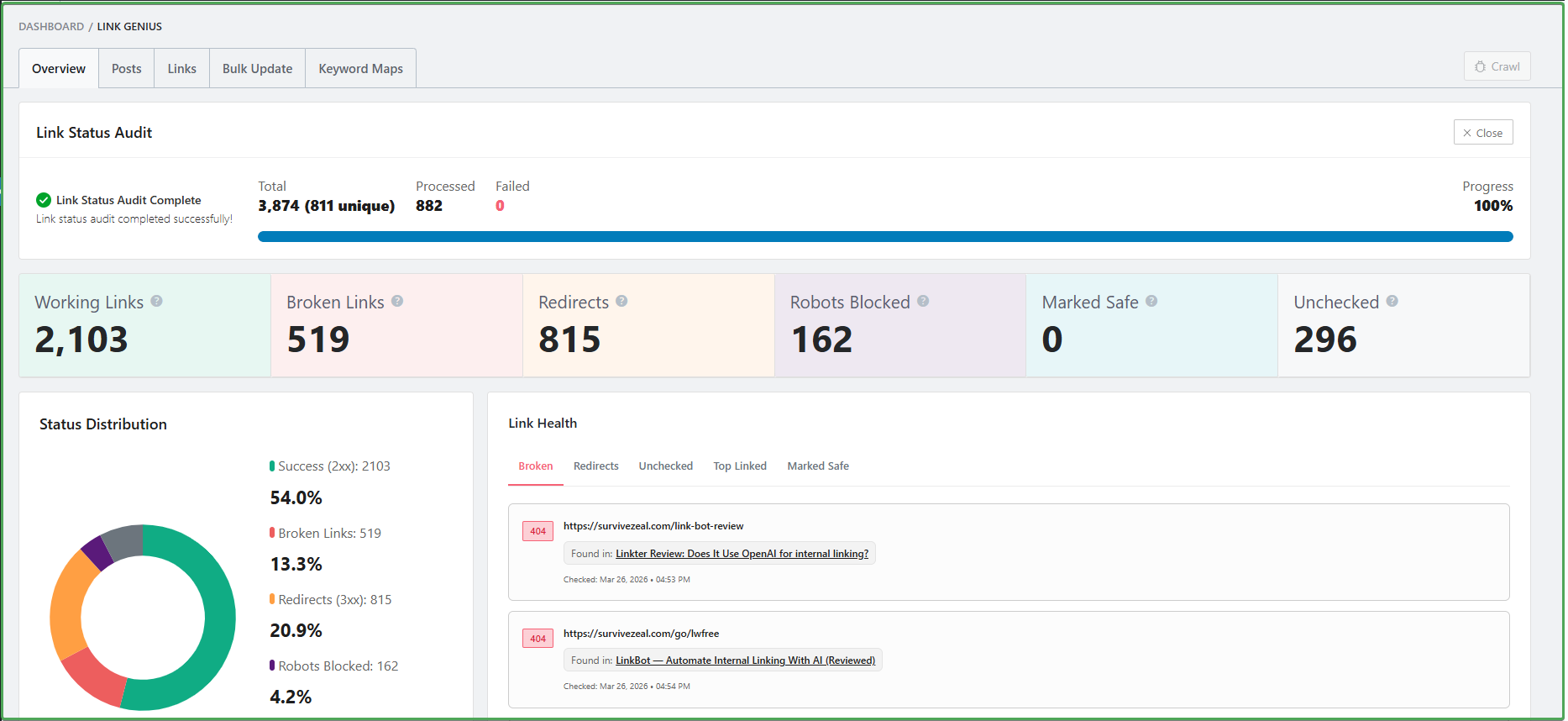 RankMath is by far one of the best SEO WordPress plugins. It covers almost every aspect of SEO and makes the whole process easier.
Internal linking is one area RankMath has always tried to simplify. For some time now, it already had features that help with internal linking in basic ways. Some of those features include related post suggestions while you write inside WordPress, which is more like a basic form of internal link suggestion, and a link counter that shows the number of internal links for each post.
Now they have introduced something more advanced. The feature, called AI Link Genius, goes beyond simple related post suggestions.
It now shows you actual anchor text opportunities that you can convert into internal links. As you write or edit a post, there is a panel on the right side of the WordPress editor. It scans your content, finds phrases, and tries to match them with relevant pages on your site.
You just review the suggestions, approve the ones you like, and they are automatically added to your content.
According to the RankMath team, they are also working on inbound internal link suggestions. This is the most important part, because it allows you to strengthen a new page without going back to edit older posts manually.
When it comes to internal link reports and analysis, RankMath goes further than all the tools in this list. Most plugins only show you lists of incoming links, outgoing links, and external links. RankMath takes it a step further by allowing you to edit those links and their anchor texts directly from the report, not just delete them.
Apart from that, RankMath also includes a search and replace feature. This allows you to update anchor texts and URLs across your site without editing posts one by one. This is especially useful when a URL changes or when you need to update anchor text at scale.
They also offer keyword-based linking through what they call keyword maps. You can assign a keyword to a specific URL, and it will automatically apply to both existing and future occurrences across your content.
Overall, AI Link Genius is a strong addition to RankMath’s feature set.
It may not yet have the full range of features you will find in some dedicated internal linking tools, but it is something most bloggers will already have access to, since RankMath itself is a core SEO plugin.
If you already use RankMath, it is worth checking out. And if you are choosing an SEO plugin for WordPress, start there first before looking at standalone internal linking tools.
Features (from FACTORS section)—
- Inbound internal link suggestion (coming soon)
- Outbound internal link suggestion
- Internal Link Reports and Analysis (called “Posts”, and “Links” tab)
- Search and Replace (Link and Anchor) [Bulk Update]
- Keyword-based Linking (called Keyword Maps)
Additional Feature— Related post widget
Cons—
- Not a dedicated internal linking tool
- Lacks some other useful internal linking features
Choose IF—
- You are in the market for a WordPress SEO plugin and want one that also handles your internal linking needs.
- You already use Rank Math and are not ready to invest further or spend money on separate internal linking tools.
- You only need the core features — not advanced automation or complex AI-driven systems you may not even use.
>> Visit AI Link Genius (and save)
2. Linksy AI
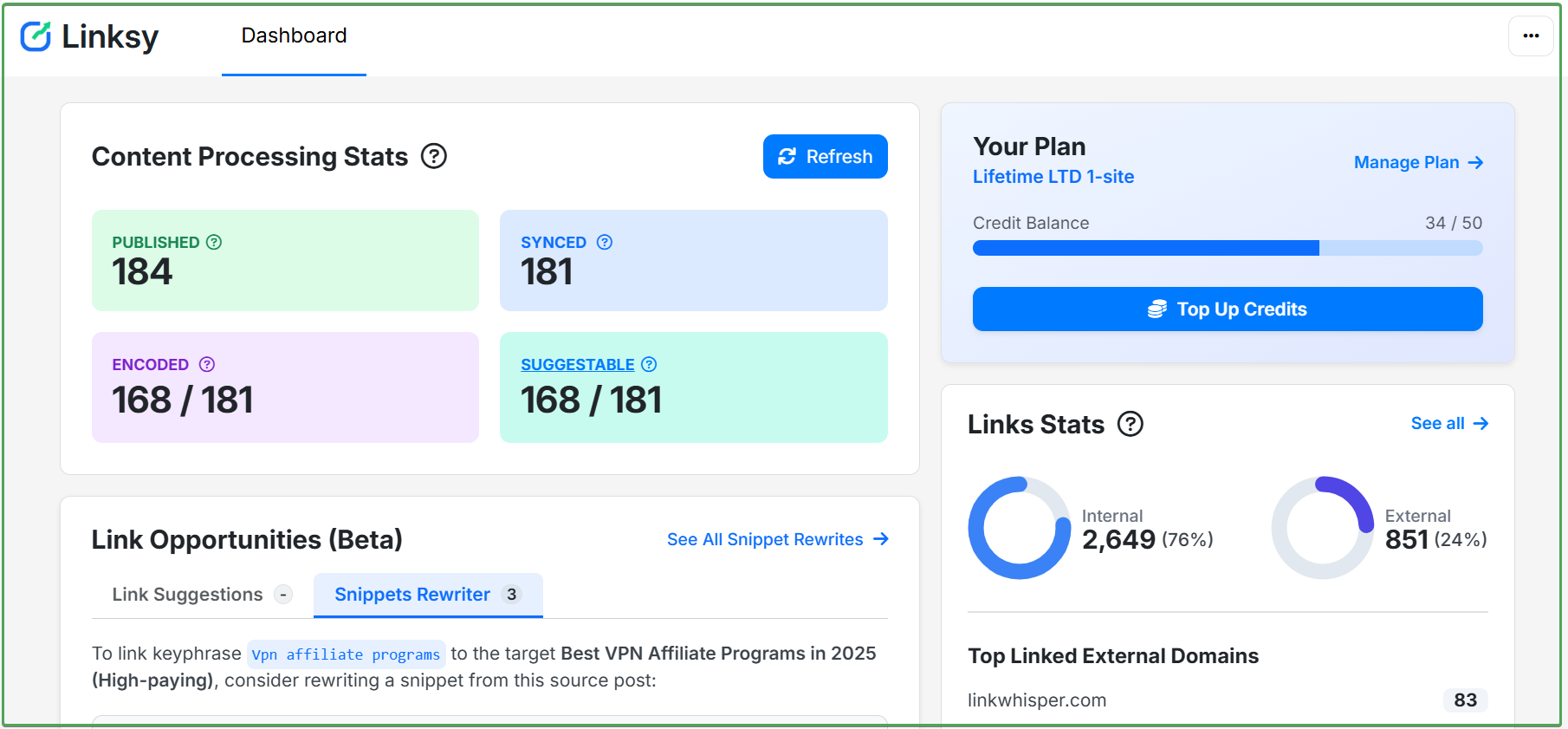
Linksy is a relatively new internal linking plugin built around artificial intelligence.
It was launched in 2023, at a time when many internal linking tools still relied mostly on basic AI and natural language processing.
In recent years, the plugin has adopted stronger AI capabilities, including the power of large language models.
Linksy covers all the features listed in the #factors to consider section of this article. It offers both inbound and outbound internal link suggestions, which are exactly what you need when publishing new content or when you want to add internal links to a page faster without manually going through everything yourself.
From our testing, Linksy stands out for the relevance of its link suggestions. That is one of the main areas where it clearly beats many other internal linking plugins.
It also comes with a full set of tools for handling internal linking in a serious way.
One of its standout features is bulk linking, which it calls link automation. This feature helps automate internal linking by analyzing your pages, matching them with other relevant pages on your site, and then creating internal links automatically.
Although this kind of feature will not always produce perfect SEO results on its own, it is still very useful to have in place, especially for sites publishing content at scale or generating large volumes of content with AI.
It is also worth mentioning that Linksy’s search and replace feature is very rich. It allows you to replace links, anchor texts, post titles, and even database values.
The plugin also includes a broken link report that is always available to help you find broken links across your site, not just internal ones. That means you may not even need a separate broken link plugin anymore.
Overall, Linksy is a strong plugin. Its biggest strength is the relevance of its suggested linking opportunities, which is better than most of the other tools we tested. It is clearly built with smart automation in mind, it is affordable, and it works.
Features (from FACTORS section)
- Inbound Internal Link Suggestion (Add internal links from older pages)
- Outbound Internal Link Suggestion (Add internal links within a page)
- Internal Link Reports and Analysis/Audit (Find internal links to/on a page)
- AI-powered Internal Linking Automation
- Anchor Text Analysis (called Anchor cloud)
- Search and Replace
- Bulk Linking
- Silo Network tool
- Linked-to Domain Reports
- Linked-to Domain Analysis
- Link Visualization
- Keyword-based Linking
Additional Features — Broken Link report, Paragraph Rewriter [adds snippets to places where there is no internal linking opportunity]
Cons— Doesn’t cover any other part of SEO aside internal linking
Choose IF—
- You need one with the most relevant internal link suggestion
- You need one with the most internal linking features
Use Linksy AI coupon “ZEALOFF” for 10% off
Or check Linksy AI review.
3. LinkBoss
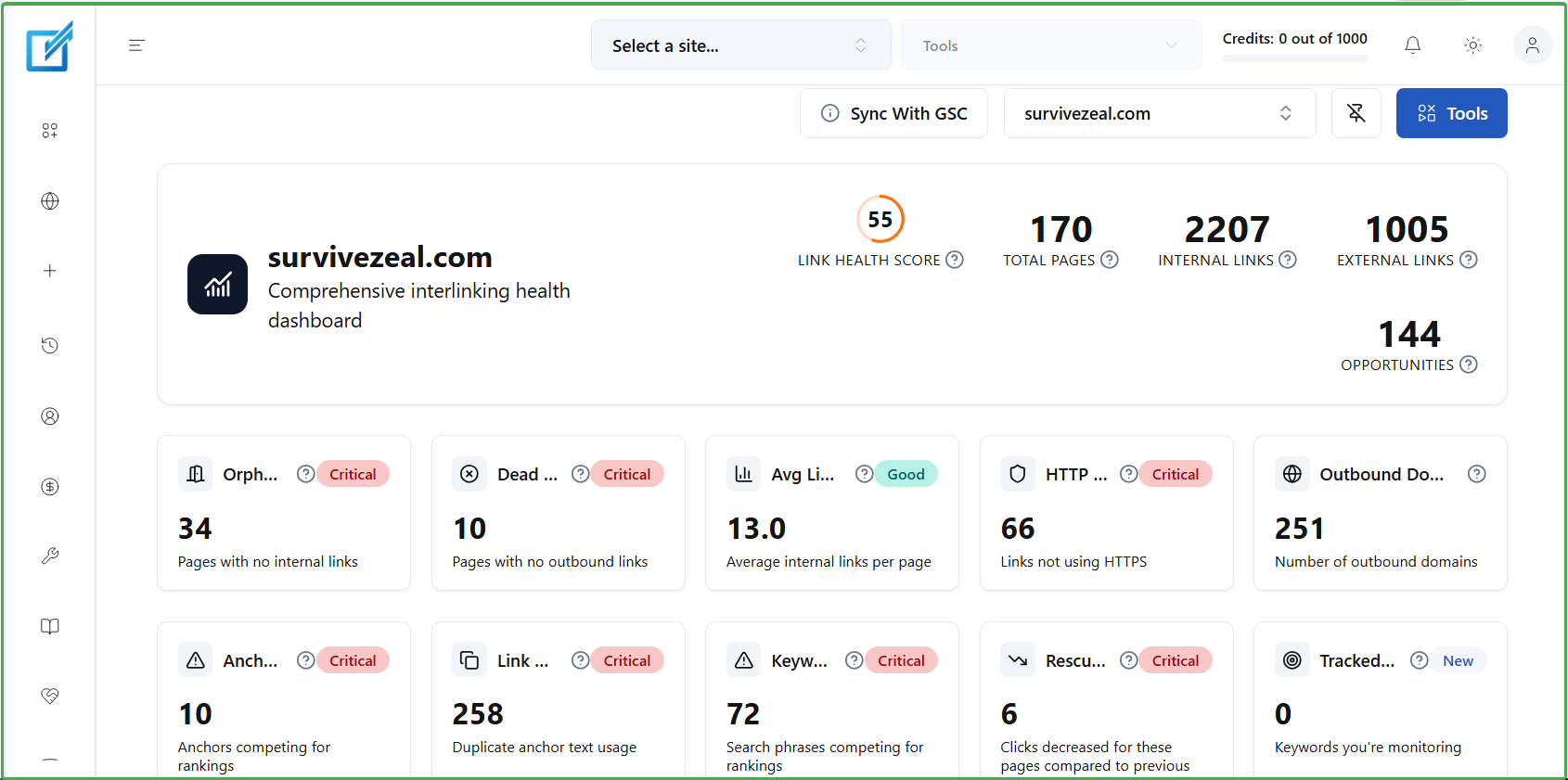
LinkBoss is one of the newer tools in this space, launched around 2022. Since then, it has continued to improve and expand its feature set.
It is built specifically for WordPress and Shopify. For WordPress, it connects through a plugin, while it runs as a cloud-based tool overall.
It can also work with other CMS platforms, but according to the team, you will need to manually copy and paste the link suggestions into those platforms.
LinkBoss is a strong contender in the internal linking space. Based on the factors we covered earlier, it offers almost all the important features, especially the ones that matter most.
The main features it lacks are keyword-based linking, which many users may not need, and search and replace. Search and replace can be useful when updating anchor texts, links or URLs, but whether that matters depends on the user and their workflow.
Where LinkBoss really stands out is in how it handles internal link suggestions. Unlike many tools that suggest links wherever they can find an opportunity, LinkBoss focuses on pages that actually need a boost to perform better in search results.
It does this by integrating with Google Search Console and tracking metrics like average position and clicks. When suggesting internal links for new content, it prioritizes pages that need support to improve their rankings.
The plugin is also among the top tools when it comes to bulk internal linking, thanks to its automation features that can create links at scale. However, this feature is still experimental, so the results may not always be perfect.
Overall, this cloud-based tool stands in its own lane. It has a unique approach and is especially suitable for users who prefer not to install additional plugins that could affect site performance.
Features (from FACTORS section)
- Inbound Internal Link Suggestion (Add internal links from older pages)
- Outbound Internal Link Suggestion (Add internal links within a page)
- Internal Link Reports and Analysis/Audit (Find internal links to/on a page)
- AI-powered Internal Linking Automation
- Anchor Text Analysis (called Anchor cloud)
- Bulk Linking
- Silo Network tool
- Linked-to Domain Report
- Link Visualization
Additional Feature — GSC Rank tracker, Snippet inserter/rewriter [adds snippets to places where there is no internal linking opportunity]
Cons—
- Doesn’t cover any other part of SEO aside internal linking
- There’s a communication delay between the cloud-based platform and WordPress, so your links take longer to get applied compared to traditional plugins.
Choose IF—
- You want a plugin that stands out as the best overall when it comes to “suggesting internal linking opportunities”.
- You prefer a cloud-based solution over a native plugin that may weigh down your site.
- You need a tool that also supports platforms like Shopify not only WordPress.
>>> Visit LinkBoss
Use ZEALOFF as a discount code to save 10% off.
4. Link Whisper
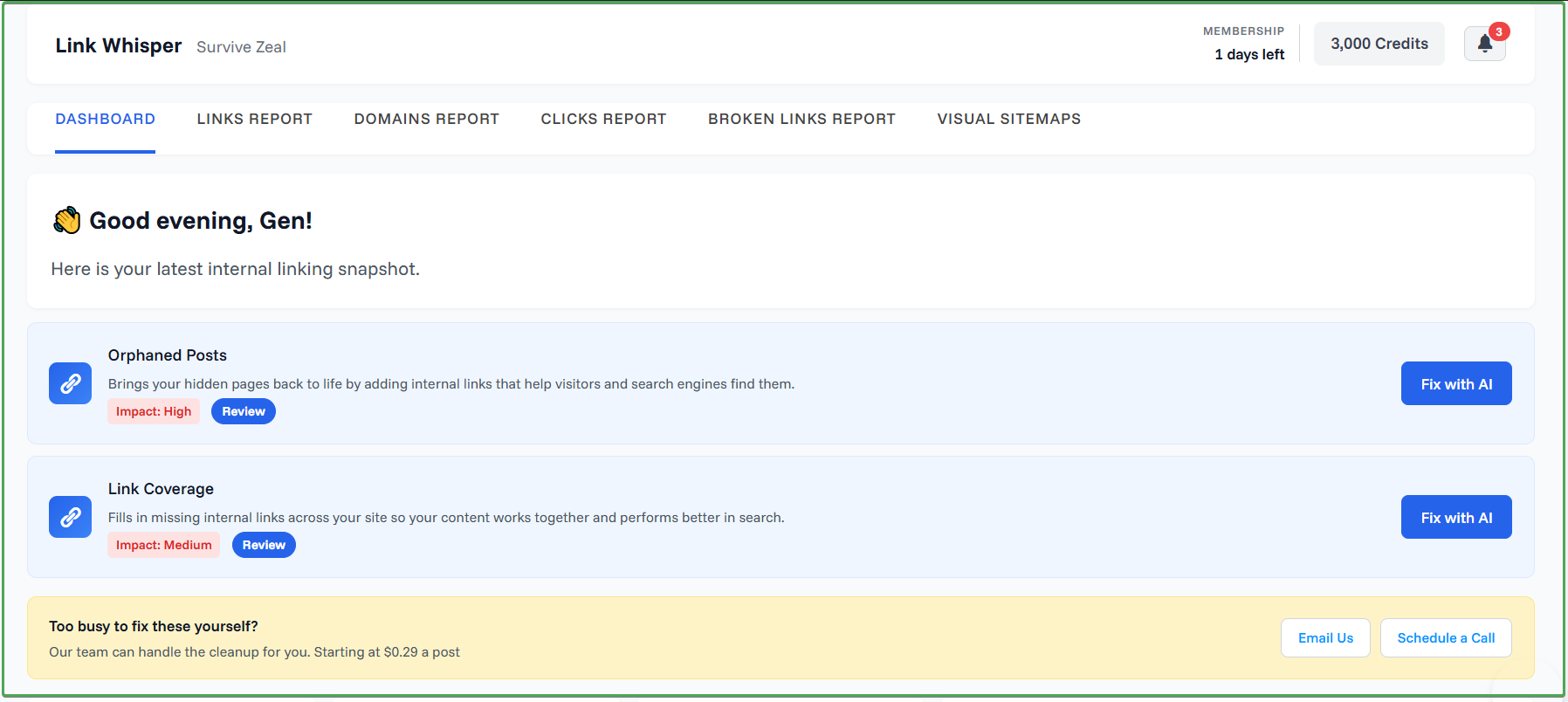
Link Whisper has been in the game longer than most of the newer tools, and many bloggers already rated it as a useful plugin to have in your toolset.
It works for both WordPress and Shopify. Link Whisper offers almost all the features covered in the factors to consider section.
It is one of the tools that helps you avoid going back to older content manually after publishing a new post just for internal linking.
Like several other tools, the plugin also makes use of advanced AI, including large language models. Its weakest point, however, is the relevance of its suggested links.
As of 2026, a number of newer tools have moved ahead of it in that area, and the links it suggests are often not very precise.
It also does not offer anchor text analysis, which can be very useful when reviewing the anchors across your site or updating them. I consider that a very important feature to be missing.
Another thing to know is that Link Whisper does not really seem built for full AI automation. It does not offer bulk linking of the type where AI connects pages and even generates snippets when no clear internal linking opportunity exists in your content.
So if no linking opportunity is found in your existing content, you will need to handle that manually when using Link Whisper. Other tools can at least try to create an anchor opportunity, even though that does not always produce strong results.
Where the plugin seems to beat much of the competition right now is in keyword-based linking. This feature lets you provide a text and its target URL, then automatically turns that text into a hyperlink where it appears.
It also includes link visualization, which gives you a more concrete view of your internal linking profile. That said, this feature is still somewhat dispensable and does not make a major difference on its own.
Features (from FACTORS section)—
- Inbound Internal Link Suggestion (Add internal links from older pages)
- Outbound Internal Link Suggestion (Add internal links within a page)
- Internal Link Reports and Analysis/Audit (Find internal links to/on a page)
- AI-powered Internal Linking Automation
- Search and Replace (URL only)
- Linked-to Domain Reports
- Linked-to Domain Analysis
- Link Visualization
- Keyword-based Linking
Additional Features— Link click tracking, Link arrow icon, Related Post widget.
Cons—
- No Anchor Text analysis
- No Bulk Linking
- No AI intervention when there’s no found internal link opportunity
>>> Visit Link Whisper (and save)
Use the Link Whisper Promo code “ZEALOFF” for 15$ off
Or check Link Whisper Review.
5. Linkilo WordPress Plugin
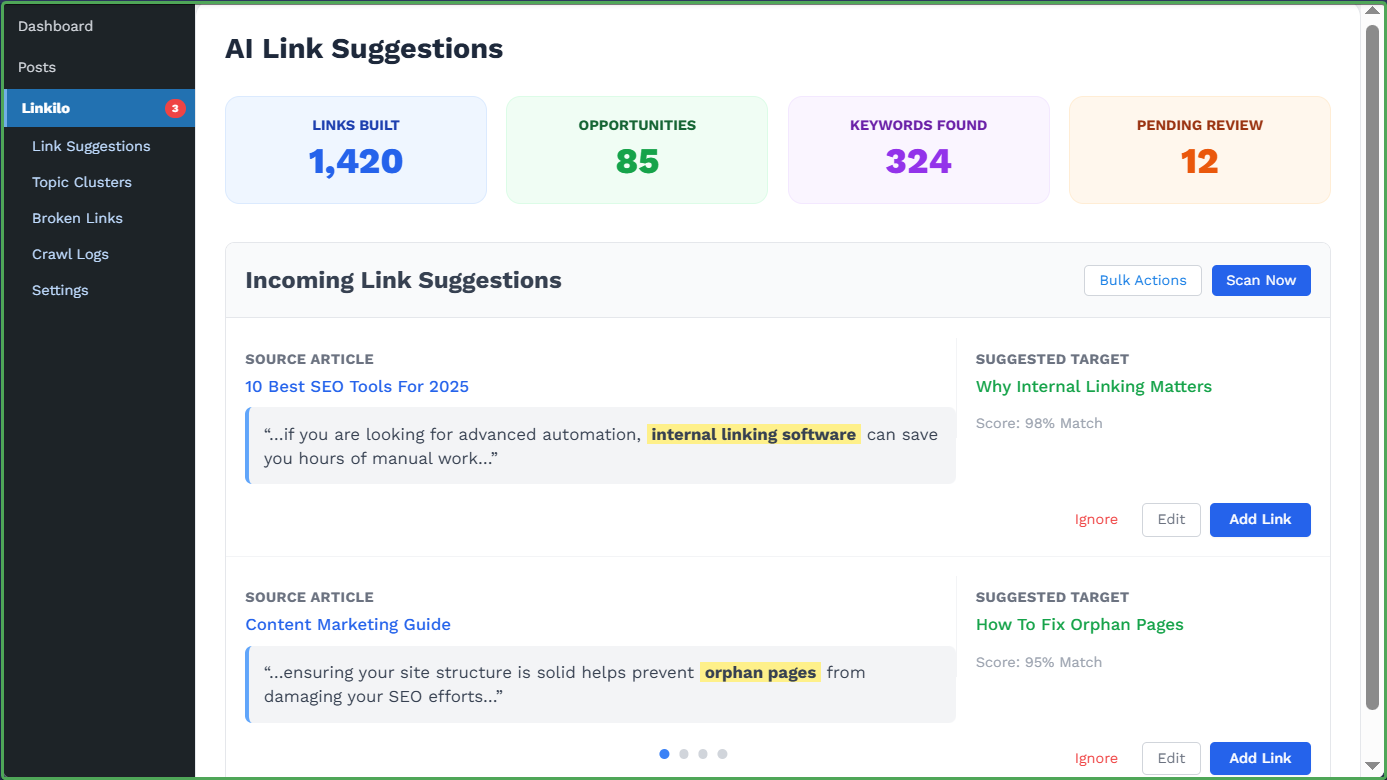 Linkilo is one of the early alternatives to Link Whisper that actually tried to bring similar features to the table. It is a traditional plugin that you install directly on WordPress.
As of 2026, Linkilo sits among the lower options, not because it lacks the core features, but because many of its needed improvements are still on the way. This includes better use of AI, natural language processing, and large language models, which it has not fully implemented yet.
The plugin does offer several of the features we covered in the factors to consider section, such as inbound internal link suggestions, outbound suggestions, and a few others. However, the quality of its link suggestions is not at the level of the tools that appeared earlier in this list.
It also includes a broken link checker and a related post widget that can be added inside WordPress.
The team is working on more features, many of which are necessary to make the tool more competitive and deliver stronger results.
Overall, it is still a decent plugin to consider, especially if you want something simple, but it is not yet at the level of the top tools in this space.
Features (from FACTORS section)—
- Inbound Internal Link Suggestion
- Outbound Internal Link Suggestion
- Internal Link Analysis (within a page)
- Anchor Text Report
- Keyword-based linking
- Related Posts widget
- Broken link checker
Additional Feature— Link Preview
Cons—
- The quality of the suggested links are not on par
- Core resource like NLP, AI or LLM is still underway.
6. Internal Link Juicer
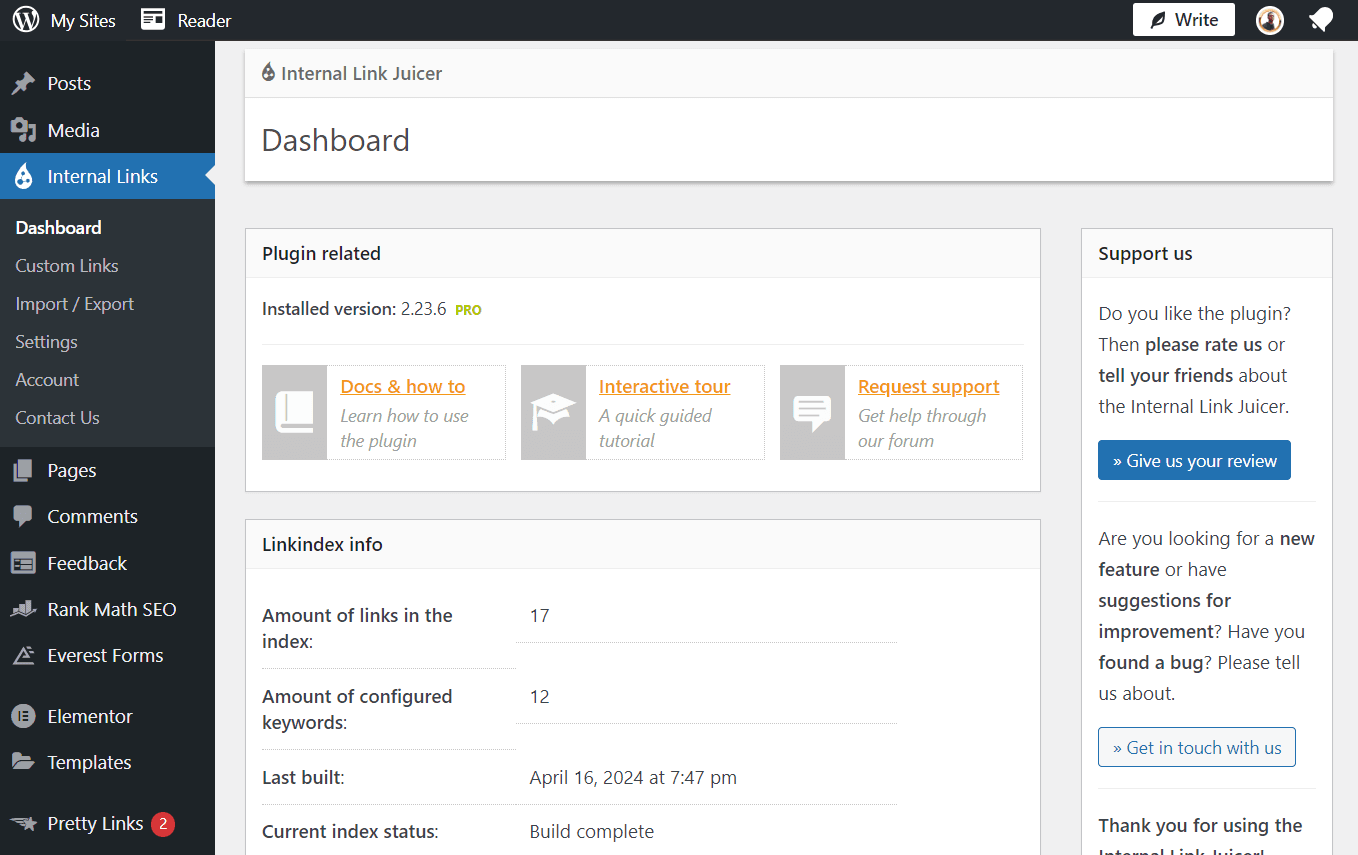
Internal Link Juicer is one of the oldest internal linking plugins available.
Its approach is mainly focused on keyword-based linking, and it does this better than all tools in this list.
It works as an automatic linker based on keywords. You define a keyword and assign it a link, then use its filters to control how and where those links appear for more meaningful results.
The plugin does not offer one of the most important features, which is internal link suggestion. It does not provide suggestions at all. Instead, it connects your pages based on the keywords you have already set.
This means that when you publish a new post, you may still need to go back to your older content to add links manually if you want full internal linking coverage. So it comes down to your preference.
You either want a tool that actively helps you find linking opportunities, or one that automatically links based on predefined keywords.
That said, the plugin performs very well in its area of focus. It includes advanced features and even allows you to define keyword gaps, which helps you expand your keyword coverage from your main seed terms.
Overall, Internal Link Juicer is a solid keyword-based auto-linking tool for WordPress, and it is also quite affordable.
Features
- Advanced keyword-based linking
- Autolinks Report
- Import and export of autolinks
Cons—
- Absence of helpful internal linking features like the “Link suggestion” and “Link Analysis”
- Merely an keyword-linker plugin
Choose IF— Keyword-to-link conversion is only what you need.
>>> Visit Link Juicer (and save)
Comparing the best Internal linking plugins for WordPress (Decision stage)
Now, let’s compare the plugins we’ve covered and narrow things down to the one you should pick.
For this, we’ll be using all the features we listed in the Factors to Consider section. So if you skipped that part, it’s worth going back to understand what each feature means, because that’s what we’ll be using to judge these tools.
>>go to the Factors to Consider section.
To compare them concisely and properly, let’s start by reducing each feature/term/factor to its initialism. Let’s do this…
- ILS — Inbound Internal Link Suggestion
- OLS — Outbound Internal Link Suggestion
- ILR — Internal Link Report
- ILA — Internal Link Analysis
- INT — Integration to GSC or SEO Plugin
- AI — whether it’s basic NLP or LLM-powered
- ATA — Anchor Text Analysis
- SR — Search and Replace (Link, Anchor, Post’s Title)
- BL — Bulk Linking
- KBL — Keyword-based linking
| ILS | OLS | ILR | ILA | INT | AI | ATA | SR | BL | KBL | |
|---|---|---|---|---|---|---|---|---|---|---|
| Link Genius | Underway | ✔️ | ✔️ | ✔️ | GSC | LLM & others | ❌ | ✔️ | ❌ | ✔️ |
| Linksy AI | ✔️ | ✔️ | ✔️ | ✔️ | GSC & SEO Plugins | NLP & LLM | ✔️ | ✔️ | ✔️ | ✔️ |
| LinkBoss | ✔️ | ✔️ | ✔️ | ✔️ | GSC & SEO Plugins | NLP & LLM | ✔️ | ❌ | ✔️ | ❌ |
| Link Whisper | ✔️ | ✔️ | ✔️ | ✔️ | GSC and SEO Plugins | NLP & LLM | ❌ | URL only | ❌ | ✔️ |
| Linkilo | ✔️ | ✔️ | ✔️ | ✔️ | SEO Plugins | ❌ | ✔️ | ❌ | ❌ | ✔️ |
| Link Juicer | ❌ | ❌ | Only autolink report | ❌ | SEO Plugins | ❌ | ❌ | ❌ | ❌ | ✔️ |
We have just judged these plugins using the most important and indispensable features. Use the comparison table above to make clear and sharp decisions.
Let us also compare the tools based on features that are not as important, but may still be useful when needed. The comparison table is below.
Coverting the name of those features to their initialism…
- SILO — Silo Network tool
- LDR — Linked-to Domain Reports
- LDA — Linked-to Domain Analysis
- LDS — Linked-to Domain setting
- LV — Link Visualization
| SILO | LDR | LDA | LDS | LV | |
|---|---|---|---|---|---|
| Linksy AI | ✔️ | ✔️ | ✔️ | ✔️ | ❌ |
| LinkBoss | ✔️ | ✔️ | ❌ | ❌ | ✔️ |
| Link Whisper | ❌ | ✔️ | ✔️ | ✔️ | ✔️ |
Bear in mind that the first comparison, based on the main features, is what matters most. The second table is there for the advanced features. Also, make sure you visit the terms to get a clearer understanding of them.
N.B. Plugins that didn’t appear in the 2nd table don’t have any of the advanced features/terms used for comparison. They are AI Link Genius, Linkilo and Internal Link Juicer. Instead of them appearing empty throughout, we chose to not include them. These tools offer the main features, so that’s not a big difference but something to take note of.
That said, let’s do a quick and unbiased rundown of what we’ve just reviewed. This was a two-way review, with both the author and the reader judging the two tools.
So now that we’ve seen everything, and now that we’ve seen how each tool compares to the other in the comparison table, here is the final judgment —
- 🥇AI Link Genius (by Rank Math) — best internal linking plugin with other SEO features | first choice if you haven’t secured an SEO Plugin yet | most suitable for Rank Math users | best in terms of Link reports and analysis.
- 🥈Linksy AI — best for relevant link suggestion | most feature-rich | great at bulk/automated linking | great at AI-powered linking.
- 🥉LinkBoss — best internal link opportunity tool overall (i.e., it has additional flexibility in its link suggestion tool) | best for SaaS tool (cloud-based) | Works for WordPress and Shopify
- Link Whisper — best for internal link click tracking | Works for WordPress and Shopify
- Internal Link Juicer — best overall for keyword-based linking
How Rank Math and Internal Linking Tools Work Together
Do you know that most internal linking plugins rely on SEO plugins like RankMath to suggest better links?
Think about the focus keywords you add when writing a post in WordPress. Those keywords are not just there for show. They play a big role.
When you install most internal linking plugins, they integrate with SEO plugins to extract those focus keywords and store them.
These keywords help the plugin understand what each page is about, which improves the quality of link suggestions. And because those keywords are carefully chosen by you, they are often more accurate than anything generated automatically.
Traditionally, internal linking plugins have depended on SEO plugins and even Google Search Console data to work effectively.
Now, with AI-powered internal linking, especially with large language models, some tools can generate these keywords on their own.
But here’s the thing — manually added keywords are still more reliable. AI-generated keywords can help when you haven’t set anything, but if you want precision, your own input is better.
Now, looking beyond that, SEO plugins themselves are starting to include internal linking features.
Take RankMath, for example. It already offers some of the core features you need. You get link suggestions, internal link reports and analysis, search and replace, and even keyword-based linking.
That’s why, in most cases, an SEO plugin should be your first step. You should have one installed before even thinking about a separate internal linking tool.
That said, SEO plugins still don’t cover everything. Advanced users will eventually need more control and deeper features, and that’s where dedicated internal linking tools come in.
RankMath is also pushing deeper into internal linking. With AI Link Genius already moving beyond the basic level and stepping into more advanced internal linking capabilities.
If you’re already using RankMath, then you already have access to something powerful. And with how they keep building, it’s clear they are not stopping here.
>>> Get Rank Math to make them work properly (includes its own internal linking module).
What are the best practices to follow when doing internal linking?
Internal linking is not just about placing links inside your posts. It goes beyond that.
There are rules to follow if you want to get the most out of it and actually improve your rankings. Here are the best internal linking practices to follow:
- Build a content hub and grow it over time
- Link to your most important pages first
- Use optimized anchor text when linking
- Link naturally within your content, not forcefully
- Use the right linking attributes where necessary
- Avoid keyword cannibalism (using the same anchor for different pages)
- Link from older content to newer pages
- Regularly fix broken links and 404 errors
- Use internal linking tools to automate and discover opportunities
- Track your internal linking performance and improve over time
You can learn more about the best practises to follow for SEO internal linking.
Conclusion
Internal linking plugins are a great addition to a blogger’s toolset.
With the right one, you save a lot of time that manual internal linking would have taken.
They also help you find and fix link issues on your site, things you may not even know exist.
They are especially useful for websites with 100 or more posts. They are not strictly necessary, but they are a huge time saver. It is something worth considering as an investment.
If you are a new content creator, you don’t need to worry about all these tools yet. Just get yourself a good SEO WordPress plugin. I recommend RankMath. It will set you on the right path.
Thankfully, RankMath already offers internal linking features, and it ranks number one here because it is the tool most people already have easy access to. I am leaving the verdict here also —
- 🥇AI Link Genius (by Rank Math) — best internal linking plugin with other SEO features | first choice if you haven’t secured an SEO Plugin yet | most suitable for Rank Math users | best in terms of Link reports and analysis.
- 🥈Linksy AI — best for relevant link suggestion | most feature-rich | great at bulk/automated linking | great at AI-powered linking.
- 🥉LinkBoss — best internal link opportunity tool overall (i.e., it has additional flexibility in its link suggestion tool) | best for SaaS tool (cloud-based) | Works for WordPress and Shopify
- Link Whisper — best for internal link click tracking | Works for WordPress and Shopify
- Internal Link Juicer — best overall for keyword-based linking
FAQs
Is Link Whisper still the number one internal linking plugin in 2026?
No. Link Whisper has fallen from the number one position. Newer tools have moved ahead of it, and as seen in our rankings above, the top tools now perform better, especially when it comes to suggesting more accurate and meaningful internal links.
What are the best SEO plugins with strong internal linking features?
The best SEO plugin that assists with internal linking right now is likely RankMath SEO. It offers many of the core features you would expect from a standalone internal linking tool.
Yoast SEO comes close, but RankMath still has the edge in terms of internal linking capabilities.
How far has AI gone in automating internal linking?
AI has come very close, but it is not perfect yet. It is still rare to find a tool that can offer ChatGPT-level suggestions consistently. Even ChatGPT itself, without proper direction, can suggest links that do not make sense.
That said, AI has improved the quality of suggestions to around 70%, which is a big step forward.
Should I trust internal linking automation?
You should not trust complete internal-linking automation. The best approach is semi-automation, where the tool suggests links, but you still review and approve them before applying.
What if I need a tool for platforms other than WordPress?
Some tools like LinkBoss and Link Whisper also work with Shopify. According to LinkBoss, it can still be used with other CMS platforms, but the process becomes manual. You will need to copy the suggested links and paste them into your content.
There are also other tools built specifically for non-WordPress platforms that perform well. Examples include LinkBot and SEOJuice, although they have not been fully reviewed here yet.







Linksy AI: Best Internal linking plugin? (A Review)
[…] compared with the tools we have in our list of the best internal linking Plugins. Linksy stands her […]
Link Whisper Review 2026: Still the #1 internal linking tool?
[…] We recently reviewed the best Internal Linking Plugins. You can check it out to know our […]
Best Internal Linking Tools and Internal Linking Plugins WordPress (AI-powered)
[…] It’s a feature that is common between Internal Linking Plugins. […]
9 Best Link Whisper Alternatives- Perfect Replacements (Free/Paid)
[…] We recently published a list of the best Internal Linking Plugins. You can check that as […]
Best AI Internal Linking Tools in 2026 (LLM-Powered)
[…] a post talking about “WordPress SEO plugins” can still be connected to another post about “internal linking plugins” if the context makes […]
How To Add an Internal Link in WordPress – Beginner’s Guide
[…] You can explore several options in this guide to internal linking wordpress plugins. […]
Internal Linking Automation: Ultimate Guide (plus Tools)
[…] Link Whisper has been existing for some time now. It’s currently the best plugin for internal link automation on WordPress. […]
Best AI Tools for SEO in 2026
[…] Think of the tool as a plugin for everything internal linking. […]
How to Automate Internal Linking Using AI Link Genius
[…] The AI Link Genius module inside Rank Math is not just a fancy addition. It genuinely competes with dedicated internal linking tools. In fact, we have already included AI Link Genius in our list of the best internal linking plugins. […]
How to Automate Internal Linking on WordPress Using AI Link Genius
[…] The AI Link Genius module inside Rank Math is not just a fancy addition. It genuinely competes with dedicated internal linking tools. In fact, we have already included AI Link Genius in our list of the best internal linking plugins. […]
AI Link Genius vs Link Whisper: Which Internal Linking Tool Wins?
[…] There are tons of features that can be added to an internal linking plugin. […]