
Publishing content alone rarely produces strong search visibility. Many websites create dozens of articles but fail to connect them properly. The result is scattered content that search engines struggle to understand and readers rarely explore more pages.
Internal linking solves this problem. It connects related pages so both users and search engines can navigate your website easily.
In this guide, you’ll learn practical internal linking practices that improve SEO performance, strengthen GEO visibility for AI search engines, and help turn visitors into readers who explore more pages.
Table of Contents
Internal Linking Best Practices for Stronger SEO, GEO Visibility, and Conversions
Internal linking best practices refer to the methods used to connect pages within the same website in a clear and strategic way.
Instead of adding links randomly, these practices focus on linking pages that are closely related in topic and purpose. This helps search engines understand how different pages on your site connect with each other.
Following proper internal linking practices also improves navigation for readers. Visitors can easily move from one useful page to another without searching through the site.
Now let’s look at the key internal linking practices that help strengthen SEO, improve GEO visibility, and guide readers through your content.
1. Build one main hub, then build around it
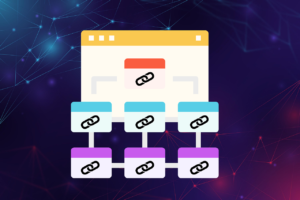
A strong internal linking strategy usually starts with a central topic page.
This page acts as the main hub that explains a topic broadly. Supporting articles then link back to this hub while also connecting with each other.
This structure helps search engines see how your content fits together. Instead of isolated articles, your site becomes a connected topic network. That makes it easier for both search engines and AI-driven systems to understand your expertise.
2. Send your link power to the pages that matter most
Not every page on a website has the same importance.
Some pages generate revenue, others target competitive keywords, and some exist mainly to support broader topics. Internal links help distribute authority across these pages. Search engines often use internal links to determine which pages carry more value.
For this reason, important pages should receive more internal links from related content. Doing this helps strengthen their ability to rank in search results.
3. Link your important pages early (with clean anchor text)
The position of a link inside a page can influence how noticeable it is.
Links placed early in the content are more likely to be clicked by readers. They are also easier for search engines to discover during crawling.
Anchor text matters as well. Instead of generic phrases like “click here,” use clear words that describe the destination page. This helps search engines understand what the linked page is about.
4. Link where it fits naturally, not everywhere
Internal linking should always follow the flow of the content.
Adding too many links simply to increase link count can confuse readers. It also weakens the contextual value of each link.
Instead, focus on linking when a related concept appears naturally in the discussion. This keeps the reading experience smooth while still connecting important pages.
5. Use follow vs nofollow the right way
Most internal links should remain follow links.
Follow links allow search engines to crawl the destination page and pass link authority across the site. This helps build a strong internal structure.
The nofollow attribute is usually reserved for special cases, such as login pages or pages that should not receive ranking signals. For normal blog posts and informational pages, follow links are the best choice.
6. Don’t reuse the same anchor for different pages
Anchor text tells search engines what the linked page is about.
If you use the same anchor text for multiple pages that target different topics, search engines may struggle to determine which page is the primary one.
A better approach is to keep anchors specific to the page they link to. Each anchor should clearly represent the destination content.
7. Use older posts to lift your newer posts
Older content often accumulates authority over time.
When you publish a new article, linking to it from relevant older posts can help it get discovered faster. This approach strengthens the internal structure and spreads authority from established pages to newer ones.
It also ensures your existing content continues supporting new topics rather than remaining isolated. Internal linking guide for WordPress.
8. Clean up orphan content and broken links
Orphan pages are pages that receive no internal links from other pages.
These pages are difficult for search engines to discover. They also receive little traffic because users rarely encounter them through navigation.
Broken internal links create a similar problem. They interrupt the user experience and reduce crawl efficiency. Regularly checking for orphan pages and broken links helps maintain a healthy linking structure.
9. Use an internal linking tool to make the work faster
Managing internal links manually can become difficult as a site grows.
Internal linking tools help identify link opportunities across your content. They can suggest related pages, detect orphan content, and report broken links. Many tools also automate part of the linking process to save time.
These tools don’t replace editorial judgment, but they significantly reduce the manual effort involved in maintaining internal links. Internal linking automation.
10. Track what’s working, then tweak your linking
Internal linking strategies improve over time through observation.
Track metrics such as page views, click paths, and crawl reports. These signals help reveal which pages receive the most internal traffic and which ones remain underlinked.
Adjusting your internal links based on this data allows you to strengthen important pages and improve the overall navigation of your site.
Conclusion
Internal linking plays a major role in how search engines and AI systems understand a website.
By building clear content hubs, linking important pages strategically, and maintaining a clean link structure, you create a website that is easier to crawl and easier to explore.
Over time, these improvements support stronger SEO performance, better GEO visibility, and a smoother experience for readers.
FAQs
Are internal links useful for SEO?
Yes. Internal links help search engines discover pages, understand content relationships, and distribute authority across your site. This can improve the ability of important pages to rank.
Are internal links useful for GEO?
Yes. Generative search systems rely on contextual signals to understand how pages relate to each other. Internal linking helps establish those relationships and strengthens topical relevance.
How to add and manage internal links on WordPress?
You can add internal links directly in the WordPress editor by highlighting text and inserting the link to another page on your site. Many WordPress plugins also provide link suggestions and reports to help manage internal linking more efficiently.
How many internal links per post?
There is no fixed number. Most posts naturally include between three and ten internal links depending on length and topic coverage. The key is linking where it provides useful context.
Do I really need an internal linking tool?
For small websites, manual linking may be enough. As the number of pages grows, internal linking tools help identify opportunities, detect errors, and maintain a consistent linking structure.





Internal Linking for SEO and GEO: How Smart Links Improve Search Visibility
[…] Internal linking best practices help solve this issue. In this guide, you’ll learn how internal links improve SEO, help AI-driven search engines understand your content, and strengthen your site’s overall search visibility. […]
Internal Linking Guide for WordPress (Complete Beginner-to-Advanced Guide)
[…] Finally, it strengthens SEO signals by showing how different topics relate across your site. For a broader overview of linking strategies, see internal linking best practices for SEO and GEO. […]
How To Add an Internal Link in WordPress – Beginner’s Guide
[…] Finally, internal links help readers find additional resources. This keeps visitors exploring your content longer. If you want to understand the strategy behind this process, see internal linking best practices for SEO and GEO. […]
Link Whisper Discount Code: $20 OFF (+ Set-up Guide)
[…] Link Whisper is a powerful Plugin for WordPress and Shopify that streamlines internal linking. […]
9 Best Link Whisper Alternatives- Perfect Replacements (Free/Paid)
[…] Until then, keep doing Internal Linking the right way! […]
Best Internal Linking Tools and Internal Linking Plugins WordPress (AI-powered)
[…] This is to testify that, Rank Math is a precious tool for intelligent Internal Linking. […]
Link Whisper vs Linksy Plugin: Best Internal linking tool?
[…] Whisper is working tirelessly to pack features that better internal linking. Here are some of its notable features that are superior to […]
Top Internal Linking Plugins for WordPress: Which One Is Best in 2026?
[…] You can learn more about the best practises to follow for SEO internal linking. […]
Internal Linking Automation: Ultimate Guide (plus Tools)
[…] internal linking strategy should at all times follow the best practices in the SEO […]
Link Whisper Black Friday: $50 Discount (+ Lifetime Deal)
[…] Claim the $50 discount now and transform your internal linking process! […]