
Internal linking is one of those SEO tasks that looks simple when your site is still small. When you have only a few posts, you can easily open your old articles, look for relevant places, and add links manually.
But as your content adds up, the work becomes tougher.
At that point, you are no longer dealing with only 20 or 30 posts. You may have 100, 200, 500, or even more articles. Finding the right internal linking opportunities manually will no longer be easy.
This is where internal linking automation can assist.
With the right tool, you can discover link opportunities faster, audit your existing links, fix weak pages, and build a better internal linking structure without doing everything manually.
One of the tools that now helps with this is AI Link Genius by Rank Math.
AI Link Genius is built inside Rank Math SEO, and it gives you different features for managing internal links, including link audit, AI-powered suggestions, keyword auto-linking, and bulk updates.
So in this guide, we are going to look at how to automate internal linking using AI Link Genius.
Table of Contents
Why Internal Linking Matters?
Internal links matter because they help both users and search engines understand your website better.
When you link one page on your site to another related page, you are not just adding a link. You are helping readers move deeper into your content. You are also helping search engines discover your pages and understand how they are connected.
This is why internal linking is important for SEO.
It helps you:
- Guide users to related content
- Improve how people move around your site
- Help search engines crawl your content better
- Pass link value from strong pages to other pages
- Support important pages you want to rank
- Build a better content structure
- Reduce orphan pages on your site
Without internal links, pages stand alone with no support from other posts. Even if the content is good, it may not get enough attention from users or search engines.
So internal linking is not something to ignore.
It is part of how you build a strong website structure.
Why Automate Internal Linking?
Manual internal linking is fine when your site is small.
But as your content grows, it gets harder to manage everything manually. You may publish a new post today, but forget to go back to your old posts and link to it.
Automation helps reduce that stress.
It helps you find linking opportunities, update old links, add links to important pages, and manage your internal linking structure without spending much time.
This does not mean you should allow the tool to do everything blindly.
Internal linking still needs human review.
But automation helps you handle the heavy part of the work.
It helps you:
- Find link opportunities across your content
- Add links across many posts faster
- Keep old content connected to new content
- Discover pages with poor internal linking
- Fix outdated URLs or anchors
- Maintain a cleaner site structure
So the main reason to automate internal linking is simple — It saves time and helps you scale.
What’s AI Link Genius?
AI Link Genius is an internal linking feature inside the Rank Math SEO plugin.
It is not a separate WordPress plugin that you install alone. It works as a module inside Rank Math. So after installing Rank Math, you need to turn on the Link Genius module before you can begin to use it.
The tool is designed to help WordPress users manage internal links in a smart way.
How does it help internal linking?
AI Link Genius helps internal linking in different ways.
First, it gives you an internal link audit from the dashboard. This allows you to see issues like broken links, redirected links, working links, and links blocked by robots.txt.
Second, it helps you find internal link opportunities while working inside the WordPress editor. Instead of manually searching your site for related posts, the tool can suggest relevant pages you can link to.
Third, it gives you a Post Tab where you can see the number of internal links, external links, and incoming links for each post. This makes it easier to know which pages need more links.
Fourth, when you click on the link data from the Post Tab, Rank Math takes you to the Links Tab. This section allows you to inspect the individual links themselves. Here, you can see the actual URLs with respect to their anchor texts.
Fifth, it has Keyword Maps. This allows you to set a keyword and a target URL so that Rank Math can automatically link that keyword when it appears in your content.
Sixth, it has Bulk Update. This helps you search and replace URLs, anchor texts, or both across your site.
So AI Link Genius helps internal linking in three major ways:
- It helps you find internal linking opportunities
- It helps you audit and manage existing links
- It helps you automate repetitive linking tasks
That is why it is useful for websites with growing content.
How to use AI Link Genius to Automate Internal Linking?
Now let’s look at how to use AI Link Genius practically.
The tool has different sections, and each section helps with internal linking in a different way.
1. Install Rank Math and turn on the Link Genius module
To use AI Link Genius, you first need to install Rank Math on your WordPress site.
Most of the important Link Genius features are not available in the free version, so you will need Rank Math Pro.
After getting Rank Math Pro, go to your WordPress dashboard and install the plugin like every other WordPress plugin.
Once Rank Math is installed and activated, go to the Rank Math SEO dashboard.
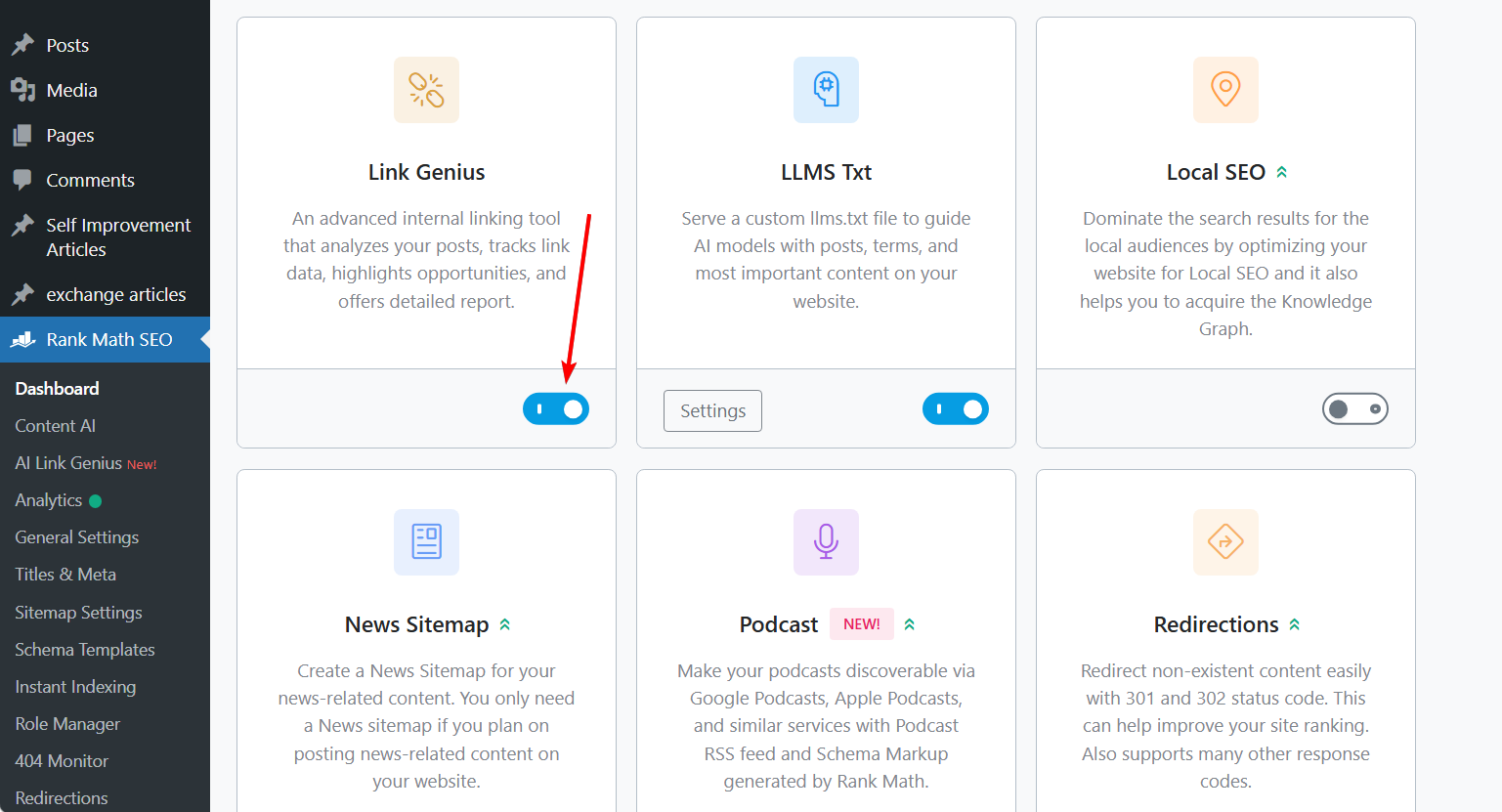
From there, look for the modules section and find Link Genius. Then turn it on.
You are now ready to use the internal linking solution.
2. The Dashboard (where the Internal Link Audit takes place)
The dashboard is where the internal link audit happens.
After turning on Link Genius, you can go to the dashboard and run the audit. Rank Math will check the links on your site and give you a summary of your link health.
This audit helps you see what is happening with your links.
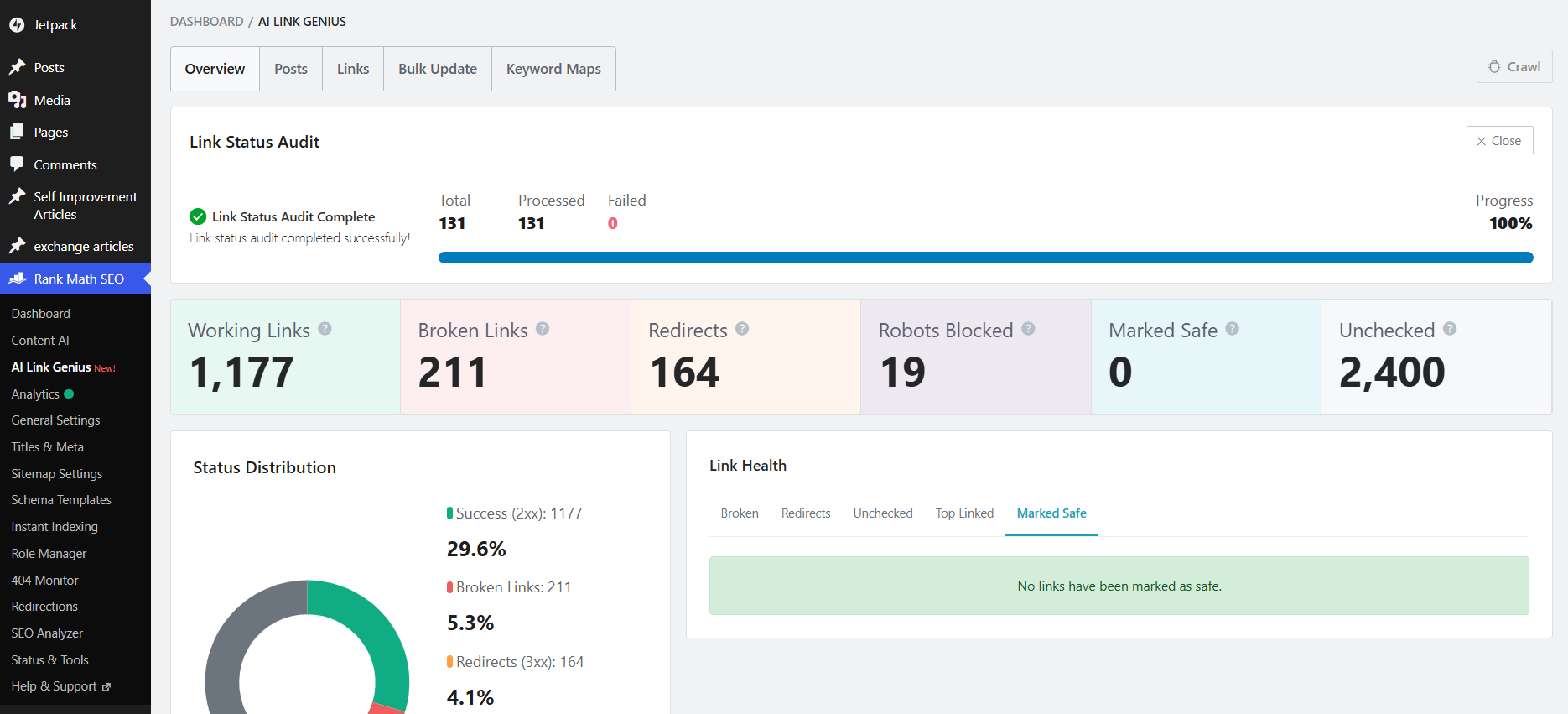
It checks things like:
- Working links
- Broken links
- Redirected links
- Links blocked by robots.txt
This is useful because internal linking is not only about adding new links. You also need to know if the links you already have are working correctly.
Making use of AI-powered internal link suggestion
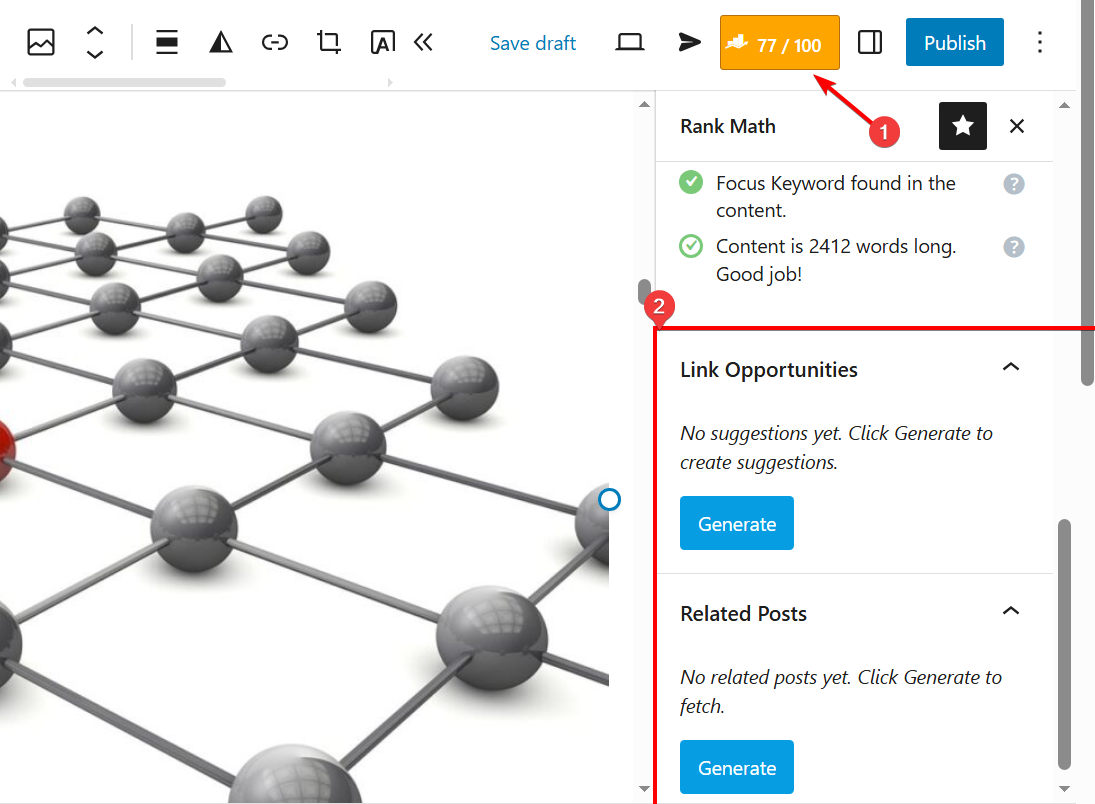
One of the most useful features of AI Link Genius is the AI-powered internal link suggestion.
This feature helps you find possible internal links while editing your content inside WordPress.
When you open a post, you can access Rank Math from the editor. From there, you will see the Link Opportunities section.
This is where Rank Math suggests relevant internal links for the content you are working on.
The tool tries to match phrases in your content with related pages on your site. When it finds a match, it gives you a suggestion. You can then review the suggestion and decide whether to apply it.
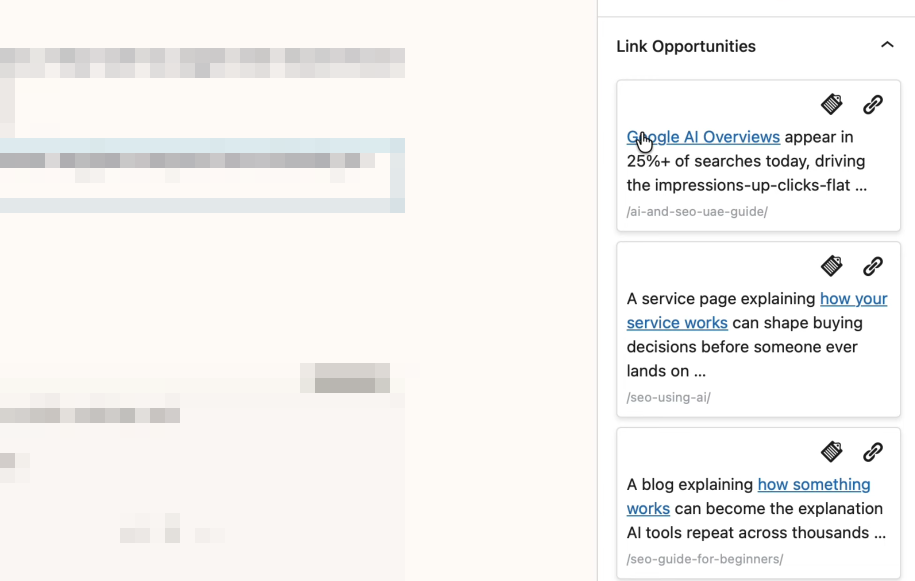
This is important because you should not add links blindly.
Even with AI, you still need to check if the link makes sense in that place.
The outbound internal link suggestion is already useful because it saves you from manually searching your site every time you want to link to another post.
Rank Math is also working on inbound link suggestions.
This will make the feature more powerful because inbound suggestions can help you find older posts that should link to your new content.
That is the part that many site owners need badly.
When you publish a new post, the normal thing is to go back to your old related posts and add links to the new post. But doing that manually is stressful.
So when they roll out inbound link suggestions, it will help users fix orphaned posts and support new content without visiting old posts one after the other.
Using the ‘Post Tab’ to find the number of internal links
The Post Tab helps you see the number of links for each of your content.
Rank Math mainly classifies the links into three categories:
- Internal links
- External links
- Incoming links
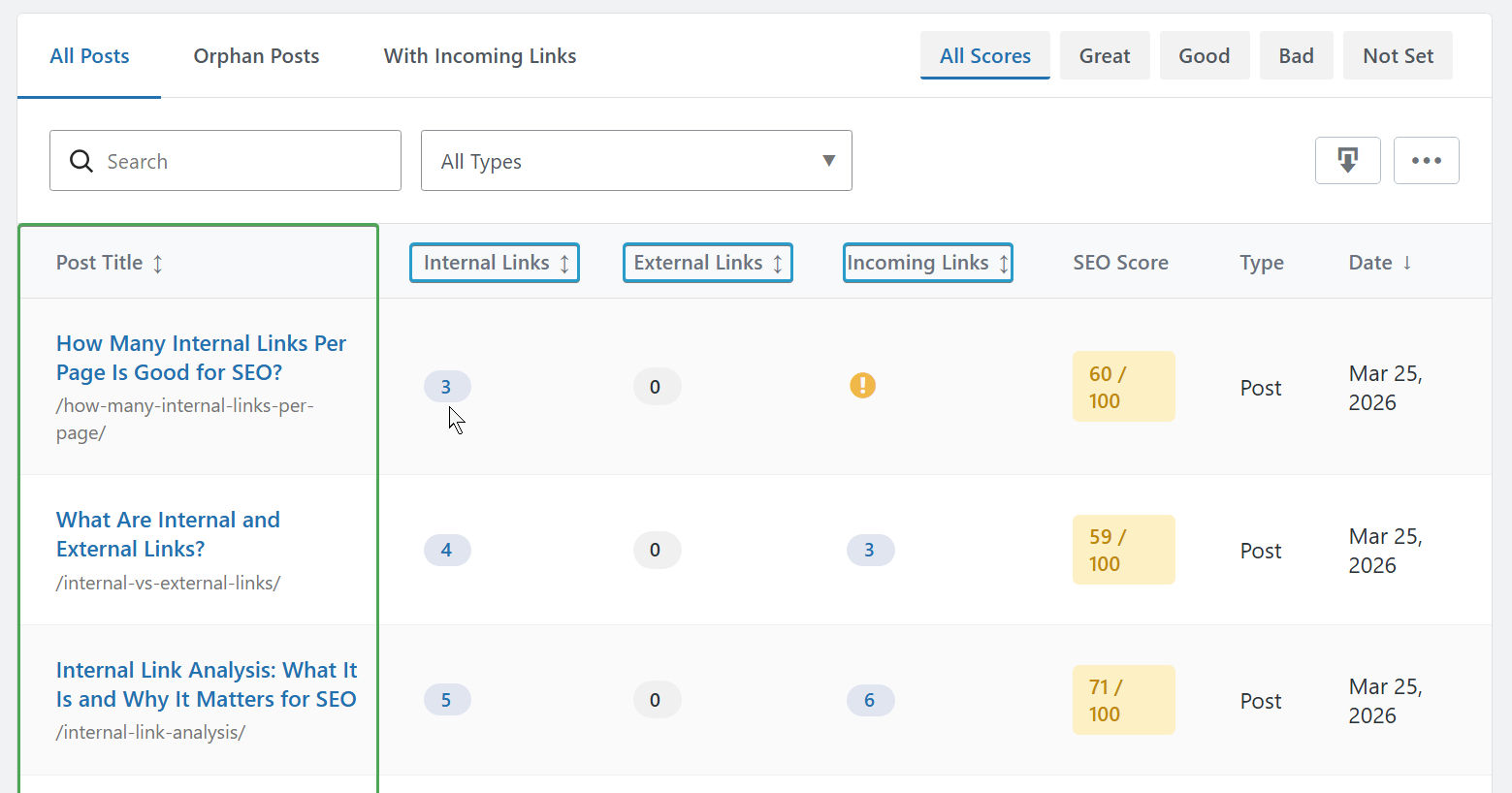
The internal links are the links placed inside that particular post and pointing to other pages on your site.
The external links are links pointing to external domains outside your website.
The incoming links are internal links coming from other pages on your site and pointing to that particular post.
This section is useful because it helps you to understand the linking strength of each page.
For example, if a page has very few incoming links, it may mean that the content is not properly connected to the rest of your site.
So instead of doing the guess work, the Post Tab gives you a summarized overview of your internal linking structure.
Using the ‘Links Tab’ to inspect the individual links
The Links Tab is where you can inspect the actual links themselves.
Whenever you click on any of the link counts from the Post Tab, Rank Math takes you to the Links Tab automatically.
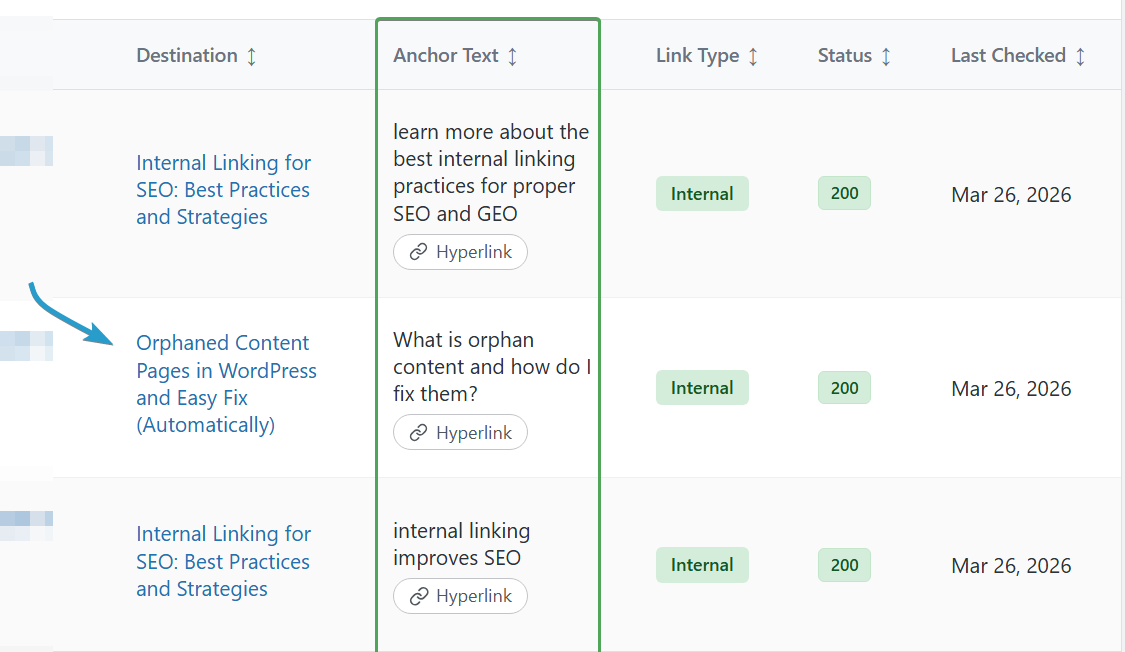
Instead of only showing the number of links, it displays the individual links connected to that page.
Here, you can see two things — the destination URL, and the anchor text in use.
This is useful when auditing your internal linking structure.
Using ‘Keyword Maps’ to auto-link keywords
Keyword Maps is where AI Link Genius handles automatic keyword linking.
This feature allows you to choose a keyword and connect it to a specific URL.
After setting it up, Rank Math can scan your content and automatically link that keyword whenever it appears, based on the rules you set.
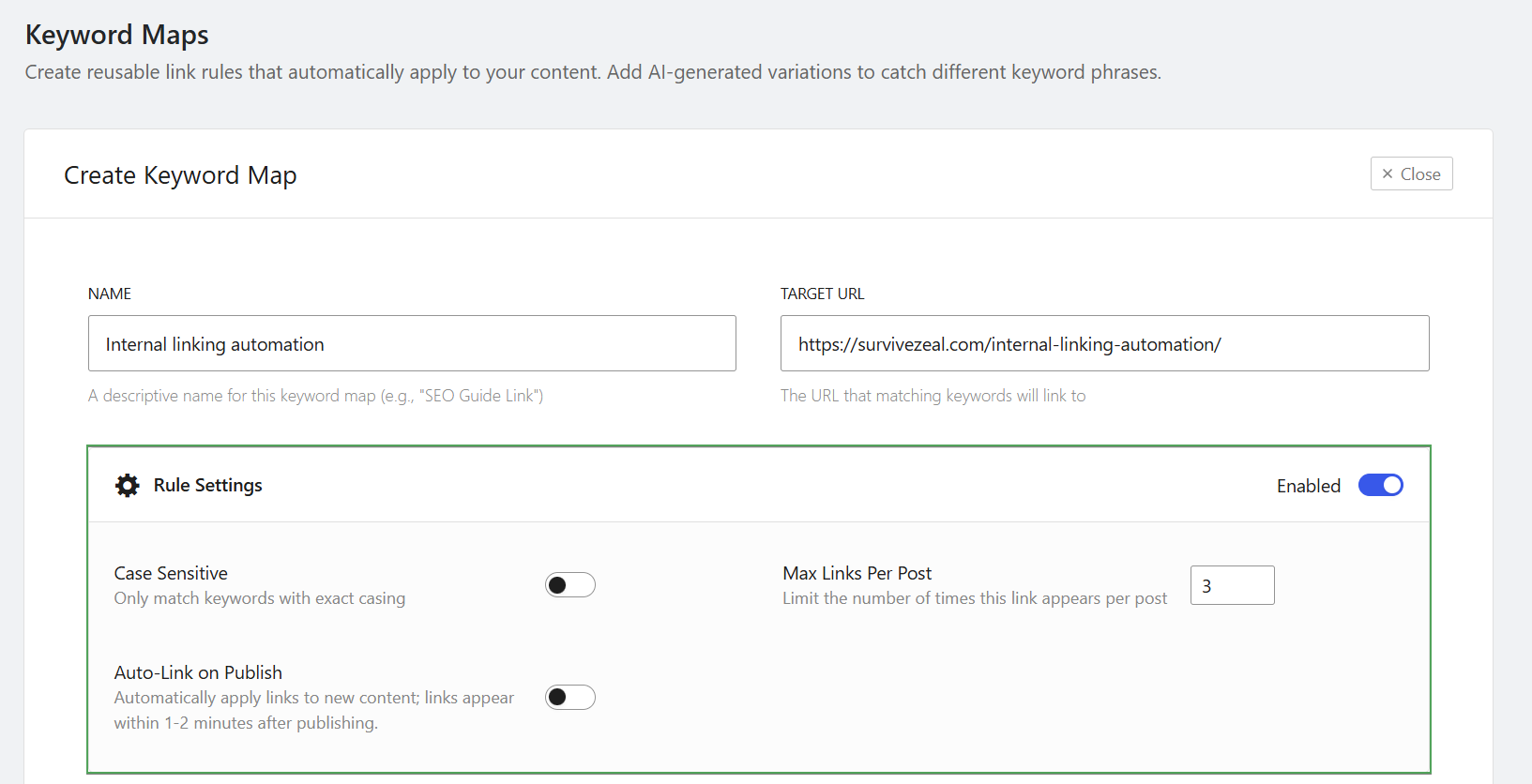
For example, if you have a page about internal linking automation, you can create a keyword map for that term.
Then when that keyword appears in your content, Rank Math can automatically turn it into a link.
This is useful when you want to link important keywords to important pages across your site.
Inside Keyword Maps, you can set different rules.
You can choose:
- The keyword
- The target URL
- Keyword variations
- Maximum number of links per post
- Whether it should apply to future content
- Whether the match should be case-sensitive
You can also use AI to generate keyword variations.
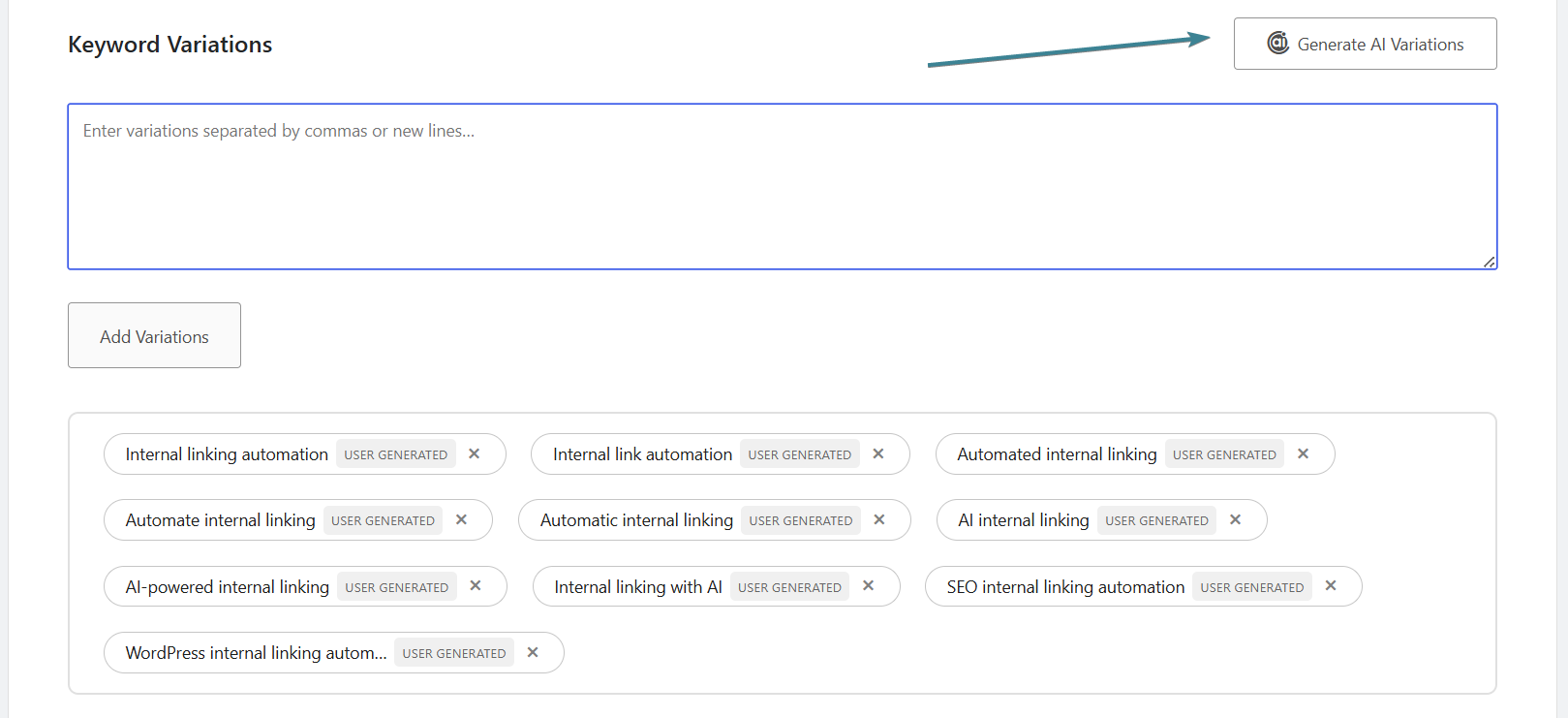
This helps you cover related phrases instead of depending on only one exact keyword.
After creating the keyword map, Rank Math will scan your posts and apply the links where it finds matching keywords.
The good part is that this can also work for future content if you enable that option.
So when you publish a new post later, Rank Math can still apply the keyword map where needed.
Using ‘Bulk Update’ to search and replace data
Bulk Update is another feature that helps automate internal link management inside AI Link Genius.
It allows you to search for existing links, URLs, or anchor texts and replace them across your content without editing individual posts one after the other.
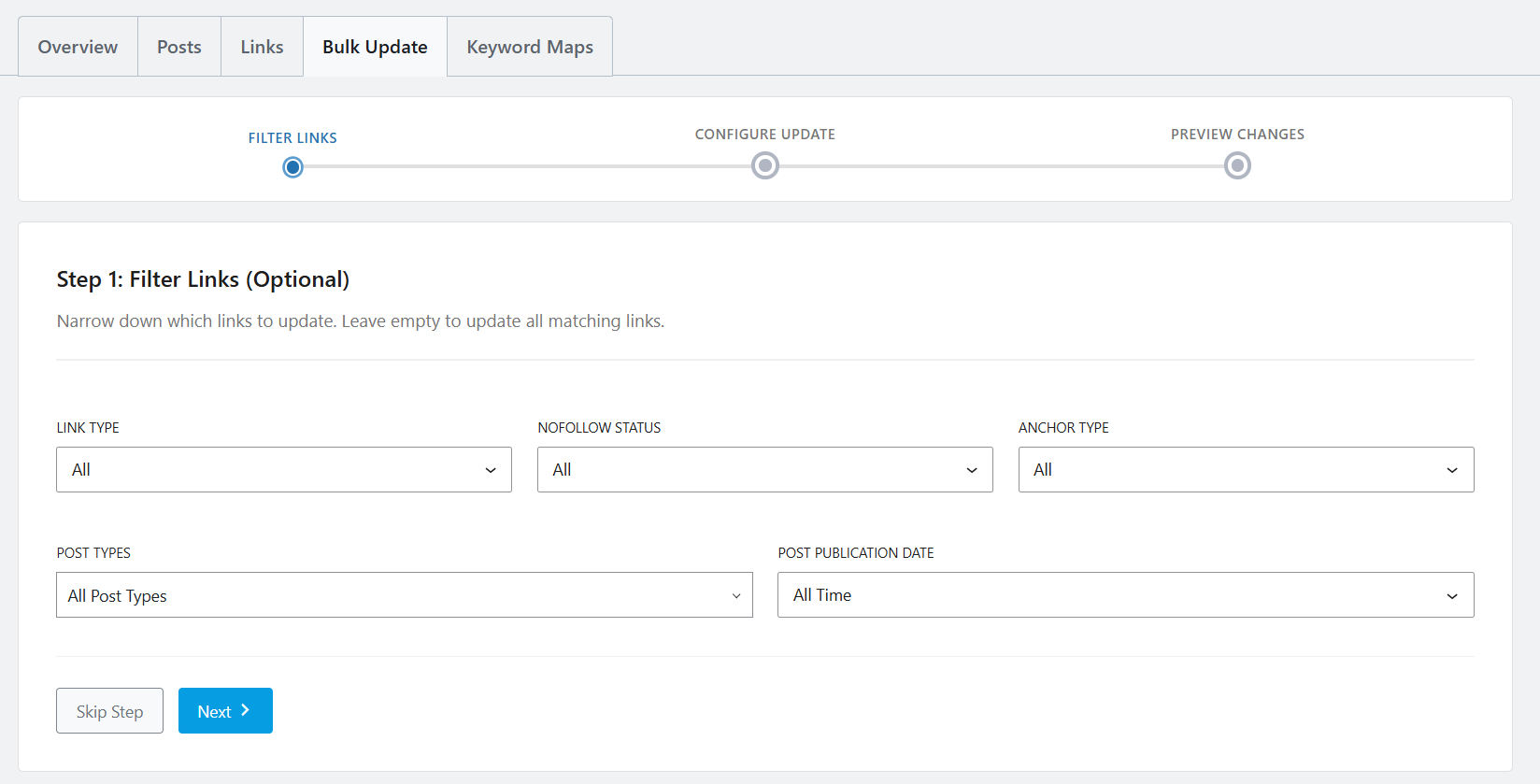
To get started, open the Bulk Update section inside Link Genius. The tool lets you apply filters before making any changes, helping you narrow down the data you want to update. Leaving the filters empty will search through all available data.
After applying your filters, proceed to the next step and choose what you want to replace.
You can update:
- URL only
- Anchor text only
- Both URL and anchor text
The option you choose depends on the type of change you are making.
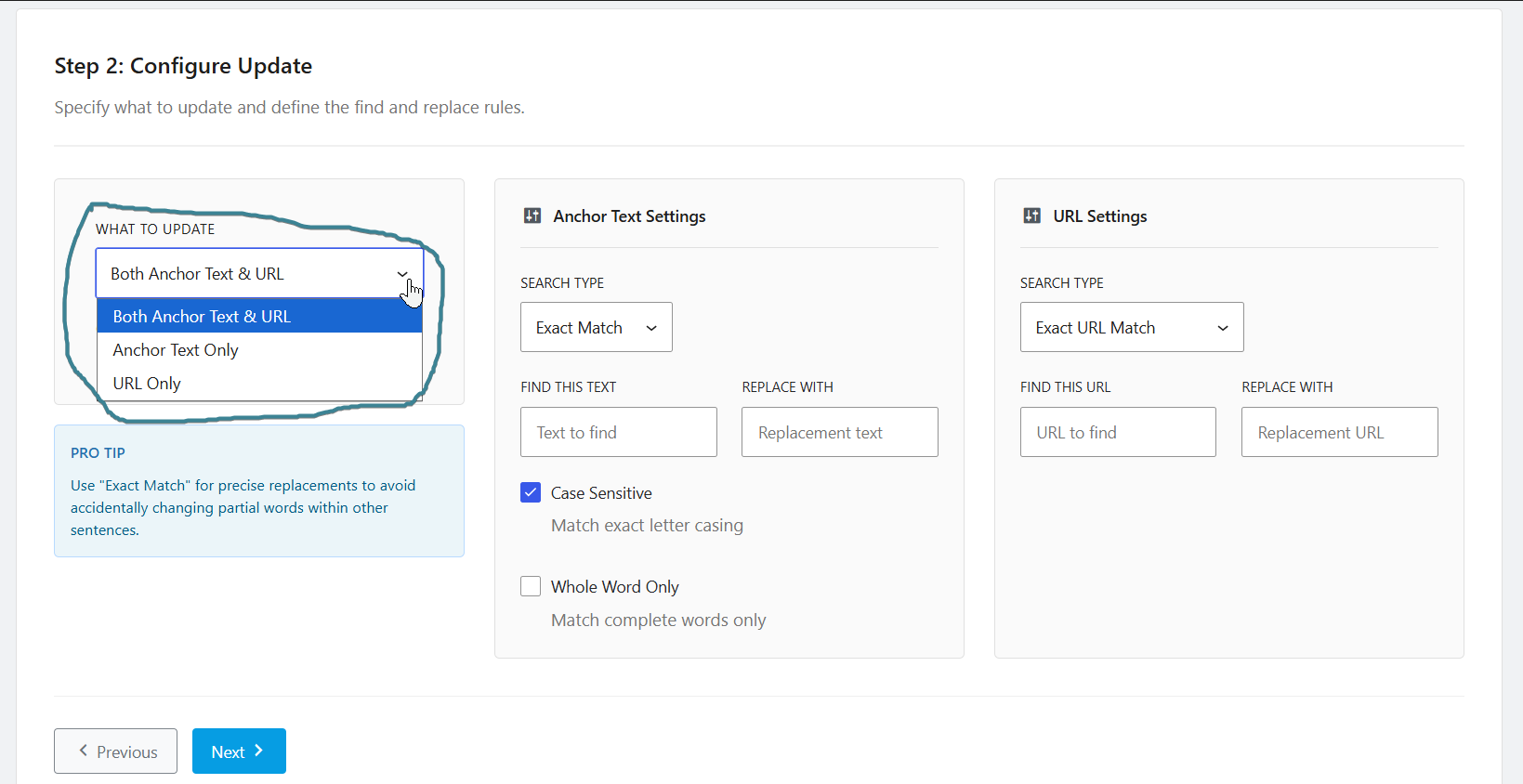
Rank Math also provides different matching methods during the replacement process.
For URLs, you can use exact match, partial match, or domain match.
For anchor texts, you can use exact match, partial match, or regex patterns.
Once you enter the existing data and the replacement value, Rank Math then handles the update for you.
This makes it easier to update outdated links, correct anchor texts, and keep your internal linking structure accurate at all times.
How does AI Link Genius compare with Internal link automation tools?
The AI Link Genius module inside Rank Math is not just a fancy addition. It genuinely competes with dedicated internal linking tools. In fact, we have already included AI Link Genius in our list of the best internal linking plugins.
The reason is simple. It already offers most of the core features you would expect from a typical internal linking solution.
For example, it comes with (Outbound) internal link suggestions. This feature helps you find suitable places within your content where internal links can be added.
Rank Math is also working on Inbound Link Suggestions. This upcoming feature is designed to help users discover linking opportunities from older content. It can be particularly useful for fixing orphan pages and finding relevant anchor texts across existing posts. For now, what is available is the regular link suggestion feature that works directly inside the WordPress editor while you create or edit content.
Another important feature is internal link reports and analysis. This is actually one of the major features we use when evaluating internal linking tools across our reviews.
In Rank Math, this feature can be found under the Post Tab and Links Tab.
The Post Tab shows the number of internal links, external links, and incoming links connected to each page. The Links Tab takes things further by showing the actual links themselves, including their destination URLs and anchor texts.
AI Link Genius also supports keyword-based linking through its Keyword Maps feature.
This allows you to associate keywords with a target URL and automatically create links whenever those keywords appear. Once configured, the automation can work across existing content and future content as well.
Another useful feature is Bulk Update.
This allows you to search and replace URLs, anchor texts, and other link data across multiple posts at once. It is particularly useful when updating old links or making large-scale changes across your site.
Looking at these features together, it becomes clear that AI Link Genius already covers the core functionality that most internal linking tools are known for.
What makes it even more interesting is that it comes inside Rank Math itself.
Most bloggers already use Rank Math for SEO, so they are not getting an internal linking solution alone. They are getting it as part of a much larger SEO toolkit.
If you have read our internal linking plugins guide, you may have noticed that many dedicated internal linking tools depend on SEO plugins to work at their best.
One reason is that they often rely on focus keywords and other SEO data to generate better link suggestions. In many cases, they work alongside SEO plugins rather than replacing them.
Now that Rank Math has entered the internal linking space directly, it is worth paying attention to what it offers. The feature set is already strong, and it is shaping up to be a very capable internal linking suite.
Conclusion
Considering the speed with which AI keeps evolving and new features keep rolling out for bloggers, the same should be expected in the area of internal linking automation.
In this guide, we have reviewed the major features of Rank Math AI Link Genius. Looking at what it offers today, it already comes with the core features expected from an internal linking tool.
We recently made a roundup of the best AI internal linking tools and intentionally ranked AI Link Genius at the top. One of the biggest reasons is that it is a tool most bloggers already have access to. Unlike dedicated internal linking tools, it comes bundled with the many SEO features Rank Math is already known for.
This was our look at how AI Link Genius can help with internal linking. We have also reviewed SEO WordPress plugins and their internal linking capabilities before, and from what we have seen so far, Rank Math still leads the industry. It has been leading in SEO for years, and now it also leads among WordPress SEO plugins when it comes to internal linking.
>> Go auto-interlinking mode using Link Genius.






AI Link Genius vs Link Whisper: Which Internal Linking Tool Wins?
[…] Useful Articles — Link Whisper Review, AI Link Genius Review. […]
Best AI Internal Linking Tools in 2026 (LLM-Powered)
[…] Or check AI Link Genius review. […]