
AI has made a major shift in how bloggers automate a lot of tasks, from content writing to image generation, and even content updates, where AI can help update your blog posts for you.
So, having seen this milestone, it should only be expected that AI would also come into internal linking, because this is one of the most time-consuming parts of content management.
At this point, we should not just expect AI to semi-automate internal linking. We should expect it to fully automate the process.
We should be able to publish a new post and have AI go back to our previous pages, find relevant internal link opportunities, and add those links for us. That means we can focus on producing the content, while AI helps connect that content across the site.
So in this article, we will be covering AI internal linking tools that actually work and can help you take your internal linking process to the next level.
Table of Contents
What is AI internal linking?
AI internal linking is the use of intelligent systems that make use of natural language processing, machine learning, and large language models to improve the process of internal linking.
AI can scan your post, understand its meaning and context, and then use that understanding to add internal links in the right places or suggest relevant internal link opportunities.
It can also go back and comb through hundreds of your posts to find suitable areas for linking.
How is AI internal linking different from traditional methods?
AI or LLM-powered internal linking is different from traditional methods in many ways.
1. It suggests better links
The suggestions are usually better because AI tends to understand context better. It can look beyond exact keywords and understand what the page is really about.
2. It can create internal link opportunities
AI does not stop at finding internal linking opportunities. It can also create them when there is no linkable phrase in your content, unlike traditional methods.
3. It does not rely only on keyword-based linking
Traditional tools often depend on keyword-based linking, where the same keywords are linked automatically. This can cause SEO issues if it is not handled properly.
AI internal linking can go beyond that by understanding the meaning of the content before suggesting or adding links.
4. It can fully automate internal linking
AI internal linking is also different because it can do full automation.
Whenever you publish a new article, the AI can go back to your previous posts, find relevant internal linking opportunities, and convert them into links while you focus on producing or generating more blog posts.
Components of AI-powered internal linking tools
AI-powered internal linking tools do not work with one form of AI alone. Most of them combine different AI technologies to understand your content, find useful link opportunities, and sometimes create the linkable phrases needed for internal linking.
1. NLP
NLP helps the tool read your content like language, not just as a group of keywords.
With NLP, the tool can scan your posts, understand the topics, detect entities, and know when two pages are contextually related. This is why an AI internal linking tool can suggest a link even when the exact keyword is not used.
For example, a post talking about “WordPress SEO plugins” can still be connected to another post about “internal linking plugins” if the context makes sense.
2. Machine Learning
Machine learning helps the tool improve its suggestions based on data and user behavior.
It can learn from the links you accept, reject, or edit. Over time, it may start understanding your linking pattern, the pages you often want to push, and the type of anchors you usually prefer.
This makes the tool more useful the more you work with it.
3. LLM
LLMs take AI internal linking a step further.
Instead of only detecting keywords or suggesting existing phrases, LLMs can understand the meaning of a page more deeply. They can suggest better anchor texts, find hidden link opportunities, and in some cases, even create a natural sentence where an internal link can fit.
This is where AI internal linking becomes more powerful than the traditional method, because the tool is not just matching words. It is trying to understand the content and link pages based on meaning.
🏃♂️💨 TL;DR (AI-powered Interlinking tools rundown)
- 🥇AI Link Genius (by Rank Math) – best AI-powered internal linking tool with other SEO features | first choice if you haven’t secured an SEO Plugin yet | most suitable for Rank Math users | best in terms of Link reports and analysis.
- 🥈Linksy AI – best for relevant link suggestion | most feature-rich | great at bulk/automated linking.
- 🥉LinkBoss – best overall for internal link suggestion | best SaaS tool (cloud-based) | works for WordPress and Shopify.
- Link Whisper – best for internal link click tracking | works for WordPress and Shopify.
>>> Hop to the comparison table to make an informed decision (save 30 minutes)
Factors to consider when buying an AI-powered internal linking tool
These are the things to keep in mind before opting for any AI-powered internal linking tool. They are the features that determine how good your experience will be and how much of the internal linking process the tool can actually handle for you.
We are categorizing them into three groups: AI-dependent features, non-AI-dependent features, and other features.
The features that fall under AI-dependent are the principal criteria we are going to use when scoring these AI-powered internal linking tools.
The non-AI-dependent features are also very important because they help improve your internal linking profile in their own way.
For the features that appear under the other features section, these ones are important too, but they are not used most of the time. You may only find yourself using them seldomly.
Still, we are writing them down so you can be aware of them and know what each tool offers beyond the core AI features.
AI-dependent features (Needed)
1. Type of Artificial Intelligence
The first thing to consider is the type of artificial intelligence the tool uses.
Top tools make use of large language models in combination with other basic AI technologies, while simple tools may only use basic AI like natural language processing.
2. Link Suggestion
The leading tools usually provide two types of link suggestions.
The first one, which is the most important, is inbound internal link suggestion.
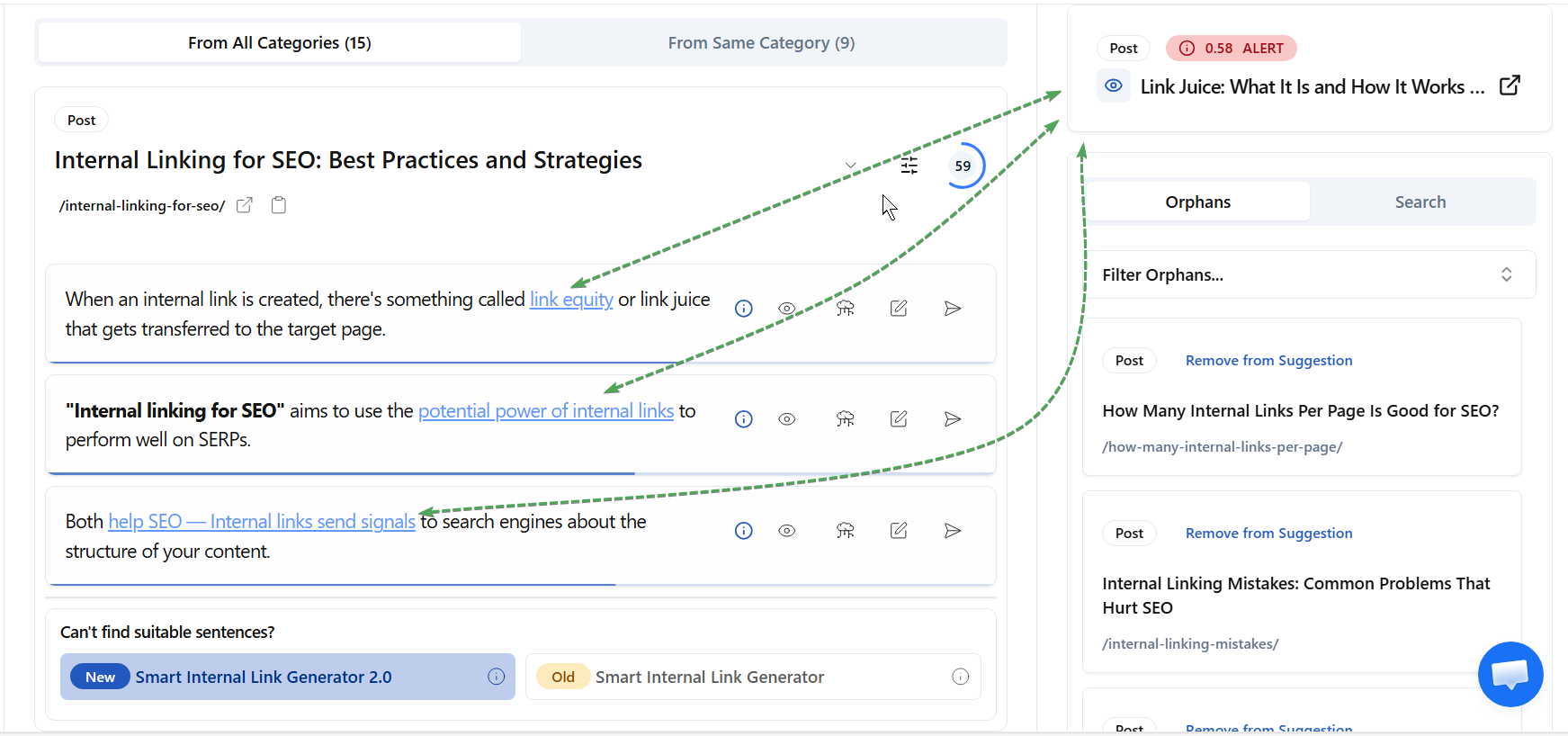
This is where the AI goes back to your old content to find internal link opportunities that can point to a particular page or to a new post you have just published. This is the most important type of link suggestion because it helps new content get connected to existing content.
The second type is outbound link suggestion.
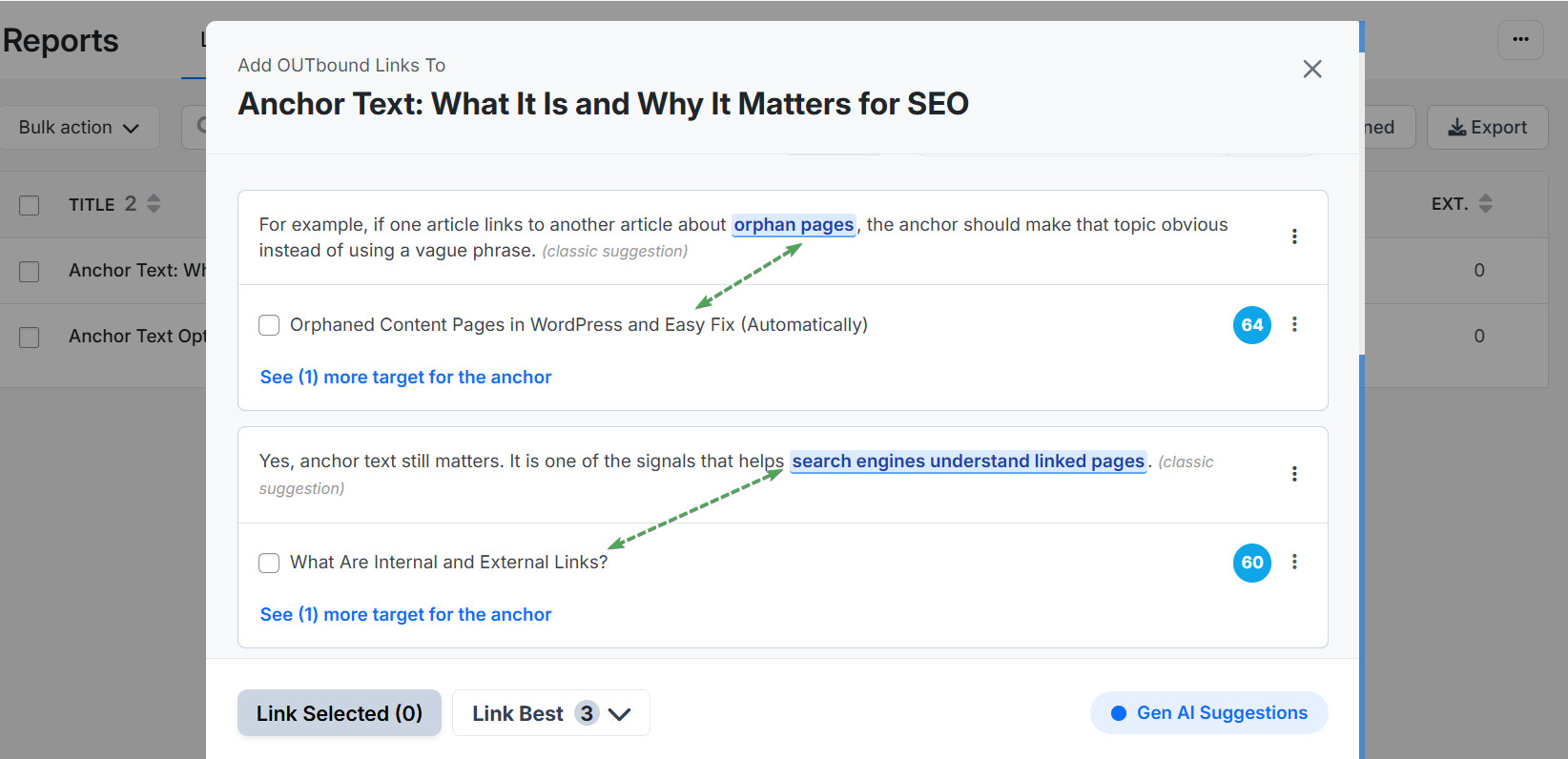
This is basically when the tool provides internal link suggestions inside the current content you are editing or working on.
Some tools also suggest external links, not just internal links. This can be useful when you are looking for one or two authoritative source to include in your post.
3. Creating Internal Link Opportunities
This is one area where AI-powered internal linking beats traditional methods.
Sometimes, link suggestions can fail when there is no existing opportunity in your content. In that case, a traditional tool may not have much to suggest.
But with this feature, the AI can create internal link opportunities for you.
It can do this by restructuring a particular part of your content to include a linkable phrase, or by adding another useful section to your article, such as an FAQ section.
4. Ongoing Link Automation
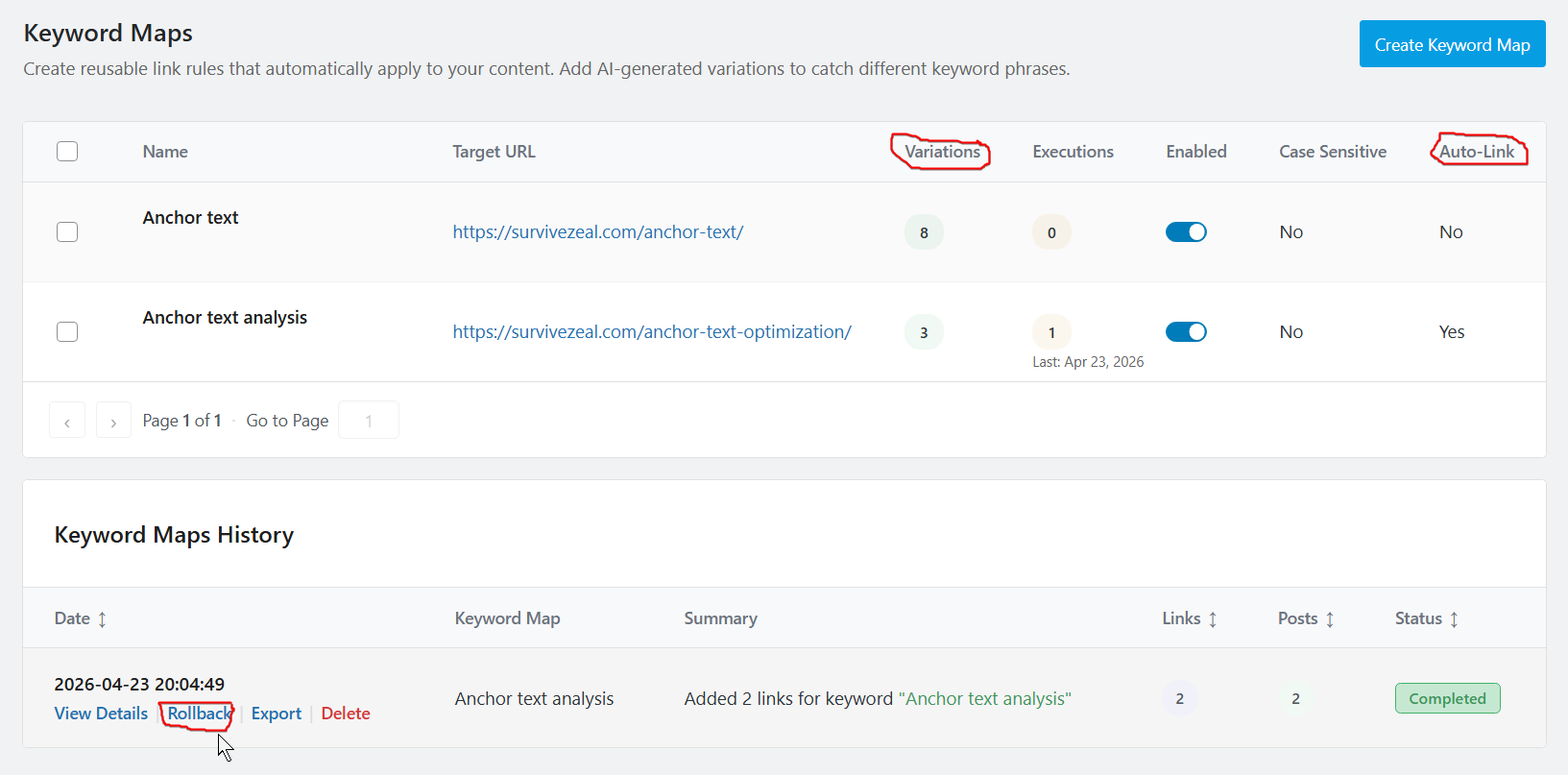
Ongoing link automation is the opposite of manual internal linking.
Here, the tool handles the process for you. You only need to select the pages or categories on your site where you want internal links to be added when a new post is published.
The primary engine here is keywords.
And this is not your typical keyword-based linking. It is very different from it.
Normally, AI internal linking tools pull keywords from various sources, especially the ones you add to your SEO plugin. Once new keywords are added for the pages you selected, those new keywords will be treated as connectors.
The automation continues to run in the background.
The keywords can also be pulled from Google Search Console for tools that integrate with it, and they can also be generated using the power of artificial intelligence.
This is a very important feature to have.
5. Bulk Linking
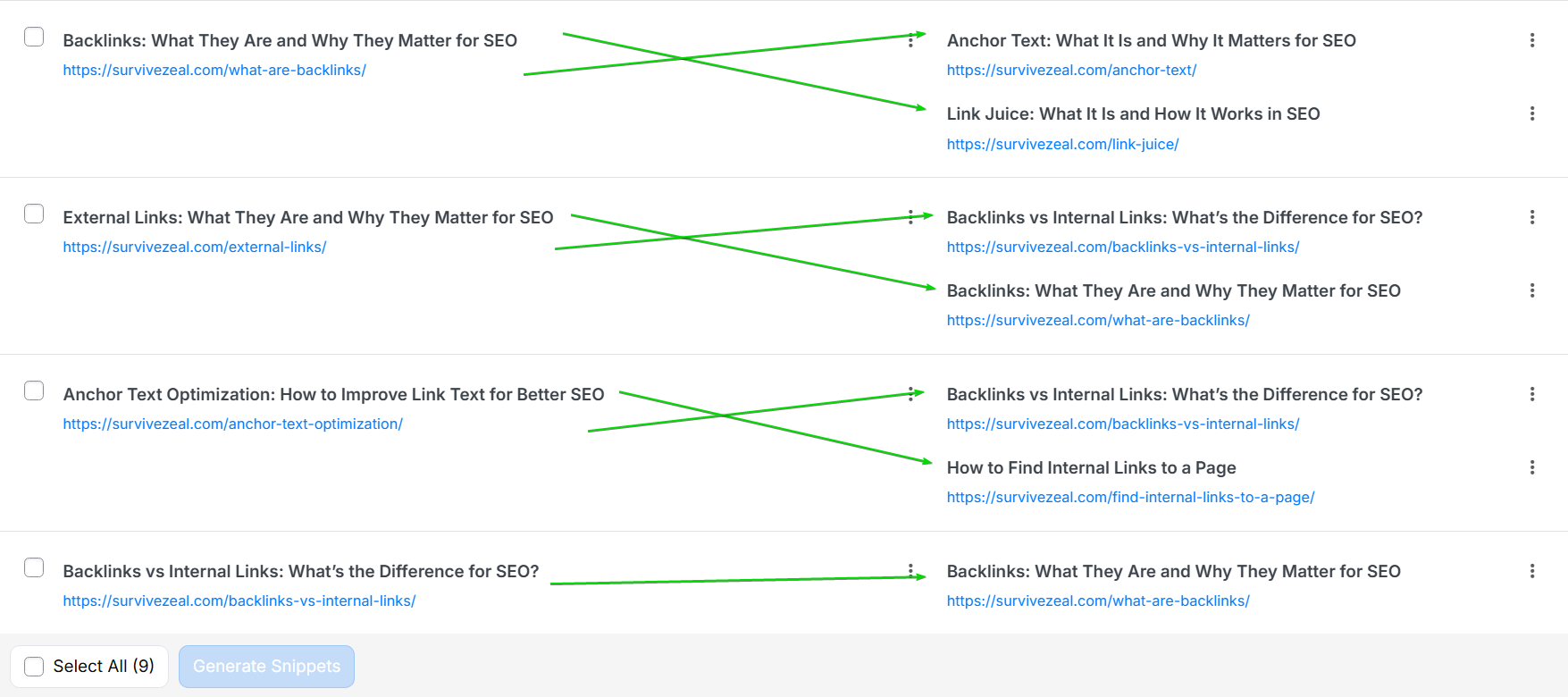
Bulk linking helps you connect selected pages to one another quickly with AI.
The AI maps the selected posts together, then assigns target keywords for each mapping. You can also enter the target keywords manually, but if you want the AI to handle everything, it can generate the target keywords and do the linking for you.
This is a big way to link dozens of related pages together without going through them one after another.
Non-AI-dependent Features (Very Important)
These are other factors that you should also consider.
The features here do not rely totally on artificial intelligence, but they may use it in their operation.
They are important too, and every good internal linking tool should have them.
1. Internal Link Reports and Analysis/Audit
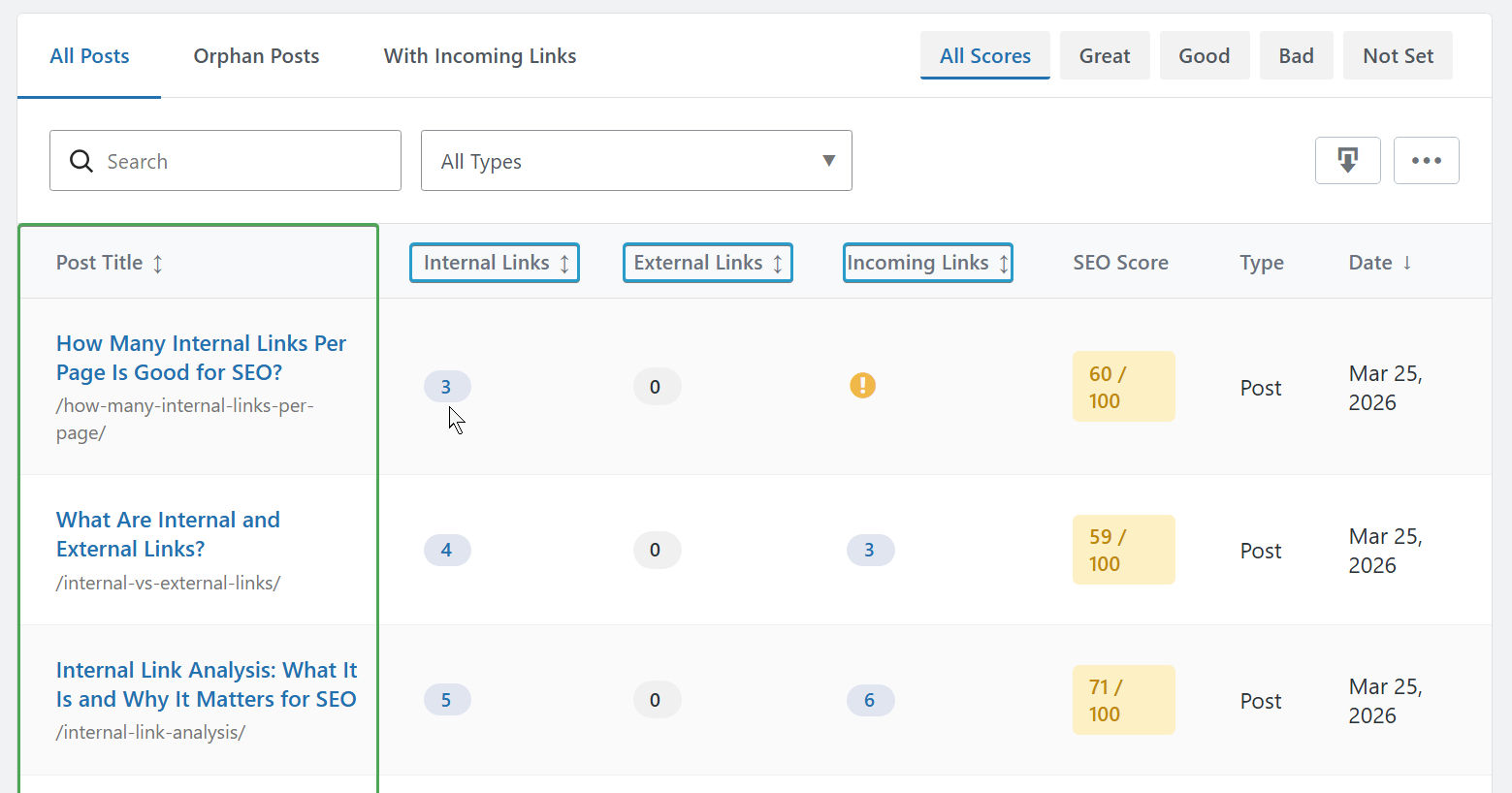
Internal link reports and analysis show you important information about your internal linking profile.
It reveals the number of links on your pages, often categorized as inbound internal links, outbound internal links, and external links.
Internal link analysis or audit goes further than just showing numbers. It pulls the pages on your site and allows you to see the live links on them.
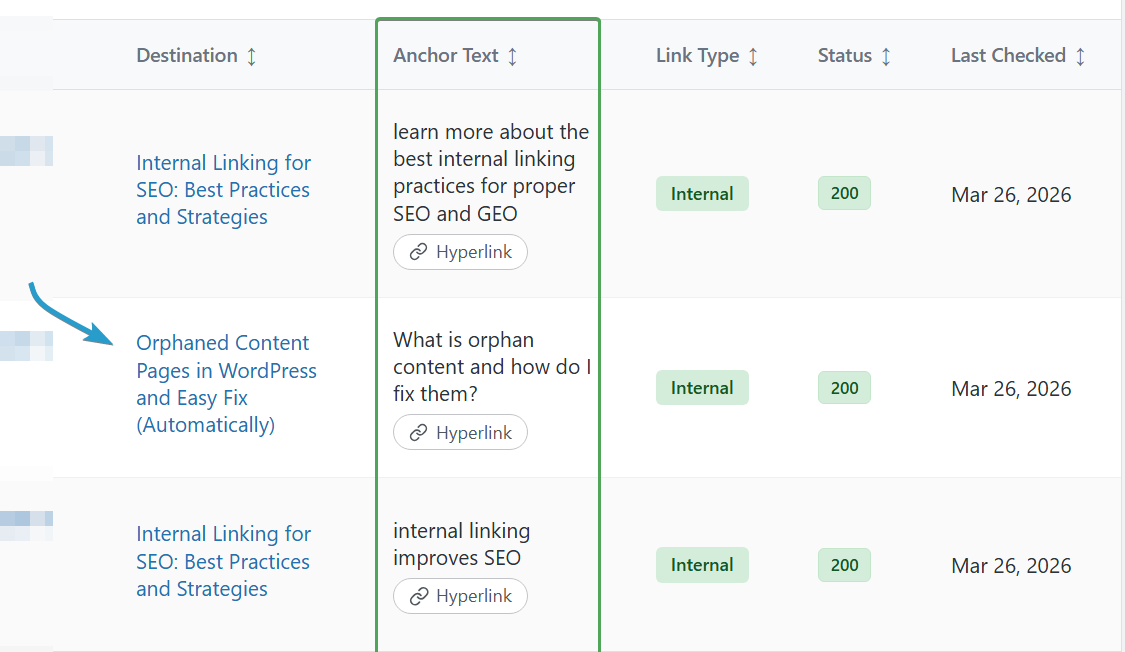
This means you can see the actual links, not just the number of links. From there, you can do many things, including editing the links or removing them.
2. Anchor Text Report/Analysis
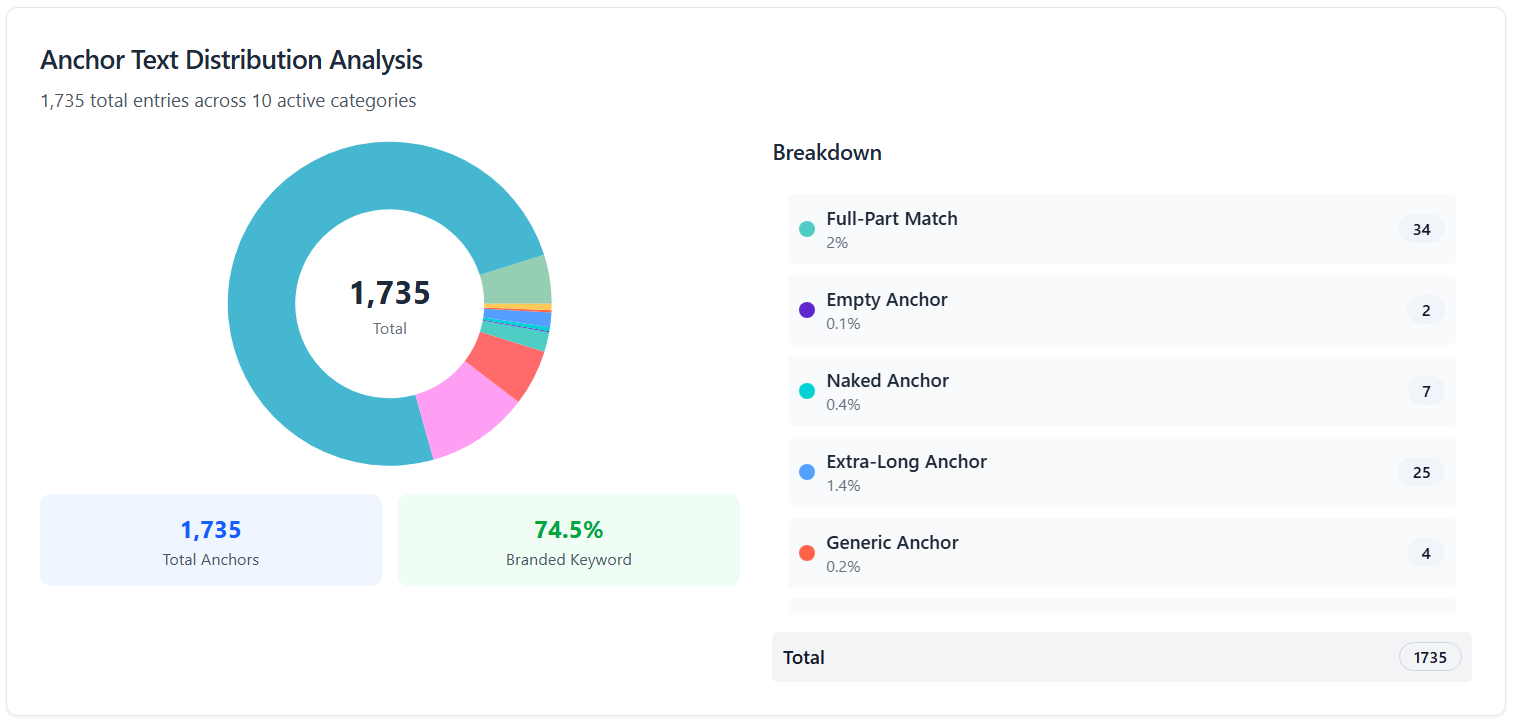
Anchor text analysis is useful because it helps you understand how anchor texts are being used across your site.
You can find your most linked anchor texts, see the pages they are pointing to, and get other useful information about your linking pattern.
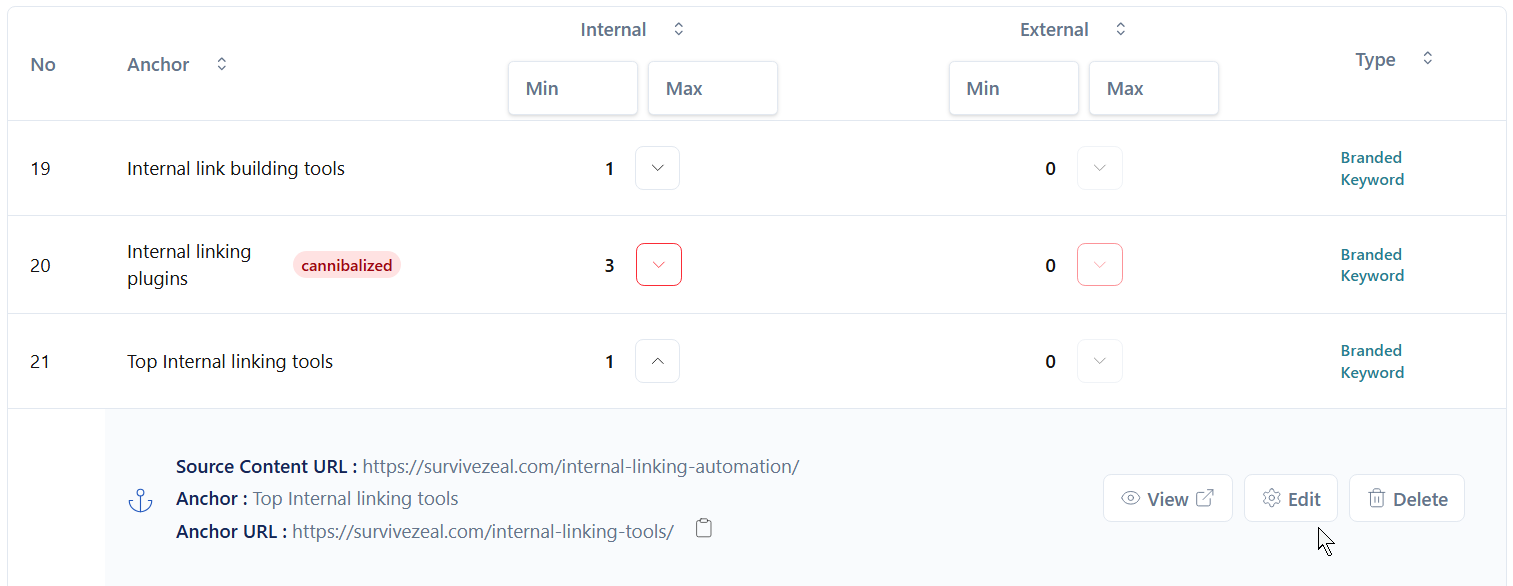
This can also help you identify anchor text issues, especially when the same anchor text is being used for two or more different pages. This can confuse search engines and create keyword cannibalization issues if it is not handled properly.
3. Search and Replace
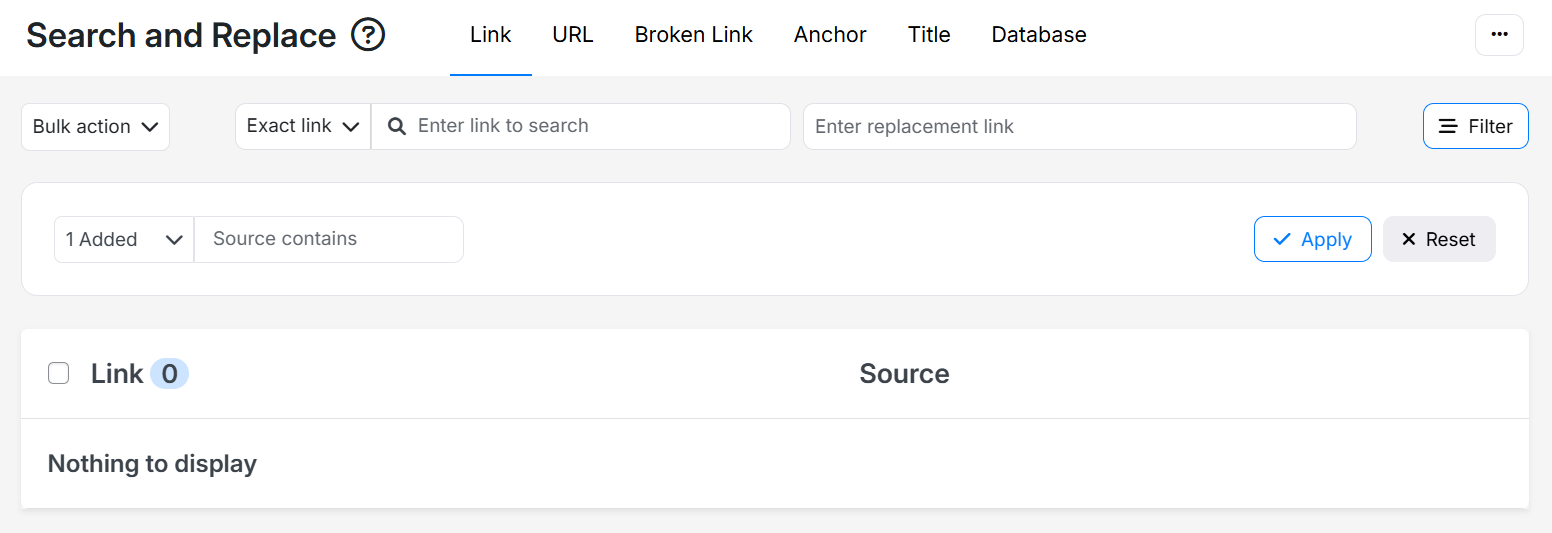
Search and replace allows you to replace URLs, anchor texts, or links across your site.
You only need to provide the old data and the new data, and the tool will help convert it for you.
Some tools also allow you to search and replace other data, such as post titles. This can be useful when you are updating old content or restructuring your site.
4. Keyword-based Linking
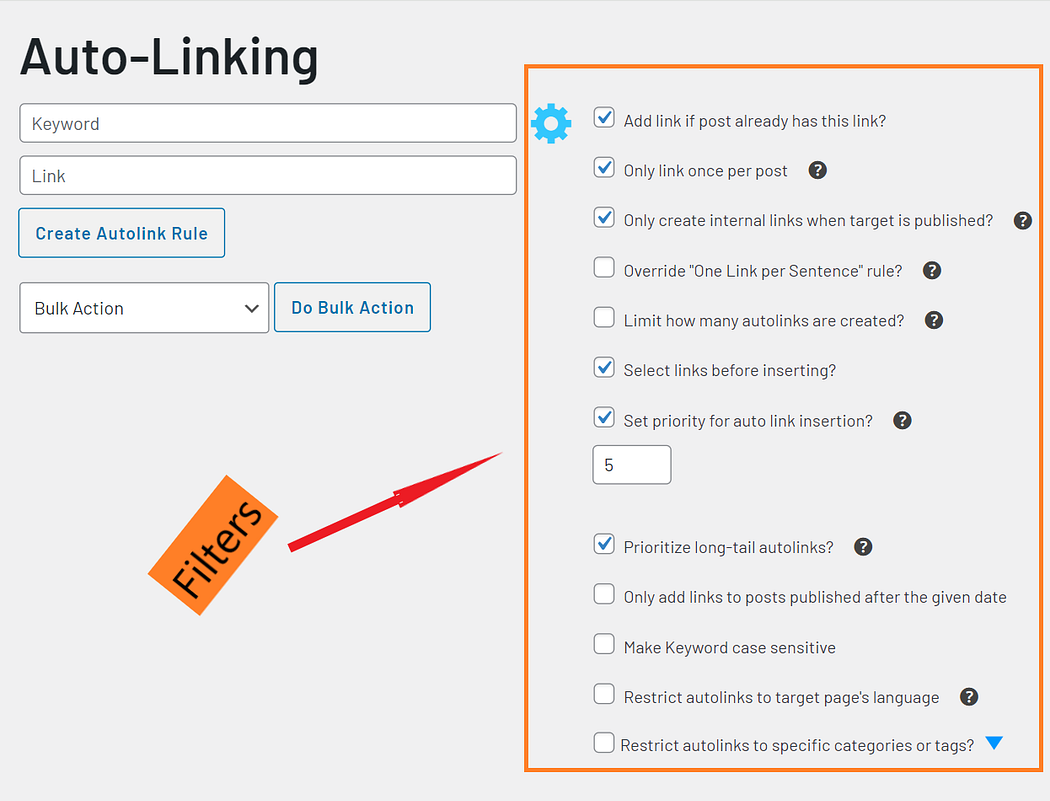
Keyword-based linking is an internal linking automation method that works with specific keywords.
You provide the link and the anchor text or keyword you want the tool to use. The tool then finds that keyword across your content and turns it into a hyperlink.
You can also use filters, such as reviewing links before insertion, to keep more control over the process.
Keyword-based linking can also keep working for new posts based on your settings.
Other Features (Important)
These are other features that are good to have, but they are not always needed and they are not always used.
Silo Network Tool
A silo network tool allows you to pick a list of pages and group them into a silo.
Then the internal linking tool helps you ensure that every cluster page is pointing to the pillar page, and that related cluster pages are also linking to one another.
This is useful when you want to build topical authority around a particular subject.
Linked-to Domain Reports and Analysis
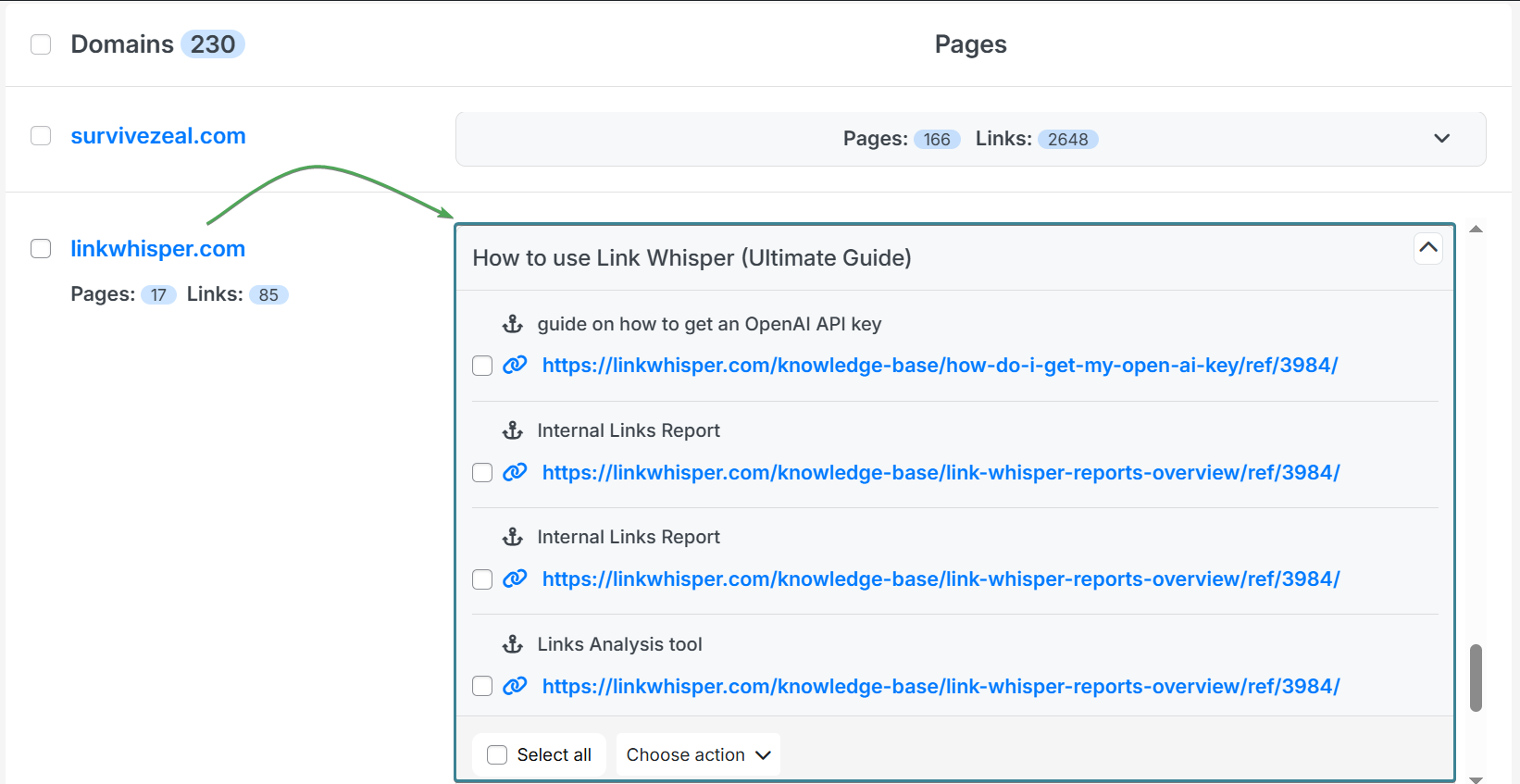
Linked-to domain reports help you find all the domains that have been linked to from your site.
It shows the number of times links from each domain appear across your content.
Linked-to domain analysis goes deeper by uncovering all the links pointing to those domains. With this, you can see all the links that belong to every domain you have linked to on your site.
Linked-to Domain Setting
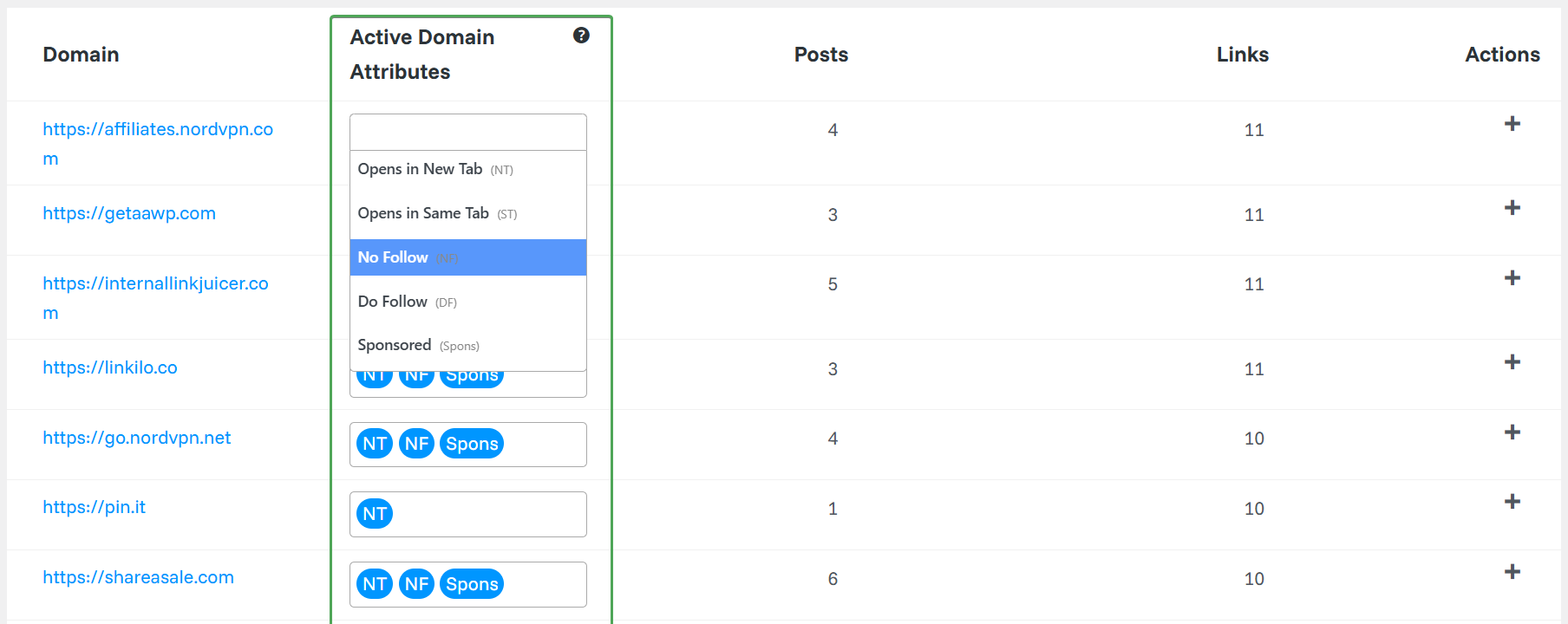
Linked-to domain setting allows you to automate link attributes and behaviors on the domain level.
This includes attributes like nofollow, dofollow, and sponsored, and behaviors like open in new tab or open in same tab.
You can set it once for a domain, and all the links that belong to that domain on your site will obey that setting.
This saves you from having to set these options every time you add a link from that domain.
Link Visualization
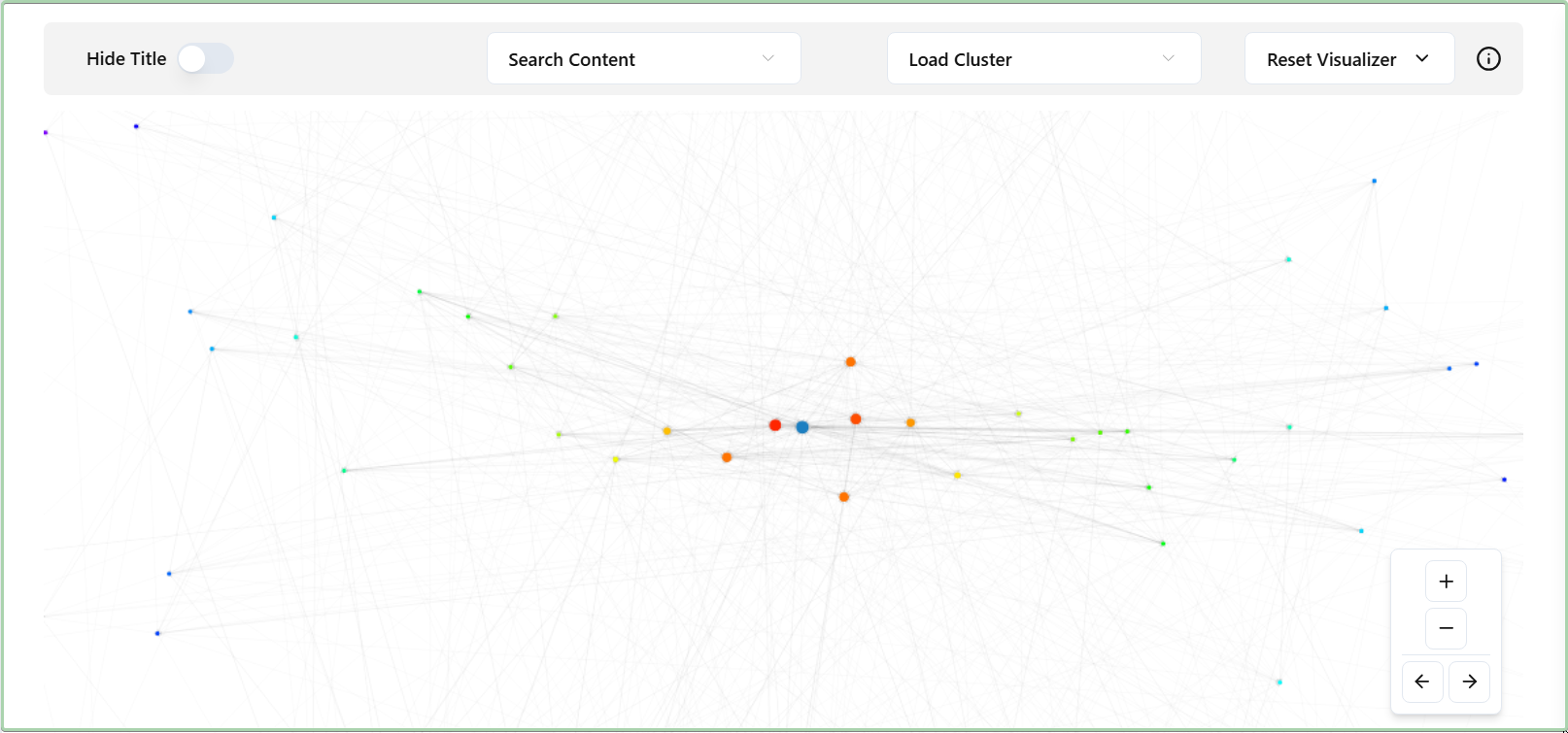
Link visualization is like the graphical version of internal link reports and analysis.
It uses visual graphs to show your internal linking profile, making it easier to see how your pages are connected.
From here, you can also discover orphan content, weakly linked pages, and pages that need more internal links.
Best Internal Linking Tools Making Use of AI Like LLMs in 2026
Now that we have explored the factors you should consider when choosing an internal linking tool that claims to use AI or LLM power, let’s start listing the tools that made it to our list.
Regardless to say, these are the same factors we are going to use to judge these tools.
So it is better to scan them properly. If you skipped them, you may have to go back to get a clearer understanding.
🏃♂️💨 TL;DR (AI-powered Interlinking tools rundown)
- 🥇AI Link Genius (by Rank Math) – best AI-powered internal linking tool with other SEO features | first choice if you haven’t secured an SEO Plugin yet | most suitable for Rank Math users | best in terms of Link reports and analysis.
- 🥈Linksy AI – best for relevant link suggestion | most feature-rich | great at bulk/automated linking.
- 🥉LinkBoss – best overall for internal link suggestion | best SaaS tool (cloud-based) | works for WordPress and Shopify.
- Link Whisper – best for internal link click tracking | works for WordPress and Shopify.
>>> Hop to the comparison table to make an informed decision (save 30 minutes)
1. AI Link Genius (by Rank Math)
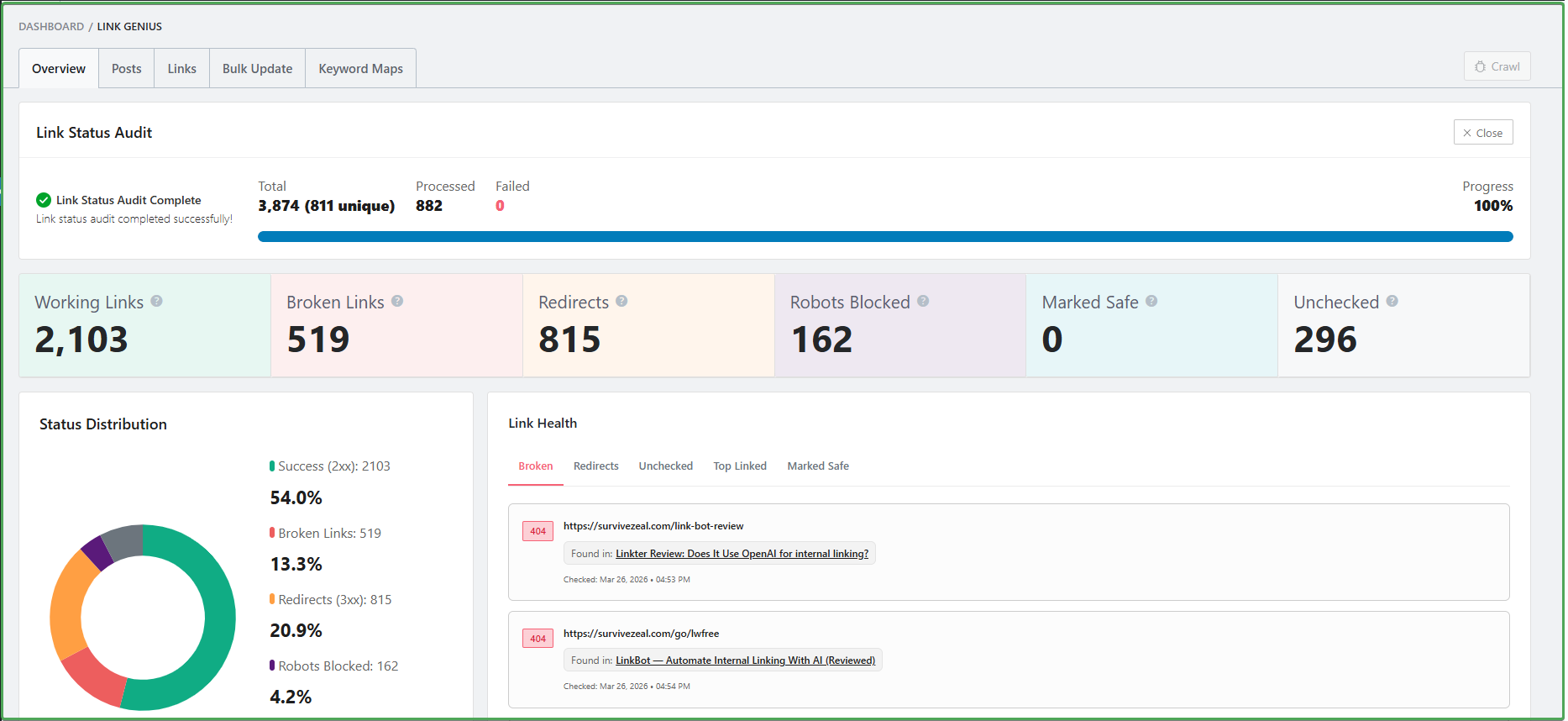
AI Link Genius is a module inside the Rank Math SEO plugin, and it is useful enough to appear on this list.
The tool uses AI to suggest internal link opportunities inside the WordPress editing area. Alongside this, it also offers related post suggestions. This simply lines up pages that are related to the content you are writing, so you can quickly copy the URLs and use them where needed.
AI Link Genius also makes use of AI in its keyword-based linking feature called Keyword Maps.
With Keyword Maps, you only need to set the keyword and the target URL. Then, you can use AI to generate several related keyword variations that carry the same meaning as your main keyword. Once this is set, the tool can continue building links even as you publish new posts.
The main selling point of AI Link Genius is its internal link reports and analysis.
It gives you up-to-date data and extra flexibility. You can see the individual links on each of your pages, and you can also edit those links right from the report area. You can find these tools under the Posts and Links tab of the AI Link Genius module.
The tool also comes with Search and Replace (called Bulk Update). These allow you to replace URLs, anchors, or links on your site with ease.
Overall, AI Link Genius is a nice tool. The good thing is that it lives inside Rank Math, so many WordPress users may already have access to it.
AI-dependent Features (on Factors section)—
- Link suggestion
- Internal link reports and analysis [Posts & Links tabs]
- Search and replace (link, URL, anchor) [bulk update]
- Keyword-based linking [Keyword Maps]
Additional Feature— Related post widget
Cons—
- Not a dedicated internal linking tool
- Inbound internal link suggestion is not available yet
- Lacks some other useful internal linking features
Choose IF—
- You are in the market for a WordPress SEO plugin and want one that also handles your internal linking needs.
- You already use Rank Math and are not ready to invest further or spend money on separate internal linking tools.
- You only need the core features — not advanced automation or complex AI-driven systems you may not even use.
>> Visit AI Link Genius (and save)
Or check AI Link Genius review.
2. Linksy AI
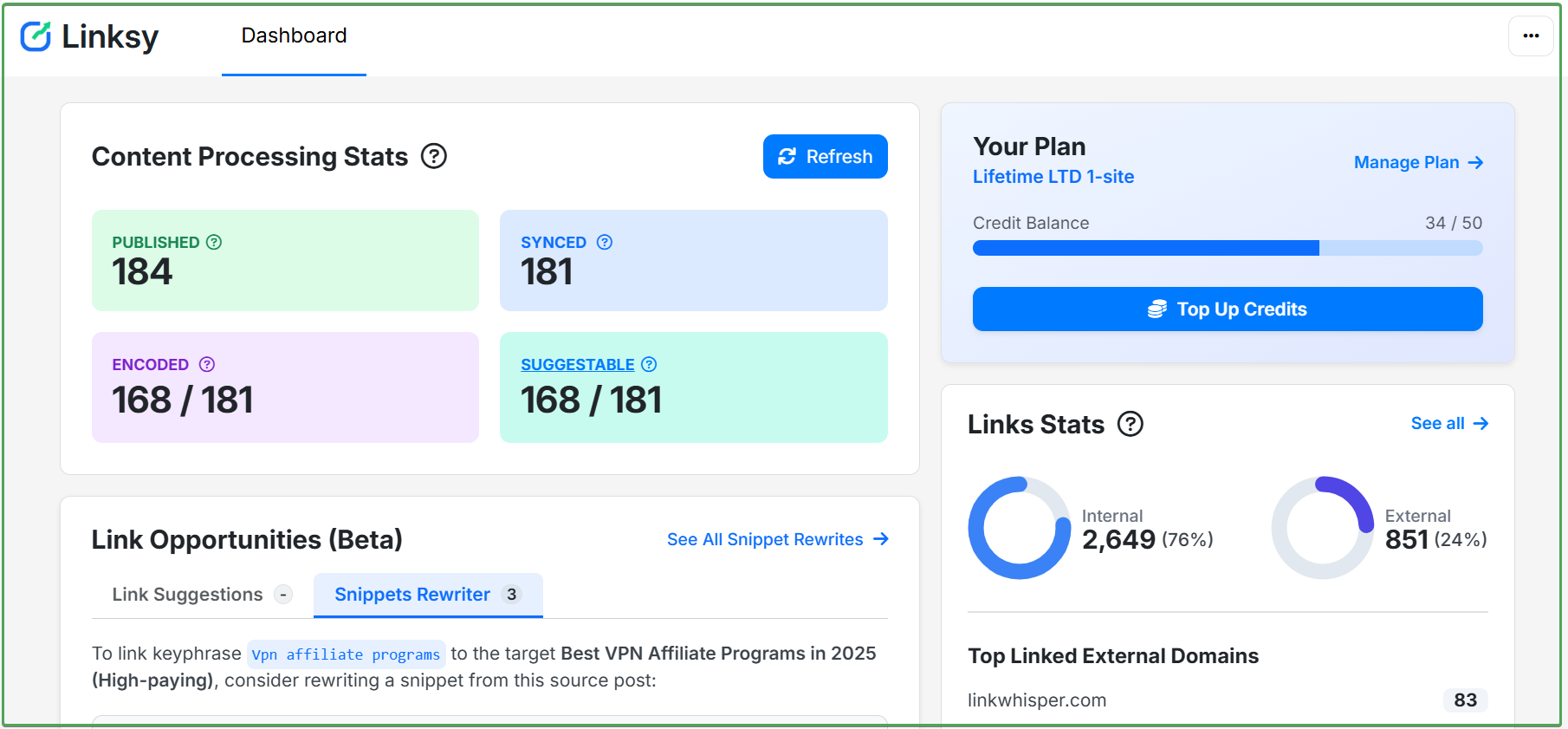 Linksy is an AI-powered internal linking tool for WordPress.
It uses AI technologies like natural language processing, machine learning, and large language models to power internal linking automation.
From our testing, the quality of the link suggestions here is the best among the tools on this list.
Linksy AI also allows you to create internal linking opportunities when there is none in your content. This is one of the tools that removes the need to visit old content just for internal linking after publishing a new post.
Even when there is no suitable phrase in your content, the AI can use its Paragraph Rewriter feature to create one for you.
It also comes with ongoing link automation, which is the kind of feature you set up and leave while the linking continues.
This is different from keyword-based linking. Here, the AI understands your pages and links them together when there is new content, instead of only depending on exact keywords.
For bulk linking, Linksy also performs well. You can select a list of pages, and Linksy will help you link them together with ease.
These are just the tip of the iceberg because we are only looking at the AI features here.
Below, you will still find other helpful Linksy features that do not depend on AI.
Overall, Linksy AI is one of the best internal linking tools powered by artificial intelligence.
AI-dependent Features (on Factors section)—
- NLP, ML, and LLM-powered
- Link suggestion
- Creating internal link opportunities
- Ongoing Link Automation
- Bulk Linking
Other Features (on Factors section)—
- Internal Link Reports and Analysis/Audit
- Anchor Text Analysis
- Search and Replace
- Keyword-based Linking
- Internal Linking service
- Silo Network Tool
- Linked-to Domain Reports and Analysis
- Linked-to Domain Setting
- Link Visualization
Choose IF—
- You need one with the most relevant internal link suggestion
- You need one with the most internal linking features
Use Linksy AI coupon “ZEALOFF” for 10% off
Or check Linksy AI review.
3. LinkBoss
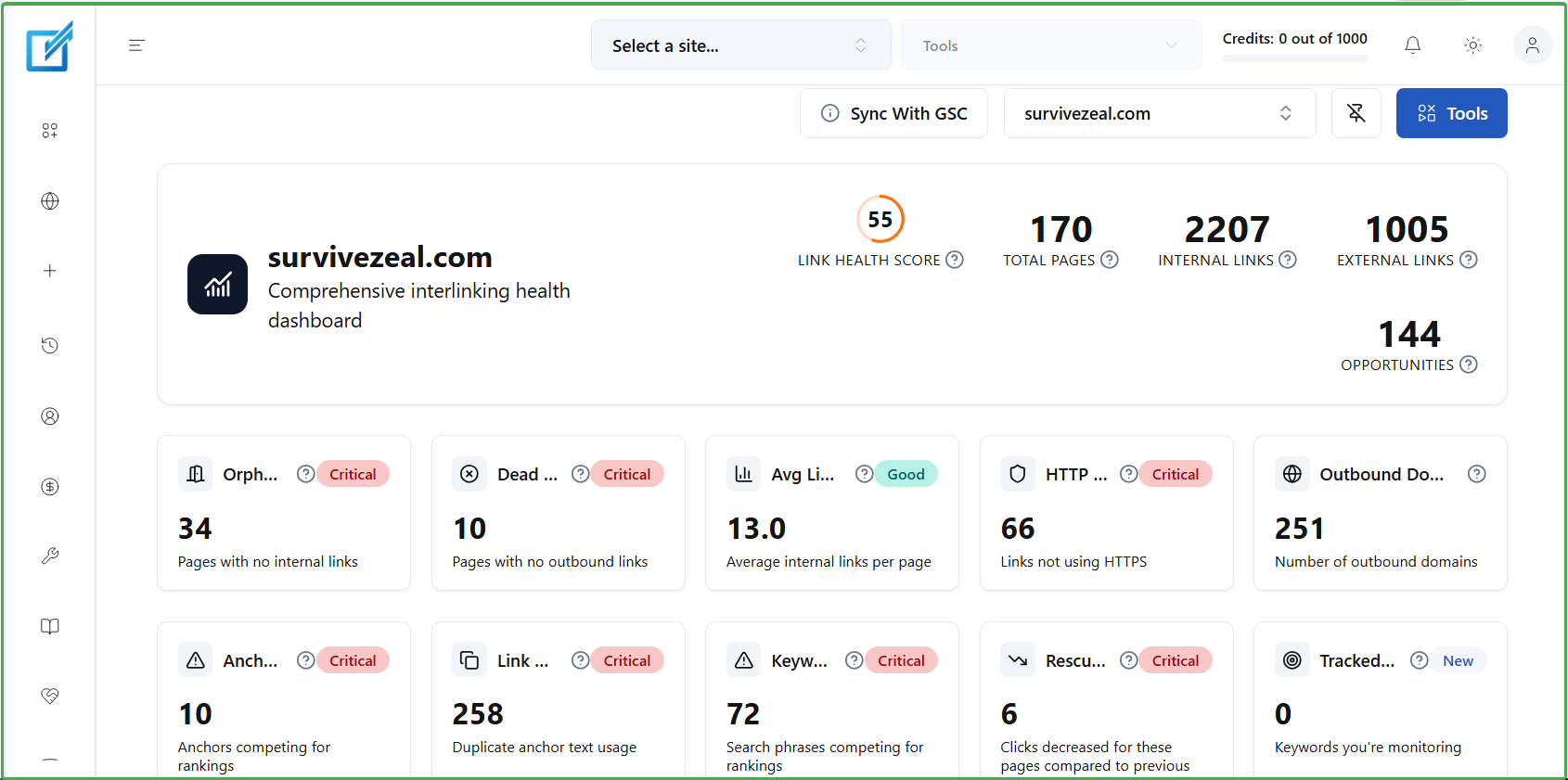 LinkBoss is another nice AI-powered internal linking tool to consider.
It is built for WordPress and also supports Shopify and other CMS platforms.
The tool uses NLP, machine learning, and AI power in its offering. It scans through your content, detects internal linking opportunities, and creates them where there is none.
From our testing, it is the best overall when it comes to internal link suggestion. One reason for this is the extra flexibility it offers, including Google Search Console integration and the use of ranking data to prioritize the pages that should get links first.
LinkBoss also lets you do bulk linking, which means connecting selected pages together quickly.
Overall, it is a nice tool for internal linking, and it works. You can find the other helpful LinkBoss features that are not AI-dependent below, as usual.
AI-dependent Features (on Factors section)—
- NLP, ML, and LLM-powered
- Link suggestion
- Creating internal link opportunities
- Bulk Linking
Other Features (on Factors section)—
- Internal Link Reports and Analysis/Audit
- Anchor Text Analysis (called Anchor cloud)
- Internal Linking service
- Silo Network Tool
- Linked-to Domain Report
- Link Visualization
Additional Feature — GSC Rank tracker
Cons— It lacks some non-AI-dependent features covered in the #factors-to-consider-section such as Search and Replace, Keyword-based linking, Linked-to Domain Analysis, Linked-to Domain setting and even Ongoing Link Automation.
Choose IF—
- You want a tool that stands out as the best overall when it comes to “suggesting internal linking opportunities”.
- You prefer a cloud-based solution over a native plugin that may weigh down your site.
- You need a tool that also supports platforms like Shopify not only WordPress.
>>> Visit LinkBoss
Use ZEALOFF as a discount code to save 10% off.
4. Link Whisper
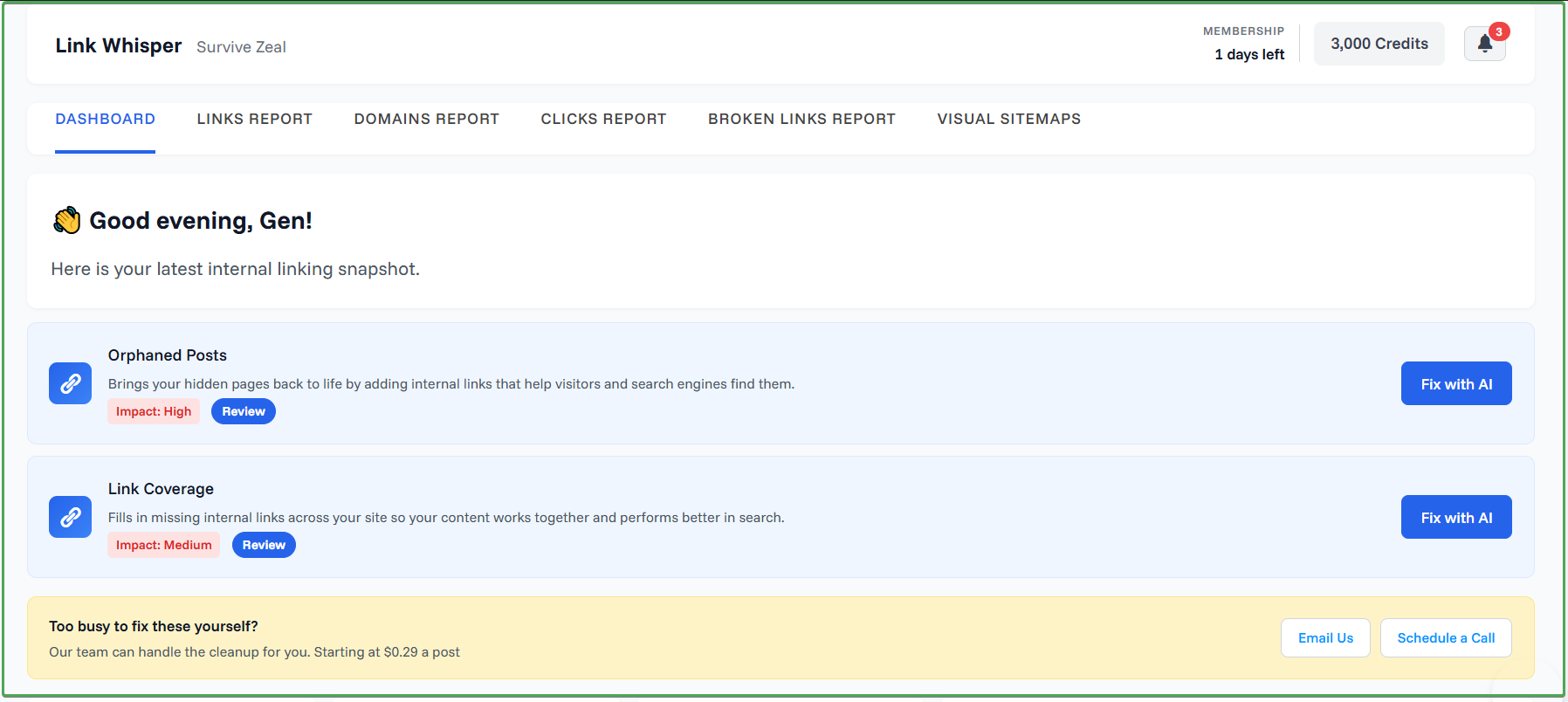
Link Whisper is the OG of AI-powered internal linking tools.
The plugin uses natural language processing and large language models to make internal linking a breeze. It is built for WordPress and Shopify, and it happens to be one of the reasons why you may not need to go back to older content after publishing a new post just for internal linking sake.
You can choose to manage the language model connection by yourself, for instance, by integrating your own API key. Or you can allow the plugin to handle it for you when you purchase credits.
From the look of things, and from our review and long-time experience with the tool, it appears the team is not really interested in full automation. They seem to prefer a system that invites human review before the final output.
Because of this, the tool lacks some amazing capabilities, like the ability to create internal linking opportunities where there is none in your content.
It also lacks ongoing link automation, which is the kind of automation we need at this age.
There is also no bulk linking, which is the ability to link selected pages to each other with the help of AI and with little to no human interference.
Before we forget, the relevance of the suggested links in this tool is somewhat inferior to all the tools ahead of it in this list.
Overall, Link Whisper is a good internal linking tool, but it is more of a simple plugin for semi-automation.
As usual, you will find all the other features that Link Whisper offers below that are not AI-dependent.
AI-dependent Features (on Factors section)—
- NLP, ML, and LLM-powered
- Link suggestion
Other Features (on Factors section)—
- Internal Link Reports and Analysis/Audit
- Search and Replace (URL only)
- Keyword-based Linking
- Internal Linking service
- Linked-to Domain Reports and Analysis
- Linked-to Domain Setting
- Link Visualization
Additional features— Link click tracking, Link arrow icon, Related Post widget.
Cons—
- No AI intervention when there’s no found internal link opportunity
- No Ongoing Link Automation
- No Bulk Linking
- No Anchor Text analysis
Choose IF—
- You’re not much concerned about fully automated linking (and prefers human review everytime)
- You need a tool that works on WordPress and Shopify
>>> Visit Link Whisper (and save)
Use the Link Whisper Promo code “ZEALOFF” for 15$ off
Or check Link Whisper Review.
Comparing the Best AI Internal Linking Tools (LLM powered)
Now that we have the tools in our shortlist, let’s begin to compare them so we can make a decision.
For this, we are going to judge these AI internal linking tools based on the features we covered in the factors to consider section.
So if you skipped that section, you can quickly use this link to reach it >>> #factors to consider section.
This will help you understand each factor properly and follow along as we do the comparison.
It is a two-way review, both the author and the reader doing the review.
The first comparison we are going to make is based on AI-dependent features.
To start, let’s first reduce each feature/term/factor to its initialism.
AI-dependent features (Needed):
- AI — whether it’s basic NLP or LLM-powered
- ILS — Inbound Link suggestion
- OLS — Outbound Link suggestion
- CLO — Creating internal link opportunities
- OLA — Ongoing Link Automation
- BL — Bulk Linking
| AI | ILS | OLS | CLO | OLA | BL | |
|---|---|---|---|---|---|---|
| Link Genius | LLM & others | coming soon | ✔️ | ❌ | ✔️ | ❌ |
| Linksy AI | NLP/ML/LLM | ✔️ | ✔️ | ✔️ | ✔️ | ✔️ |
| LinkBoss | NLP/ML/LLM | ✔️ | ✔️ | ✔️ | ✔️ | ✔️ |
| Link Whisper | NLP/ML/LLM | ✔️ | ✔️ | ❌ | ❌ | ❌ |
Now, let’s compare the same tools using non-AI dependent features.
These features are also very important, like we said earlier in the factors to consider section.
So, let’s reduce each feature, term, or factor to its initialism.
Non-AI dependent features (Very Important):
- ILR — Internal Link Report
- ILA — Internal Link Analysis
- INT — Integration to GSC or SEO Plugin
- ATA — Anchor Text Analysis
- SR — Search and Replace (Link, Anchor, Post’s Title)
- KBL — Keyword-based Linking
| ILR | ILA | INT | ATA | SR | KBL | |
|---|---|---|---|---|---|---|
| Link Genius | ✔️ | ✔️ | GSC & RankMath | ❌ | ✔️ | ✔️ |
| Linksy AI | ✔️ | ✔️ | GSC & SEO plugins | ✔️ | ✔️ | ✔️ |
| LinkBoss | ✔️ | ✔️ | GSC & SEO plugins | ✔️ | ❌ | ❌ |
| Link Whisper | ✔️ | ✔️ | GSC & SEO plugins | ❌ | URL only | ✔️ |
Lastly, let’s compare these LLM-powered internal linking tools based on the other features we covered in the factors to consider section.
As I mentioned earlier, these are features you may not use regularly, but they are still important and worth taking note of.
Other Features:
- SIL — Internal linking service
- SILO — Silo Network tool
- LDR — Linked-to Domain Report
- LDA — Linked-to Domain Analysis
- LDS — Linked-to Domain setting
- LV — Link Visualization
| SIL | SILO | LDR | LDA | LDS | LV | |
|---|---|---|---|---|---|---|
| Linksy AI | ✔️ | ✔️ | ✔️ | ✔️ | ✔️ | ✔️ |
| LinkBoss | ✔️ | ✔️ | ✔️ | ❌ | ❌ | ✔️ |
| Link Whisper | ✔️ | ❌ | ✔️ | ✔️ | ✔️ | ✔️ |
N.B. Any plugin that does not appear here was removed because it does not have any of these features. So it is better not to include it than to include it and leave the row empty throughout. The tool removed here is AI Link Genius.
That said, having seen how each of these tools stacks up in these tables, it is time to finally draw the curtain.
So here is the judgment—
- 🥇AI Link Genius (by Rank Math) — best AI-powered internal linking tool with other SEO features | first choice if you haven’t secured an SEO Plugin yet | most suitable for Rank Math users | best in terms of Link reports and analysis.
- 🥈Linksy AI — best for relevant link suggestion | most feature-rich | great at bulk/automated linking.
- 🥉LinkBoss — best internal link opportunity tool overall (i.e., it has additional flexibility in its link suggestion tool) | best for SaaS tool (cloud-based) | Works for WordPress and Shopify
- Link Whisper — best for internal link click tracking | Works for WordPress and Shopify
How Rank Math and Internal Linking Tools Work Together
If you are using WordPress, this is for you.
Let’s talk about how Rank Math works with internal linking tools.
Most internal linking tools rely on the focus keywords you set inside SEO plugins like Rank Math for them to work better.
These focus keywords help power link suggestions, which is the number one feature. They also help with automated linking based on keywords.
The focus keywords we are talking about here are the ones you set inside WordPress while editing your content.
What internal linking tools do is that after you install them, they retrieve those keywords and use them to understand what your pages are about.
That is to tell you that SEO plugins like Rank Math still remain the first choice.
You only need dedicated internal linking tools if you want to access deeper features. But for the core features, you will usually find what you need inside a good SEO plugin.
Thankfully, AI Link Genius offers link suggestions, internal link reports and analysis, search and replace, and keyword-based linking which are the core features.
And Rank Math is not stopping there. We expect it to add more features.
If you are using Rank Math, then you already have access to something powerful, so it is vital to make use of what you have now.
If you do not have any SEO plugin yet, Rank Math is the best option to consider.
>> Get Rank Math to make them work properly (includes its own internal linking module).
What are the best practices to follow when doing internal linking?
Internal linking is not just about placing links inside your posts. It goes beyond that.
There are rules to follow if you want to get the most out of it and actually improve your rankings. Here are the best internal linking practices to follow:
- Build a content hub and grow it over time
- Link to your most important pages first
- Use optimized anchor text when linking
- Link naturally within your content, not forcefully
- Use the right linking attributes where necessary
- Avoid keyword cannibalism (using the same anchor for different pages)
- Link from older content to newer pages
- Regularly fix broken links and 404 errors
- Use internal linking tools to automate and discover opportunities
- Track your internal linking performance and improve over time
You can learn more about the best practises to follow for SEO internal linking.
Conclusion
It was a long read. Now we are at it.
AI has also come into the field of internal linking, just like it did with content writing, image generation, and other content tasks.
And needless to say, it is now the best form of internal link automation.
AI internal linking tools are a good addition to your SEO tool set. But while there are several tools out there that claim to use AI, it is not always what you think.
Some only use basic NLP and keyword matching systems.
I am happy that you have now gone through this list of the best ones in the industry, so you can tell which tool actually brings something strong to the table.
Some SEO tools like Rank Math have also started integrating AI internal linking. And AI Link Genius has already done a great deal by offering the core features that most users need.
Rank Math ranks #1 here because it is a tool most people already have access to, and it is amazing. I am leaving the verdict here also —
- 🥇AI Link Genius (by Rank Math) — best AI-powered internal linking tool with other SEO features | first choice if you haven’t secured an SEO Plugin yet | most suitable for Rank Math users | best in terms of Link reports and analysis.
- 🥈Linksy AI — best for relevant link suggestion | most feature-rich | great at bulk/automated linking.
- 🥉LinkBoss — best internal link opportunity tool overall (i.e., it has additional flexibility in its link suggestion tool) | best for SaaS tool (cloud-based) | Works for WordPress and Shopify
- Link Whisper — best for internal link click tracking | Works for WordPress and Shopify
FAQs
Is the use of AIs like LLMs the best method for automating internal linking?
Of course, large language models have better intelligence because they can understand context, not just basic keyword matches.
Truly, LLM power is what has made full internal link automation possible with meaningful results.
What can AI-powered internal linking be able to do?
AI-powered internal linking can score pages based on their content, i.e, the actual meaning and focus of the pages, rather than just keywords.
AI, especially LLMs, helps internal linking in many ways.
It comes up with better link suggestions. It helps to generate more target keywords that can be used to connect pages more easily.
It can also create internal linking opportunities when there is none in your content, instead of only finding existing ones.
What is the best internal linking tool making use of artificial intelligence?
There is no one-size-fits-all answer to this, as the best tool depends on the features you need and the use case you are trying to tackle.
While Link Genius is a great addition and a tool most people already have access to, dedicated tools like Linksy AI take internal link automation to the next level.
What about the best tool for WordPress users?
If you are talking about WordPress, then the best option is to choose an internal linking plugin.
We have a roundup of the best internal linking plugins for WordPress, which you can check out.
Nevertheless, the tools that appeared here are still among the top ones in that list.






Top Internal Linking Plugins for WordPress: Which One Is Best in 2026?
[…] plugins. If you want broader coverage, you can check our internal linking tools article or the AI-powered internal linking tools […]
Link Whisper Discount Code: $20 OFF (+ Set-up Guide)
[…] Link Whisper discount code “ZEALOFF” gives anyone who’s ready to try the AI-powered internal linking tool a huge $15 fixed discount on all the plans. And it’s the biggest you can […]
Linksy AI: Best Internal linking plugin? (A Review)
[…] can also check out this out 👉 internal linking tools making use of AI and LLM power. It would help you find Linksy’s current performance in the […]
Internal Linking Automation: Ultimate Guide (plus Tools)
[…] AI internal linking is the use of artificial intelligence like NLP, Machine Learning and the power of LLMs think ChatGPT to come up with better internal linking automation. […]
How to Automate Internal Linking on WordPress Using AI Link Genius
[…] Best AI Internal Linking Tools in 2026 (LLM-Powered) […]
Linksy Plugin Lifetime Deal: AI Internal linking (Discount code)
[…] If you’re looking for one that supports other CMS, check other AI internal linking tools. […]